Showing posts with label updates. Show all posts

Tuesday, January 12, 2016

New Year = Same Stuff

   It's a new year, but the same kind of online problems we've seen over the past few years are still here and are more prevalent than ever.

   Here's a great video about this issue by Media Pro:
Don't Let Malware Spoil the Fun from MediaPro on Vimeo. (I can't embed the video here, but do click on the link to view it.)

   The video reminds us that malware can, unfortunately, be found in many places including:
  • insecure websites
  • email attachments
  • browser add-ons
  • USB sticks
  • PDF files
   In additional to slowing down your system and causing it to not operate correctly, many kinds of malware try to grab your personal or work information.

   As we discussed here recently, your home computer defense toolkit should include:
  • anti-malware software
  • automatic updates
   But software tools are not enough.  You need to take action to protect your data and your computer:  Remember:
  1. You didn't win!...If it's too good to be true, it probably isn't true.
  2. Be careful with attachments, unknown programs, or files from USB sticks.
  3. Keep your software up to date.
   Let's do what we can to keep ourselves, our data (and our patients', customers' and clients' data) and our computers safe in 2016!

Tuesday, December 22, 2015

What's in Your Home Computer Security Toolkit?

   It's always great to get questions and comments from readers.  I received this question recently:
My home recipe is Windows Defender, Malwarebytes and KeePass. Is that a good approach or should I be thinking about adding something to my security toolkit in 2016?
   Thanks for the great question!  You’ve got some good bases covered:
  • Anti-malware (I also use defender)
  • Malware removal (I also use malwarebytes), and
  • A password vault (I use LastPass)
   That’s a great start. To round out the core toolkit, I’d add 2 things:
  1. Backups – you’ve got irreplacable pictures, tax returns, music and info of all sorts. There are many of good online products available that encrypt your data before cloud storage. I use CrashPlan, but there are many others.  For extra bonus points, you can both backup one computer to another computer and to the cloud.  That way you have more than one way to recover.

  2. Next, 2-factor authentication should be added for any sites and accounts where available.  This nicely complements your password vault so that even if an attacker stole individual or multiple passwords, they still couldn't log in to your accounts without your phone or other second authentication device.  I wrote about this recently.
   There are also a few things to do:

Tuesday, August 4, 2015

See the Man With the StageFright

   I always liked the way Rick Danko sang that song, and I saw him perform it a few times.


   But now we have a new StageFright, a vulnerability in the base android phone operating system.  This is an equal-opportunity vulnerability effecting all android phones (nearly 1 billion!).  Like many new vulnerabilities discovered in the past year, this one has a name and a logo.

   The issue is a "feature" in the way androids pre-processes MMS multi-media messages (pictures, videos) sent via your text messaging app.  That could be the stock messaging app, a custom messaging app from your phone manufacturer or data provider, or even Google Hangouts.

   Here's why the vulnerability is so bad... you don't have to open the message!  You don't even have to know that you received the message.  All it takes is for your phone to automatically download a malicious message in the background - which is exactly what it does - for your phone to be owned!  That's a problem.

   At the time I wrote this column, there seems to be a fix only for Google-branded phones, and that's a very small percentage of all phones.  You can check with your carrier to find out when you'll get a patch.

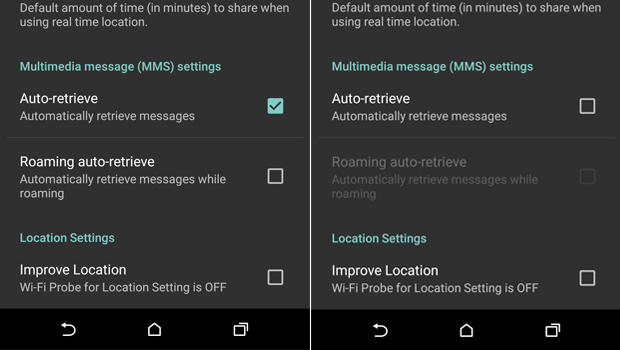
   Meanwhile, there is a work-around.  You need to configure your messaging app to not automatically download MMS messages.

  1. Open you rmessaging app.
  2. Go to Settings
  3. Select: Multimedia messages
  4. un-select Auto Retrieve
   Now, when someone tries to send you a message with multi-media content, you'll see that the message arrived, but the photo or video will not be downloaded.  Only tap to download if the message came from a trusted source.

   Of course, you should also keep your phone patched by applying all phone and app updates.  And... get rid of any apps you don't need.

   Here are some references for more info.

Tuesday, October 7, 2014

Celebrate Cyber-Style!

   It's time again to celebrate that wonderful US event... Happy Cyber Security Awareness month!  This event started in 2003 as a way to build awareness for online security and privacy and to encourage individuals, business and government.

   Over the past couple of posts I've focused on Identity Fraud (here and here).  We'll pause on that topic until next time.

   Today I give you...  The Top 10 Ways to Celebrate Cyber Security Month 2014!
  1. Change your password
  2. Yes, I know... I said in the past that just changing your password is not the effective measure.  That's true but with the frequency with which online sites get compromised, it's not a bad idea.  Even better - use really long passwords.  Remember, when it comes to passwords... size matters!

  3. Use a password vault
  4. A password vault is a program that encrypts and holds all your passwords.  I explain these in detail, and list some good products, in this post.

  5. Look before you click
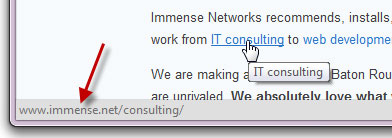
  6. With most links to can "mouse over" the link.  That means you just move your mouse so it's on the link, but don't click yet!  Your browser will display the address to which the link will lead.  This displays at the bottom of the browser.  The actual link in the display should make sense and be the location you're expecting.  If not then... don't click!

Tuesday, August 5, 2014

When Androids Attack!

   All computers, devices and software have flaws.  In fact, there are so many it's hard to keep up.  In the past (not so long ago), we only had to worry about computers... and they were mostly big desktops.  Then came laptops, and with them the additional problems introduced when connecting to unknown and open networks.  And lately, we seem to spend plenty of time talking about flaws in smartphones and tablets.

   The latest in a long string of smartphone issues is the so-called "Fake ID" flaw affecting Android devices.  This attack exploits a vulnerability in the way an Android device checks the authenticity of an app.

   The issue is kind of similar to controls around US credit cards.  When you sign a credit card receipt or at a terminal, the clerk or cashier might check that signature against the one on the card.  Even if the signatures match (and when does that happen???  I can barely duplicate my own signature! :-), that doesn't mean that you are the owner of the card nor does it let anyone know if the card is fake or stolen.

   In a somewhat analogous way, apps are "signed".  The flaw allows Android phones to accept unverified apps.  This provides a potential opportunity to download fake or malicious apps.

   This issue should be patched on your phone by now.  But this is not the first time this kind of problem has emerged. And it won't be the last time!  This can be a serious issue.

Tuesday, October 8, 2013

Online Self Defense - Your Computer

   It's Cyber Security Month!  And the more things change, the more they stay the same.  The key advice for online self-defense I've given in the past is just as true now.  So to help us all celebrate, I'm "re-featuring" a few articles I've run in the past.


   Happy US Cyber Security Month!  This partnership between Homeland Security, NCSA and MS-ISAC is an opportunity to recognize the importance of information security.  How are you celebrating?

   Last week I ran a couple of sessions at work on awareness and security.  Over the next few posts I will be reviewing some of the 3 themes I covered in a talk entitled "Online Self-Defense". You can view the slides on my slideshare page. (actually, the talk focuses on just 2 of the themes but that's OK!). Since everything comes in threes (omne trium perfectum), I will give 3 easy tips for each theme (and some bonus tips as well).

   The first theme is protecting your computer or device.

Tuesday, October 9, 2012

Online Self Defense - Part 1 - Your Computer

   Happy US Cyber Security Month!  This partnership between Homeland Security, NCSA and MS-ISAC is an opportunity to recognize the importance of information security.  How are you celebrating?

   Last week I ran a couple of sessions at work on awareness and security.  Over the next few posts I will be reviewing some of the 3 themes I covered in a talk entitled "Online Self-Defense". You can view the slides on my slideshare page. (actually, the talk focuses on just 2 of the themes but that's OK!). Since everything comes in threes (omne trium perfectum), I will give 3 easy tips for each theme (and some bonus tips as well).

   The first theme is protecting your computer or device.