You're minding your own business, just checking email, when you get an email from a "friend" inviting you to get a shared Google Doc file.
You're a student of security, or at least a fan, so you're always skeptical when you receive an email with a link or attachment. This one appears to come from someone you know. The subject and body of the message seem consistent with a Google doc sharing message.
Problem clue #1 - look at the "To:" line. Clearly, this message wasn't sent to you.
Problem clue #2 - were you expecting this email and file? Has this sender sent you Google docs in the past? Did this email arrive at work or home - and do you normally use Google docs there?
But, you are rushed and don't have time to send your friend a message to see if this email is legit. So you click. If you're not already logged in to your Google account, you're asked to log in. What you see next is...
A place to talk about information security, Internet safety and, of course... coffee!
Thoughtful, sometimes controversial, but not following the crowd unless I'm in line at the coffee shop.
Showing posts with label Google. Show all posts
Tuesday, May 9, 2017
Tuesday, December 6, 2016
Information Security Learning Resources part 2
Today we have part 2 of a 2-part guest post by security analyst Chris Goff. Chris has collected a setof info, links and lists that definitely qualify as extremely cool resources! You can check out Chris' website at http://chris-goff.com/ or follow him at https://www.linkedin.com/in/goffchris
There's a lot of info packed in here, and it's pretty technical. But you don't have to memorize it all now and there won't be a test! Just skim it, enjoy it and bookmark it!
Security
Concepts
There are
three key concepts of information security which you may or may not be familiar
with:
-
Confidentiality
o
Confidentiality
is the characteristic of information whereby only those with sufficient
privileges and a demonstrated need may access certain information. When
unauthorized individuals or systems can view information, confidentiality is
breached.
-
Integrity
o
Integrity
is the quality or state of being whole, complete, and uncorrupted. The
integrity of information is threatened when it is exposed to corruption,
damaged, destruction, or other disruption of its authentic state. Corruption
can occur while information is being entered, stored, or transmitted.
-
Availability
o
Availability
is the characteristic of information that enables user access to information in
a usable format without interference or obstruction. A user in this definition
may be either a person or another computer system. Availability does not imply
that the information is accessible to any user; rather, it means availability
to authorized users.
This is
known as the “security triad”. It can be further expanded upon:
-
Privacy
o
Information
that is collected, used, and stored by an organization is intended only for the
purposes stated by the data owner at the time it was collected. Privacy as a
characteristic of information does not signify freedom from observation (the
meaning usually associated with the word), but in this context, privacy means
that information will be used only in ways known to the person providing it. Many
organizations collect, swap, and sell personal information as a commodity. It
is now possible to collect and combine information on individuals from separate
sources, which has yielded detailed databases whose data might be used in ways
not agreed to, or even communicated to, the original data owner. Many people
have become aware of these practices and are looking to the government for
protection of the privacy of their data.
-
Identification
o
An
information system possesses the characteristic of identification when it is
able to recognize individual users. Identification is the first step in gaining
access to secured material, and it services as the foundation for subsequent
authentication and authorization. Identification and authentication are
essential to establishing the level of access or authorization that an
individual is granted. Identification is typically performed by means of a user
name or other ID.
-
Authentication
o
An
information system possesses the identity that he or she claims. Examples include
the use of cryptographic certificates to establish Secure Sockets Layer (SSL)
connections or the use of cryptographic hardware devices--for example, hardware
tokens provided by companies such as RSA's SecurID--to confirm a user's
identity.
-
Authorization
o
After
the identity of a user is authenticated, a process called authorization assures
that the user (whether a person or a computer) has been specifically and
explicitly authorized by the proper authority to access, update, or delete the
contents of an information asset. An example of authorization is the activation
and use of access control lists and authorization groups in a networking
environment. Another example is a database authorization scheme to verify that
the user of an application is authorized for specific functions such as
reading, writing, creating, and deleting.
-
Accountability
o
Accountability
of information exists when a control provides assurance that every activity
undertaken can be attributed to a named person or automated process. For example,
audit logs that track user activity on an information system provide
accountability. (Management of Information Security by Michael E. Whitman and
Herbert J. Mattord)
Tuesday, November 22, 2016
Information Security Learning Resources part 1
Today we have a guest post by security analyst Chris Goff. Chris has collected a set of info, links and lists that definitely qualify as extremely cool resources! You can check out Chris' website at http://chris-goff.com/ or follow him at https://www.linkedin.com/in/goffchris
There's a lot of info packed in here, and it's pretty technical. But you don't have to memorize it all now and there won't be a test! Just skim it, enjoy it and bookmark it!
Information Security Learning Resources
or information security for the self-learner
by Chris Goff
This is the result of many years of
notes. This is by no means an exhaustive list, nor the definitive path to
information security.
Bookmark these Google Search cheat
sheets, they will come in handy:
Core competencies
Here are three core competencies within
information technology that will provide a solid foundation on which to start a
security career:
- Systems Administration
- Network Administration
- Programming
The core competencies are not a
requirement, however be aware that InfoSec is expected to be a Subject Matter
Expert (SME) on most topics. If you wish to be successful diversity of
knowledge is key.
“There is no security without understanding.” – Michael Lucas, author Absolute OpenBSD
Monday, November 23, 2015
Do the Amazon 2-Step... Now!
It's not a new song or a new dance... Amazon has just announced 2-step, aka 2-factor or multi-factor, authentication for online logins! It's overdue but I'm glad it's here.
Here's an overview article and here's a great step-by-step with screen shots. I set this up for my account and it was really easy using my phone and Google Authenticator. You can also use text messaging, or setup text messaging as a backup method.
We've talked about 2-factor authentication in the past so I won't go deeply into it in this post. The important take-away is that Amazon now offers this service and you should use it!
Here's an overview article and here's a great step-by-step with screen shots. I set this up for my account and it was really easy using my phone and Google Authenticator. You can also use text messaging, or setup text messaging as a backup method.
The main reason that 2-factor is good and important is that it prevents an attacker, who has stolen your userid and password, from logging in as you. This is because they would need to have your smartphone in addition to the userid and password! (yes, there are other methods as well).
Labels:
2-factor,
Amazon,
authentication,
Facebook,
fob,
Google,
ID,
identification,
identity,
login,
Microsoft,
password,
passwords,
Paypal,
phone,
security,
smartphone
Tuesday, August 4, 2015
See the Man With the StageFright
I always liked the way Rick Danko sang that song, and I saw him perform it a few times.
But now we have a new StageFright, a vulnerability in the base android phone operating system. This is an equal-opportunity vulnerability effecting all android phones (nearly 1 billion!). Like many new vulnerabilities discovered in the past year, this one has a name and a logo.
The issue is a "feature" in the way androids pre-processes MMS multi-media messages (pictures, videos) sent via your text messaging app. That could be the stock messaging app, a custom messaging app from your phone manufacturer or data provider, or even Google Hangouts.
Here's why the vulnerability is so bad... you don't have to open the message! You don't even have to know that you received the message. All it takes is for your phone to automatically download a malicious message in the background - which is exactly what it does - for your phone to be owned! That's a problem.
At the time I wrote this column, there seems to be a fix only for Google-branded phones, and that's a very small percentage of all phones. You can check with your carrier to find out when you'll get a patch.
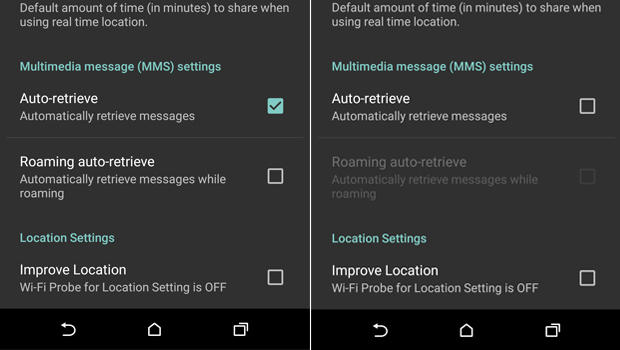
Meanwhile, there is a work-around. You need to configure your messaging app to not automatically download MMS messages.
But now we have a new StageFright, a vulnerability in the base android phone operating system. This is an equal-opportunity vulnerability effecting all android phones (nearly 1 billion!). Like many new vulnerabilities discovered in the past year, this one has a name and a logo.The issue is a "feature" in the way androids pre-processes MMS multi-media messages (pictures, videos) sent via your text messaging app. That could be the stock messaging app, a custom messaging app from your phone manufacturer or data provider, or even Google Hangouts.
Here's why the vulnerability is so bad... you don't have to open the message! You don't even have to know that you received the message. All it takes is for your phone to automatically download a malicious message in the background - which is exactly what it does - for your phone to be owned! That's a problem.
At the time I wrote this column, there seems to be a fix only for Google-branded phones, and that's a very small percentage of all phones. You can check with your carrier to find out when you'll get a patch.
Meanwhile, there is a work-around. You need to configure your messaging app to not automatically download MMS messages.
- Open you rmessaging app.
- Go to Settings
- Select: Multimedia messages
- un-select Auto Retrieve
Now, when someone tries to send you a message with multi-media content, you'll see that the message arrived, but the photo or video will not be downloaded. Only tap to download if the message came from a trusted source.
Of course, you should also keep your phone patched by applying all phone and app updates. And... get rid of any apps you don't need.
Here are some references for more info.
Tuesday, March 10, 2015
Chip & Pin & a Tin Foil Wallet
"A question came up at home – and that is about use of credit card wallets that protect from rogue scanners. Are they necessary? Will they be more or less necessary when newer cards with embedded microchips are more prevalent?I thought this might be an interesting topic for your blog."
Thanks for the great question and idea to put this in a blog post!
So, by credit card
wallet I’m assuming that you mean some kind faraday cage or lead lined
case that blocks electronic signals, as opposed to a credit card wallet
like Google Wallet, Apple Pay or SoftCard.
When it comes to
old-school mag stripe cards… have you noticed how you sometimes have to reinsert or
re-swipe the card in the reader, and even then it doesn’t always read? Mag
stripe is definitely a direct-physical-contact
medium. Other than vendor breaches or stolen (physical) wallets, the typical way
someone can steal your mag-stripe card data is via some kind of skimmer. There are
very low profile skimmers that can be inserted into ATMs or gas pumps to
grab your card data while you’re trying to
do a legit transaction. There are also hand-held or desktop units that
an “evil waiter” can use to grab your card data when they take your
card at a restaurant. There are no reliable remote ways to read magnetic data
off a card. So, a lead wallet won’t help here
at all. It’s the same way you can’t read the contents of a hard drive
just by being near it.
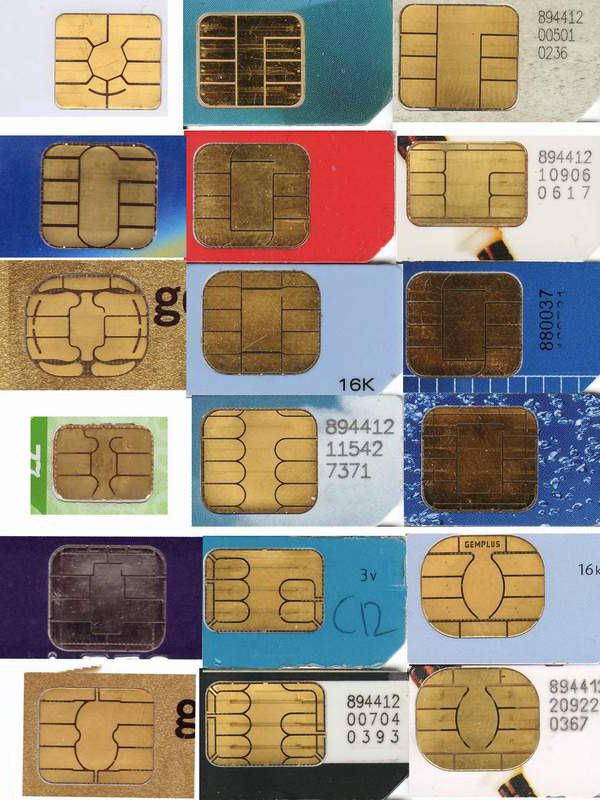
Next is RFIDs. That stands for Radio Frequency IDentification and, as the name implies, they do transmit data. These are the chips in the tap & pay cards.
There are transmission-blocking wallets for RFID passports and things like that
which transmit data. So anything with
RFID or a transmitter can be remotely read (at
various distances).
The new cards coming
out will be chip & "something". Currently in Europe they use chip
& pin. This is expensive to implement and requires replacing all
the mag stripe readers with much costlier readers.
The chip is a microchip that computes a value and provides a 1-time-use
code for a transaction. Note that it does not use your credit card
number. In addition to that single use code, the person also needs to
put in their numerical PIN. So, even if the
card was stolen, or the code could be remotely read, it couldn’t be
used for a transaction without the PIN, and the code couldn't be reused.
The US is actually
considering chip & signature. Among the reasons is that the cost will be lower
even though the readers still need to be replaced. (though, because of
the marketing power of Apple and Apple Pay, many
merchants have already upgraded readers). The chip works the same way,
but the 2nd part of the verification is the physical signature. Not particularly strong but better than nothing.
Now… neither of
these new card types solves a particularly important case… Card Not Present. This is
when you buy something over the phone or internet. So there’s no card
reader nor person to look at your signature, and
you don’t want to give some random merchant your PIN.There are a number of potential solutions in the works. Verified-By-VISA or MasterCard SecureCode are examples of tools available now, even for mag stripe cards. Basically, you choose one of these at online checkout; then you’re transferred to the VISA or MasterCard site; you authenticate there; the VISA or MasterCard site generates an acceptance code that get sent back to the merchant and you’re all set.
So, chip &
signature cards and readers will help deal with some of the credit card
fraud we have, but we still need a standardized solution for Card Not
Present (CNP).
You'd be far better off taking the precautions I listed in my previous ID Fraud articles including:
- regularly viewing your credit report
- watching your bills
- shredding unneeded documents that have personal info
- carrying only the minimum cards you need
- using care online
Thanks again for the great question! If anyone has questions or ideas for things I should write about in the future, please let me know.
Tuesday, August 5, 2014
When Androids Attack!
All computers, devices and software have flaws. In fact, there are so many it's hard to keep up. In the past (not so long ago), we only had to worry about computers... and they were mostly big desktops. Then came laptops, and with them the additional problems introduced when connecting to unknown and open networks. And lately, we seem to spend plenty of time talking about flaws in smartphones and tablets.
The latest in a long string of smartphone issues is the so-called "Fake ID" flaw affecting Android devices. This attack exploits a vulnerability in the way an Android device checks the authenticity of an app.
The issue is kind of similar to controls around US credit cards. When you sign a credit card receipt or at a terminal, the clerk or cashier might check that signature against the one on the card. Even if the signatures match (and when does that happen??? I can barely duplicate my own signature! :-), that doesn't mean that you are the owner of the card nor does it let anyone know if the card is fake or stolen.
In a somewhat analogous way, apps are "signed". The flaw allows Android phones to accept unverified apps. This provides a potential opportunity to download fake or malicious apps.
This issue should be patched on your phone by now. But this is not the first time this kind of problem has emerged. And it won't be the last time! This can be a serious issue.
The latest in a long string of smartphone issues is the so-called "Fake ID" flaw affecting Android devices. This attack exploits a vulnerability in the way an Android device checks the authenticity of an app.
The issue is kind of similar to controls around US credit cards. When you sign a credit card receipt or at a terminal, the clerk or cashier might check that signature against the one on the card. Even if the signatures match (and when does that happen??? I can barely duplicate my own signature! :-), that doesn't mean that you are the owner of the card nor does it let anyone know if the card is fake or stolen.
In a somewhat analogous way, apps are "signed". The flaw allows Android phones to accept unverified apps. This provides a potential opportunity to download fake or malicious apps.
This issue should be patched on your phone by now. But this is not the first time this kind of problem has emerged. And it won't be the last time! This can be a serious issue.
Labels:
android,
anti-malware,
apps,
attack,
flaw,
Google,
patches,
patching,
permissions,
phone,
signature,
smartphone,
tablets,
updates,
vulnerability
Tuesday, September 17, 2013
When is Encrypted really Encrypted?
With all the discussion on the NSA and what they can, and cannot, see, collect and decrypt on the net, the picture is pretty muddy. Google has the announced plans to enhance their encryption. Perhaps most confusing is what this means for home users. Is your data safe? Is it being collected? Who can see your data and how can it be kept private?First, a few concepts... you can skip this and jump right to the "how-to's" if you want. Without getting too deep into the bits and bytes, there are basically 2 forms of encryption: transport and file.
Tuesday, June 18, 2013
One if by Land, Two if by Prism
Last week I avoided talking about Prism, the supposed NSA wiretapping issue that has been all over the news.
However, in the past week I've read or heard 3 different highly insightful analyses and I'd like to comment on them.
First, on the possible techniques used. Major data collection organizations including Facebook and Google have denied providing any information to the US Feds as has been alleged. But the NSA is getting information.
However, in the past week I've read or heard 3 different highly insightful analyses and I'd like to comment on them.
First, on the possible techniques used. Major data collection organizations including Facebook and Google have denied providing any information to the US Feds as has been alleged. But the NSA is getting information.
Tuesday, May 28, 2013
Twitter 1-and-a-half Factor Authentication
As you may have read, and hopefully enabled, Twitter added a 2-factor authentication capability last week.
If you haven't yet turned this on, here's how. Log in to Twitter; select Settings; select Mobile; add and activate your phone. Here are the detailed instructions for adding your phone number. To enable 2-factor authentication, select Account, then check the box labeled: Account security
Here's the good news... as I've discussed in the past, I am a fan of using some kind of 2-factor auth for website authentication. I also like the use of a smartphone for delivering that one-time-use PIN or code. While we still have a digital divide in the US, most people do have a cell phone, and most of those have a smartphone.
But there are some issues.
If you haven't yet turned this on, here's how. Log in to Twitter; select Settings; select Mobile; add and activate your phone. Here are the detailed instructions for adding your phone number. To enable 2-factor authentication, select Account, then check the box labeled: Account security
Here's the good news... as I've discussed in the past, I am a fan of using some kind of 2-factor auth for website authentication. I also like the use of a smartphone for delivering that one-time-use PIN or code. While we still have a digital divide in the US, most people do have a cell phone, and most of those have a smartphone.
But there are some issues.
Subscribe to:
Posts (Atom)