Showing posts with label router. Show all posts

Tuesday, December 22, 2015

What's in Your Home Computer Security Toolkit?

   It's always great to get questions and comments from readers.  I received this question recently:
My home recipe is Windows Defender, Malwarebytes and KeePass. Is that a good approach or should I be thinking about adding something to my security toolkit in 2016?
   Thanks for the great question!  You’ve got some good bases covered:
  • Anti-malware (I also use defender)
  • Malware removal (I also use malwarebytes), and
  • A password vault (I use LastPass)
   That’s a great start. To round out the core toolkit, I’d add 2 things:
  1. Backups – you’ve got irreplacable pictures, tax returns, music and info of all sorts. There are many of good online products available that encrypt your data before cloud storage. I use CrashPlan, but there are many others.  For extra bonus points, you can both backup one computer to another computer and to the cloud.  That way you have more than one way to recover.

  2. Next, 2-factor authentication should be added for any sites and accounts where available.  This nicely complements your password vault so that even if an attacker stole individual or multiple passwords, they still couldn't log in to your accounts without your phone or other second authentication device.  I wrote about this recently.
   There are also a few things to do:

Tuesday, October 7, 2014

Celebrate Cyber-Style!

   It's time again to celebrate that wonderful US event... Happy Cyber Security Awareness month!  This event started in 2003 as a way to build awareness for online security and privacy and to encourage individuals, business and government.

   Over the past couple of posts I've focused on Identity Fraud (here and here).  We'll pause on that topic until next time.

   Today I give you...  The Top 10 Ways to Celebrate Cyber Security Month 2014!
  1. Change your password
  2. Yes, I know... I said in the past that just changing your password is not the effective measure.  That's true but with the frequency with which online sites get compromised, it's not a bad idea.  Even better - use really long passwords.  Remember, when it comes to passwords... size matters!

  3. Use a password vault
  4. A password vault is a program that encrypts and holds all your passwords.  I explain these in detail, and list some good products, in this post.

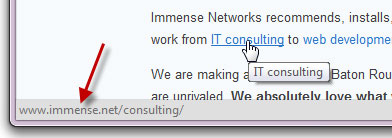
  5. Look before you click
  6. With most links to can "mouse over" the link.  That means you just move your mouse so it's on the link, but don't click yet!  Your browser will display the address to which the link will lead.  This displays at the bottom of the browser.  The actual link in the display should make sense and be the location you're expecting.  If not then... don't click!

Tuesday, October 8, 2013

Online Self Defense - Your Computer

   It's Cyber Security Month!  And the more things change, the more they stay the same.  The key advice for online self-defense I've given in the past is just as true now.  So to help us all celebrate, I'm "re-featuring" a few articles I've run in the past.


   Happy US Cyber Security Month!  This partnership between Homeland Security, NCSA and MS-ISAC is an opportunity to recognize the importance of information security.  How are you celebrating?

   Last week I ran a couple of sessions at work on awareness and security.  Over the next few posts I will be reviewing some of the 3 themes I covered in a talk entitled "Online Self-Defense". You can view the slides on my slideshare page. (actually, the talk focuses on just 2 of the themes but that's OK!). Since everything comes in threes (omne trium perfectum), I will give 3 easy tips for each theme (and some bonus tips as well).

   The first theme is protecting your computer or device.

Tuesday, October 9, 2012

Online Self Defense - Part 1 - Your Computer

   Happy US Cyber Security Month!  This partnership between Homeland Security, NCSA and MS-ISAC is an opportunity to recognize the importance of information security.  How are you celebrating?

   Last week I ran a couple of sessions at work on awareness and security.  Over the next few posts I will be reviewing some of the 3 themes I covered in a talk entitled "Online Self-Defense". You can view the slides on my slideshare page. (actually, the talk focuses on just 2 of the themes but that's OK!). Since everything comes in threes (omne trium perfectum), I will give 3 easy tips for each theme (and some bonus tips as well).

   The first theme is protecting your computer or device.