Showing posts with label patching. Show all posts

Tuesday, January 30, 2018

Speculative Speculation

   Patch.

   NO WAIT!... DON’T Patch!

   It may cause unexpected reboots (as opposed to the expected kind???? J).

   It may cause system slowdowns.

   It may conflict with your other system controls.

   It sounds kind of like the “fine print” in one of those pharmaceutical adds… patching side effects may include arrhythmia, faintness, moderate to severe amnesia, flushing of the face, dry mouth, blurry vision, visual distortions or white spots, nausea and vomiting, constipation, muscle twitches, confusion, euphoria, sedation, itchiness, and increased anxiety, respiratory or cardiac arrest, coma, hypoventilation (inadequate ventilation), and possibly death.
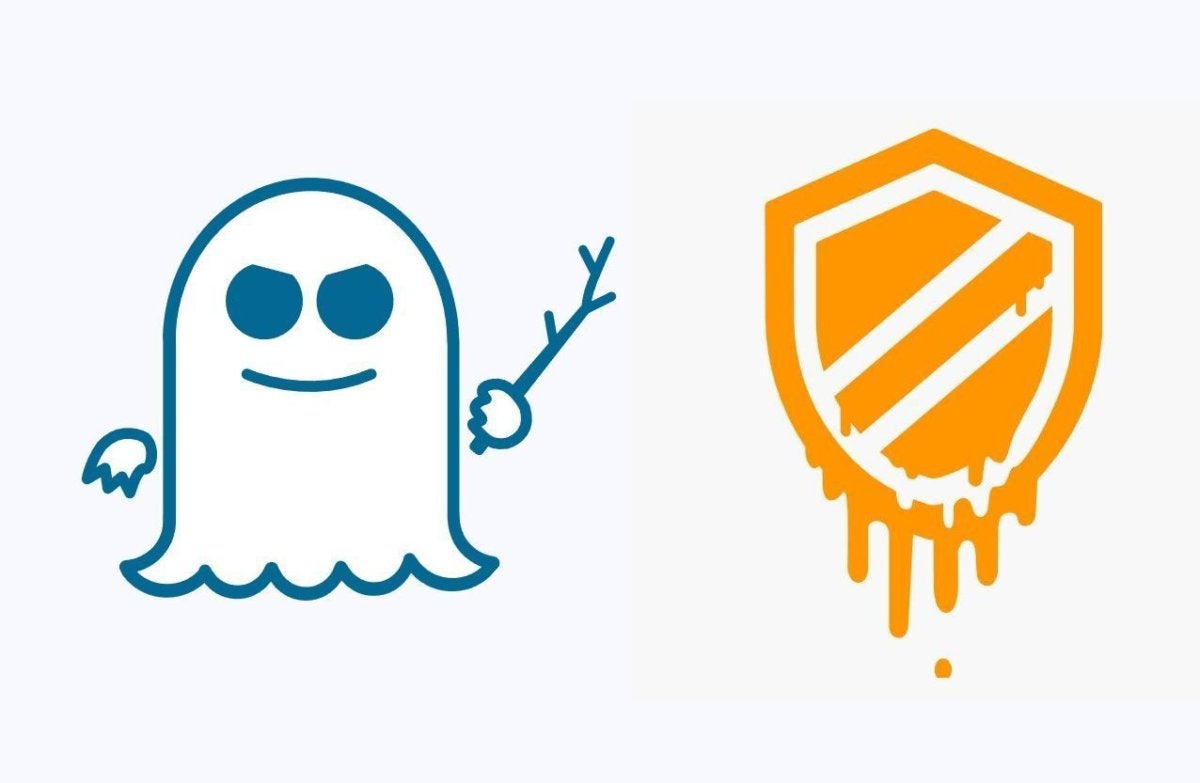
   This whole Spectre/Meltdown thing has gotten so much attention lately. But the reports are loaded with misinformation, speculation (!), and even some facts.  I’ve have seen some uber-geeky explanations of what is going on.  If you haven’t seen the major rant by the father of linux Linus Torvalds, check this out.

   One thing that has been lacking is more simple, straightforward explanations of this complex topic.  I think Steve Gibson did a great job talking about this recently in his SecurityNow! podcast.  He actually explained the underlying mechanism of speculative execution years ago when he was talking about how modern processors work.

   Speculative Execution is really pretty cool.  It can be complex, but a good example is when there are two choices in how some code may execute, i.e. GO here or GO here, the processor does both!  And it executes steps ahead from where you are in the code now.  The overall effect is that the code executes faster.  It’s kind of like paying it forward with extra computing cycles.  Here's a great explanation.

   Here’s the point about this vulnerability… we’ve had plenty of named vulnerabilities.  They are all the rage these past few years – a name and a logo.  But most of these vulnerabilities are code or protocol problems.  Yes, some of those were very wide ranging.  However, this newly discovered problem is a vulnerability in the underlying architecture of nearly every modern computer chip created since 1995.  Everywhere.

   And while this has not been exploited in practice, that will happen.  The Fix is not yet in.  For now, the advice is to not panic, patch selectively and we’ll all watch and wait!

Tuesday, May 23, 2017

I'll Cry if I Wanna

   I try not to jump on bandwagons, but with so much coverage and affects of the whole worldwide WannaCry mess, I do have a few things to say.  I have a few different things to cover that you may not have seen elsewhere.

   There's been plenty of media coverage so I'll just give a high level overview of what happened.  Like many other nations, the US National Security Agency (NSA) studies computer flaws and develops ways to attack them.  The Shadow Brokers are a hacker group who started leaking some of these NSA-developed attacks in the second half of 2016.  The April 2017 edition of their leaks included the code that enabled the WannaCry attack.
   The attack that started on Thurs May 11 consisted of two parts.  One would encrypt files so that the owner could not get access to their files (commonly called "CryptoWare").  The other part could get remote access to any vulnerable computer.  This was a very powerful combination and this is the first time we've seen this kind of auto-spreading cryptoware.  Once infected, the victim sees a screen that directs them to pay a ransom in bitcoin - so the whole attack is considered "Ransomware".

   Now, Microsoft did release a patch in March to fix some of these problems, in particular the remote access part.  So no problem, right?  Desktops and laptops are usually easier to patch, and you should always have your home systems set to automatically update.  But servers need more testing to assure that applications continue to work as expected.

   Patching was a critical part of the fix, but there was definitely more to it including things like new anti-virus signatures, whitelisting, intrusion prevention signatures and firewall rules.

Tuesday, August 4, 2015

See the Man With the StageFright

   I always liked the way Rick Danko sang that song, and I saw him perform it a few times.


   But now we have a new StageFright, a vulnerability in the base android phone operating system.  This is an equal-opportunity vulnerability effecting all android phones (nearly 1 billion!).  Like many new vulnerabilities discovered in the past year, this one has a name and a logo.

   The issue is a "feature" in the way androids pre-processes MMS multi-media messages (pictures, videos) sent via your text messaging app.  That could be the stock messaging app, a custom messaging app from your phone manufacturer or data provider, or even Google Hangouts.

   Here's why the vulnerability is so bad... you don't have to open the message!  You don't even have to know that you received the message.  All it takes is for your phone to automatically download a malicious message in the background - which is exactly what it does - for your phone to be owned!  That's a problem.

   At the time I wrote this column, there seems to be a fix only for Google-branded phones, and that's a very small percentage of all phones.  You can check with your carrier to find out when you'll get a patch.

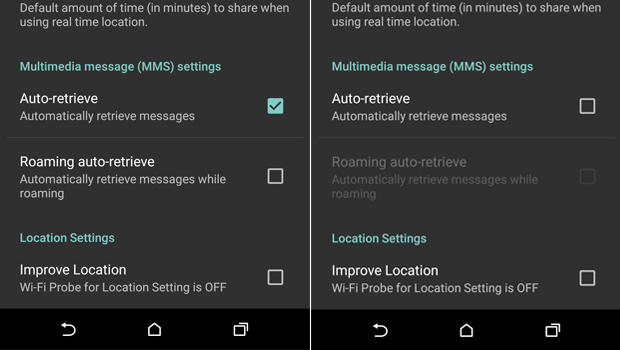
   Meanwhile, there is a work-around.  You need to configure your messaging app to not automatically download MMS messages.

  1. Open you rmessaging app.
  2. Go to Settings
  3. Select: Multimedia messages
  4. un-select Auto Retrieve
   Now, when someone tries to send you a message with multi-media content, you'll see that the message arrived, but the photo or video will not be downloaded.  Only tap to download if the message came from a trusted source.

   Of course, you should also keep your phone patched by applying all phone and app updates.  And... get rid of any apps you don't need.

   Here are some references for more info.

Tuesday, August 5, 2014

When Androids Attack!

   All computers, devices and software have flaws.  In fact, there are so many it's hard to keep up.  In the past (not so long ago), we only had to worry about computers... and they were mostly big desktops.  Then came laptops, and with them the additional problems introduced when connecting to unknown and open networks.  And lately, we seem to spend plenty of time talking about flaws in smartphones and tablets.

   The latest in a long string of smartphone issues is the so-called "Fake ID" flaw affecting Android devices.  This attack exploits a vulnerability in the way an Android device checks the authenticity of an app.

   The issue is kind of similar to controls around US credit cards.  When you sign a credit card receipt or at a terminal, the clerk or cashier might check that signature against the one on the card.  Even if the signatures match (and when does that happen???  I can barely duplicate my own signature! :-), that doesn't mean that you are the owner of the card nor does it let anyone know if the card is fake or stolen.

   In a somewhat analogous way, apps are "signed".  The flaw allows Android phones to accept unverified apps.  This provides a potential opportunity to download fake or malicious apps.

   This issue should be patched on your phone by now.  But this is not the first time this kind of problem has emerged. And it won't be the last time!  This can be a serious issue.

Tuesday, March 18, 2014

XP End of an Era or... Deja Vu All Over Again!

   Unless you just came back from time traveling, you know that Microsoft is ending support for the XP
operating system on April 8.  To be clear... April 8 is Patch Tuesday, so that will be the last set of updates for XP.  Sort of.

   XP has been one of Microsoft's most popular desktop operating systems and many organizations are dependent upon it.  Many organizations have not yet updated to Windows 7 or 8 and the clock is ticking.  I'd like to look at what that means and share a few ideas of what we can do to protect ourselves and our organizations.

   Microsoft will be stopping all patches, hotfixes and enhancements to XP after April 8.  Anti-virus signatures will continue to be made available.  This means that any vulnerabilities that are discovered or disclosed might not be fixed.  Organizations will need to figure out if they are vulnerable to any new threats and then weigh the risks associated with their options.

   There has been some speculation that online criminal organizations may be stocking up on new vulnerabilities so these can be released after the last patch date.  We can't know if this is true, but it is possible.

   So... if you are still running XP, and need to continue to run XP, what can you do?  Let's do a high-level threat analysis:

Tuesday, December 10, 2013

Password Problems Again

   So here we go again... more problems with breached passwords.  But this time there is a different wrinkle.

   By now, most of you have probably heard about the recent discovery of hackers getting around 2 million userid's and passwords to online services like Facebook, Gmail, Yahoo, LinkedIn and Twitter.  Notable on the list of sites is ADP, the payroll processor.

   It's "just" 2 million sets of ID's and passwords.  That's not really big news these days when the new record of over 152 million stolen passwords was recently set by the Adobe breach.  But there is a difference here.  For most of the big password breaches, the service provider's website or password store is hacked.  Then the encrypted password file or database is downloaded.  The attackers can take their time analyzing the encrypted data to come up with userid's and passwords.  This work is made easier because so many sites use poorly implemented encryption.  And some sites use no encryption at all.

   But that's not what happened here.

   This time the passwords were stolen from the users of the sites.  That's you and me (well... hopefully not you or me!).

Tuesday, October 8, 2013

Online Self Defense - Your Computer

   It's Cyber Security Month!  And the more things change, the more they stay the same.  The key advice for online self-defense I've given in the past is just as true now.  So to help us all celebrate, I'm "re-featuring" a few articles I've run in the past.


   Happy US Cyber Security Month!  This partnership between Homeland Security, NCSA and MS-ISAC is an opportunity to recognize the importance of information security.  How are you celebrating?

   Last week I ran a couple of sessions at work on awareness and security.  Over the next few posts I will be reviewing some of the 3 themes I covered in a talk entitled "Online Self-Defense". You can view the slides on my slideshare page. (actually, the talk focuses on just 2 of the themes but that's OK!). Since everything comes in threes (omne trium perfectum), I will give 3 easy tips for each theme (and some bonus tips as well).

   The first theme is protecting your computer or device.

Tuesday, April 9, 2013

Keeping Security Simple

   This week I did a national webcast with Capella University.  The topic was the Insider Threat.  But my take on this is a bit different than what's usually said on this subject.  I call it "The Accidental Insider".  You can see my slides here.

   I was talking about how I think that accidents are the major cause of breaches.  I've talked a bit about how important it is to keep things simple here.

   If you're an information security professional, hopefully you are familiar with the Verizon Data Breach Investigations Report (DBIR).  You can see their page for the latest report.

   One of the interesting things they point out in the report is summarized in this table:

Tuesday, October 9, 2012

Online Self Defense - Part 1 - Your Computer

   Happy US Cyber Security Month!  This partnership between Homeland Security, NCSA and MS-ISAC is an opportunity to recognize the importance of information security.  How are you celebrating?

   Last week I ran a couple of sessions at work on awareness and security.  Over the next few posts I will be reviewing some of the 3 themes I covered in a talk entitled "Online Self-Defense". You can view the slides on my slideshare page. (actually, the talk focuses on just 2 of the themes but that's OK!). Since everything comes in threes (omne trium perfectum), I will give 3 easy tips for each theme (and some bonus tips as well).

   The first theme is protecting your computer or device.

Tuesday, September 25, 2012

Stuff I Say - KISS - Keep It Simple Security

   This is the first of a series of posts covering themes I talk about all the time.  The theme today is keeping things simple.

   Last week I spoke at the Interface conference in St. Paul.  It was a fun talk entitled #*%! My CISO Says, covering a range of security governance and management topics.  Slides are on my slideshare page.  In that talk I frequently referenced keeping our security program simple.