Showing posts with label smartphone. Show all posts

Tuesday, January 3, 2017

New Year, Don't Click!

   Well, it's a new year and, as we've discussed in the past, the more things change the more they stay the same.

   My advice for 2017... Don't Click!

   Of course, that's easier said than done.  We've discussed phishing and malicious email here, here and here.

   But on a more practical note, and because I like things that come in 3's, here's some info from the way-back machine... it's advice from Brian Krebs from 2011.  It is his 3 basic rules for online safety.  They are every bit as relevant now as when this was first published.  And it was relevant for years before that.

   The 3 rules are:
  1. If you didn’t go looking for it, don’t install it - this means when you get a pop-up asking you to install some software... don't click!  Only install software that you look for and intend to use.  And, wherever possible, install from reputable websites.  Do your research.
  2. If you installed it, update it - After you install the software you want, you need to keep it up to date.  This is not trivial, but I like using Secunia PSI (Personal Software Inspector) on my home systems for keeping software up to date.
  3. If you no longer need it, remove it - software will have vulnerabilities.  The less software you have, the fewer opportunities there are for vulnerabilities and malware.  This is especially true on your smartphone and tablet, where excess software really slows the performance of the device.
   Here's to a safe and secure 2017!

Tuesday, May 3, 2016

Secrets Your Phone Told Me

   You may remember that earlier this year we were all talking about the standoff between the FBI San Bernadino attack.  This specific problem was "solved" when the FBI said they were able to decrypt the phone and no longer needed Apple's help.  The assumption by many is that the FBI purchased an exploit used to break into the phone.
and Apple about the decryption of an iPhone used by one of the shooters in the

   This leads us to an important consideration and question... can any phone be hacked?  Is any information on your smartphone really private?

   We have become completely dependent upon our phones.  According to a 2015 Pew Research Center study, in the US over two-thirds of the population uses a smartphone.  We keep all of our personal information on there: passwords and accounts, photos and videos, credit card data, tax data; we shop and set many preferences (travel, food, dating, real estate); we track our workouts, our weight our food and all our movements.  Today's smartphone is the key to far more information about you than you can imagine!

   We can, of course, watch TV on our phone.  And on 4/17/2016, 60 Minutes aired a show about smartphone security and privacy.  You can view it here.

   In the episode, they talked about the SS7 (Signaling System 7) protocol and how it works.  SS7 was designed in 1975 and it is the protocol that allows phone systems to pass calls between them.  For mobile, it handles maintaining connections as you move between cell towers, for example as you are driving down the road (using hands-free calling of course! :-).  This particular exploit is not new at all.  In fact, this has been a topic at the Black Hat Briefings and other security conferences for years.

   But all this aside, there is no need for exploits or vulnerabilities to track people or glean personal information through their phones.  Disclosing this information is simply how phones and apps work!  Let me explain...

Tuesday, December 22, 2015

What's in Your Home Computer Security Toolkit?

   It's always great to get questions and comments from readers.  I received this question recently:
My home recipe is Windows Defender, Malwarebytes and KeePass. Is that a good approach or should I be thinking about adding something to my security toolkit in 2016?
   Thanks for the great question!  You’ve got some good bases covered:
  • Anti-malware (I also use defender)
  • Malware removal (I also use malwarebytes), and
  • A password vault (I use LastPass)
   That’s a great start. To round out the core toolkit, I’d add 2 things:
  1. Backups – you’ve got irreplacable pictures, tax returns, music and info of all sorts. There are many of good online products available that encrypt your data before cloud storage. I use CrashPlan, but there are many others.  For extra bonus points, you can both backup one computer to another computer and to the cloud.  That way you have more than one way to recover.

  2. Next, 2-factor authentication should be added for any sites and accounts where available.  This nicely complements your password vault so that even if an attacker stole individual or multiple passwords, they still couldn't log in to your accounts without your phone or other second authentication device.  I wrote about this recently.
   There are also a few things to do:

Monday, November 23, 2015

Do the Amazon 2-Step... Now!

   It's not a new song or a new dance...  Amazon has just announced 2-step, aka 2-factor or multi-factor, authentication for online logins!  It's overdue but I'm glad it's here.

   We've talked about 2-factor authentication in the past so I won't go deeply into it in this post.  The important take-away is that Amazon now offers this service and you should use it!

   Here's an overview article and here's a great step-by-step with screen shots.  I set this up for my account and it was really easy using my phone and Google Authenticator.  You can also use text messaging, or setup text messaging as a backup method.

   The main reason that 2-factor is good and important is that it prevents an attacker, who has stolen your userid and password, from logging in as you.  This is because they would need to have your smartphone in addition to the userid and password! (yes, there are other methods as well).

Monday, October 12, 2015

Keep Celebrating! - Mobile and Social

   We continue our celebration of US Cyber Security Awareness month!  This partnership between Homeland Security, NCSA (National Cyber Security Alliance) and the MS-ISAC (Multi-State Information Sharing and Analysis Center) is an opportunity to recognize the importance of information security.  It started in 2003 as a way to build awareness for online security and privacy and to encourage individuals, business and government.

   This is another of my weekly posts connected with the weekly themes put together by DHS.  This week the theme is staying protected while always connected.  That rhymes!

   We are always connected!  According to the Pew Research Center, in 2015 90% of american adults own a cell phone, 64% own a smart phone.  And one of the major uses for smart phones is... not calls but social media!  How do we stay safe online and on the move?

Tuesday, September 15, 2015

Bring It On Home

   I'm giving a presentation at the Twin Cities ISSA Security Awareness SIG.  I'll be talking about a number of different methods I've used over the years to create buzz and interest about security and make topics accessible to everyone.

   I was planning to refer to one of my earliest blog posts, covering my general philosophy on this topic.  But... going through past posts it appears that, while I've alluded to the ideas, I never actually wrote the post!  So I'll do that now!


   Like the song says, I try to bring it on home.  I find that while people do want to understand security rules at work, when we start talking about things like home computers, smart phones and family internet safety, then we get peoples' attention.

   And that's a great thing!  For a bunch of reasons:
  • When people think about protecting themselves and family and data, it helps them remember that in the office we are protecting customers'/patients'/users' privacy and data.
  • Security needs the eyes and ears of all staff to help us know what is going on.  Security Awareness focusing on personal topics helps open the communication channels to the security team.  We're not so scary! :-)
  • When staff understand more about how security topics can help them, we gain real evangelists.
   And yet there is still controversy about the usefulness of Security Awareness.  But I think it's one of the most important and useful things we can do to help secure our environments.

   Here's a link to the slides from my presentation.

   And here are a few of my past favorite security awareness posts:
   If you are a computer use, what are some topics you'd like to learn more about?

   If you are an information security professional, what tips and techniques would you like to share?

Tuesday, October 7, 2014

Celebrate Cyber-Style!

   It's time again to celebrate that wonderful US event... Happy Cyber Security Awareness month!  This event started in 2003 as a way to build awareness for online security and privacy and to encourage individuals, business and government.

   Over the past couple of posts I've focused on Identity Fraud (here and here).  We'll pause on that topic until next time.

   Today I give you...  The Top 10 Ways to Celebrate Cyber Security Month 2014!
  1. Change your password
  2. Yes, I know... I said in the past that just changing your password is not the effective measure.  That's true but with the frequency with which online sites get compromised, it's not a bad idea.  Even better - use really long passwords.  Remember, when it comes to passwords... size matters!

  3. Use a password vault
  4. A password vault is a program that encrypts and holds all your passwords.  I explain these in detail, and list some good products, in this post.

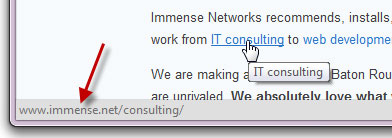
  5. Look before you click
  6. With most links to can "mouse over" the link.  That means you just move your mouse so it's on the link, but don't click yet!  Your browser will display the address to which the link will lead.  This displays at the bottom of the browser.  The actual link in the display should make sense and be the location you're expecting.  If not then... don't click!

Tuesday, August 5, 2014

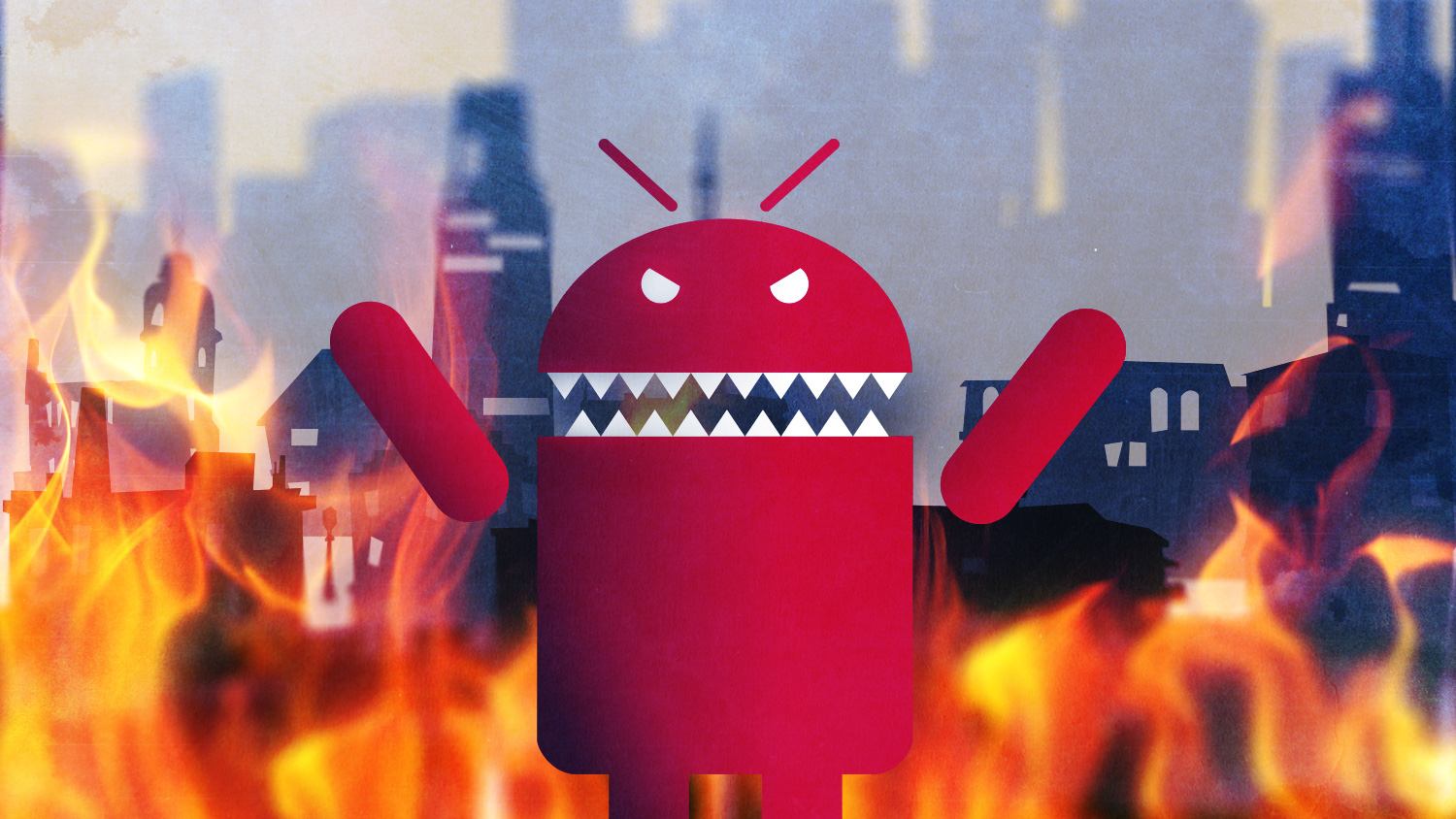
When Androids Attack!

   All computers, devices and software have flaws.  In fact, there are so many it's hard to keep up.  In the past (not so long ago), we only had to worry about computers... and they were mostly big desktops.  Then came laptops, and with them the additional problems introduced when connecting to unknown and open networks.  And lately, we seem to spend plenty of time talking about flaws in smartphones and tablets.

   The latest in a long string of smartphone issues is the so-called "Fake ID" flaw affecting Android devices.  This attack exploits a vulnerability in the way an Android device checks the authenticity of an app.

   The issue is kind of similar to controls around US credit cards.  When you sign a credit card receipt or at a terminal, the clerk or cashier might check that signature against the one on the card.  Even if the signatures match (and when does that happen???  I can barely duplicate my own signature! :-), that doesn't mean that you are the owner of the card nor does it let anyone know if the card is fake or stolen.

   In a somewhat analogous way, apps are "signed".  The flaw allows Android phones to accept unverified apps.  This provides a potential opportunity to download fake or malicious apps.

   This issue should be patched on your phone by now.  But this is not the first time this kind of problem has emerged. And it won't be the last time!  This can be a serious issue.

Tuesday, November 26, 2013

Internet Safety... The Song Remains the Same

   As seems to often be the case in the fall, I'm doing a number of Internet Safety talks lately.  Maybe it's the tie-in with October US Cybersecurity month, and I did some posts celebrating that.  Maybe it's that fall makes us think about back to school (though maybe safety should be a "hotter" topic in the summer when kids have more free time!).

   I've been presenting to groups about Internet Safety and related topics for over 12 years.  I've got a few events coming up at work, so I'm updating my material.  I've got a number of talks on these "consumer" issues.  You can see my slides on my slideshare page.  I regularly update my material.  But what's really amazing to me is that the core, key messages have substantially remained the same.


   For example, I recently did a presentation and blog post on bullying.  The biggest change in online bullying in the past few years has been the news media attention.  But what happens, how it happens and options for victims, unfortunately, hasn't changed much.

   As I talk with people about these issues, and research and update my presentation material, I think there are 3 main areas in which things have substantially changed.
  1. The rise and expansion of social media.  In the early 2000's, we were talking about things like email, Chat like AOL Instant Messenger (AIM) and web surfing.  Xanga.com was around, but MySpace and Facebook weren't even invented until around 2003!  And, needless to say, there's been an explosion of social media sites with the latest trends favoring pictures and video.  While kids had the ability to share too much information since the beginning, social media sites really drove the norms.
  2. Technology.  In particular... mobile technology.  I used to recommend that families keep their computer (singular) in a common place like the family room or kitchen so kids' use could be seen.  While that is still good advice, most families have more than one computer.  And most teens, and many younger kids, carry a powerful computer with them wherever they go... their smartphone.  While we still have options available for monitoring, and good communication is key, portable devices are really a game-changer.
  3. Kids get it.  During my Internet Safety talks of the mid-2000's, we used to play a little game.  It was a live demo in which I would bring up a social media site, typically MySpace.  The game was to see how few clicks it would take us to get to some inappropriate content (like kids/teens sharing too much personal information or posting pictures parents would wish they didn't).  When I first started doing this demo it would only take a few clicks.  Then, by around 2008, it took more.  Then I would just save a few URLs of TMI pages.  Then I gave up the game altogether!  It's not that we can't still find inappropriate content, or examples of kids sharing far more than parents might want.  But kids are doing a much better job of protecting their information online.  Of course, kids, teens and young adults - actually digital natives in general - do have different ideas, definition and expectations of privacy compared to their parents!
    One final thought... another thing that has changed is that the oldest digital natives - people who do not know of a time without pervasive digital media and technology - are now having their own kids and showing up at Internet Safety talks!  But some things don't change and their kids still know more about technology!


   What surprises you about changes in our online world over the past decade?  What do you think has changed, or has not changed?

Tuesday, July 2, 2013

Want someone's password? Just ask!

   SC Magazine recently put out an article entitled: More users than ever experiencing phishing attack attempts.  According to the article, phishing attacks are on the rise.

   Phishing is simply any kind of communication intending to extract (typically) personal information from someone.  The scam usually tries to either get the victim to visit a malicious website or directly provide their information, via a reply to the attacker or in an online form.

   Years ago, phishing emails were easy to spot.  They typically used obvious From: addresses, poor grammar and spelling, clearly misleading url's, and overall poor imitation of a legitimate organization's communication.

   But, as is often the case, the phishers have gotten better.  The emails look legit, the grammar and use of language is good, and the links often go to realistic-looking, but malicious, sites.  And email isn't the only delivery method.

   So, how do we avoid, and help others avoid, these attacks?

Tuesday, June 11, 2013

Light and Sound - the next mobile malware vector?

   With all the talk about Prism in the security news, we didn't hear about much else.

   But here's an interesting story... Researchers at University of Alabama, Birmingham verified that malware, or other actions, can be triggered on a mobile device by sounds, music or light!

   From the article:
   "In one instance, the researchers used music in a crowded hallway to launch an attack on an off-the-shelf Android phone. In others, the malicious code was activated by a song with a particular pattern or the ambient light from a TV, computer monitor or overhead light bulb."

   For most of their experiments, the source of the sound or light needed be very close to the target device.

   Right now this is only experimental.  However, we know that well over 50% of mobile phone users in the US have smartphones.  And these phones have input sensors for light, sound and motion.  Essentially, we are all carrying devices that not only track our location and movements, but can record, and be influenced by, the environment around us.

   It will be interesting to track this research and see the ongoing new ways in which these ubiquitous devices can be exploited.

Tuesday, May 28, 2013

Twitter 1-and-a-half Factor Authentication

   As you may have read, and hopefully enabled, Twitter added a 2-factor authentication capability last week.

   If you haven't yet turned this on, here's how.  Log in to Twitter; select Settings; select Mobile; add and activate your phone.  Here are the detailed instructions for adding your phone number. To enable 2-factor authentication, select Account, then check the box labeled: Account security

   Here's the good news... as I've discussed in the past, I am a fan of using some kind of 2-factor auth for website authentication.  I also like the use of a smartphone for delivering that one-time-use PIN or code.  While we still have a digital divide in the US, most people do have a cell phone, and most of those have a smartphone.

   But there are some issues.

Tuesday, January 22, 2013

Something You Lost - 3 Factors of Fail (part 3)

   As you can tell if you read my last post, I have some pretty strong opinions about the failure of passwords as an authentication mechanism.

   To review, the 3 factors of authentication are referred to as: something you know, something you have and something you are.  Today, in part 3 of this series, we'll talk about the failure of the second factor of authentication, "something you have".  Here are links to parts 1 and 2 of the series.

   While not the oldest form of authentication, this factor of authentication has been around for a long time.  Think about a key, or perhaps some kind of scroll with the symbol from a leader, or even the sword in the stone!  A driver's license, ID card, credit card or passport is also something you have.  These are all things someone can have and can be used identify them or grant access.

   Today, the term "2-factor authentication" can the use of any two different factors of authentication.  But most commonly it refers to the combination of password or PIN that you know, with a single use 6-digit number from some kind of token.

   Here are the three most common single use string/token delivery methods:

Tuesday, December 25, 2012

A Few of My Favorite Things - Apps

   I recently (finally) got modern smartphone.  My previous phone was the "free" phone from over 2 years ago.  Even when I had a basic smartphone I very quickly found useful apps that used everyday.

   Someone was recently asking me what apps I use on my phone.  I thought it would be useful to make a list of some of my favorites here and focus on those that I use most.