Showing posts with label anti-malware. Show all posts

Tuesday, December 12, 2017

Ho-Ho-Holiday Spams and Scams

   It's that time of year again folks.  And whatever holiday you may, or may not, celebrate... there's something we're all likely to see.  It's not presents, though maybe there are some for you.  It's not snow, though we're already seeing that here in the upper midwest US.

   It's malware and holiday scams!

   Unfortunately, it happens every year.  Sometimes it's malicious attachments.  Sometimes it's links to malware to download or phishing sites with forms ready to collect your personal and financial information.

   Here is my 2017 edition of my Top 10 Tips To Avoid Holiday Spams and Scams...

Tuesday, September 20, 2016

It's Microsoft Calling (Not!)

   The amount of automation and detection in our world today can be scary but it can also be useful.  You can set your lights to come on as you approach your home.  You can have your phone switch to wifi when you get to the office.  And Microsoft will even call you when they detect a problem with your PC!

   OK, maybe not that last one!  As we've discussed before, this is a common scam that has now been around for a few years.

   It works like this... There are 2 basic scenarios:
  1. you get a popup on your computer telling you that "Microsoft" has detected that there is a problem with your PC, and you should call the phone number they provide, or;
  2. you get a phone call directly from "Microsoft" telling you that they have detected a problem on your PC.
   Of course, neither of these are legitimate.  Microsoft will not call you.

   This article has a recording of what one of these calls sounds like.  Here's another.

   I said PC above, but people with Macs have received these as well!

   Here's the thing about these scammer orgs...  they provide very good customer support!  That, of course, is good for them but bad for us.  It's one of the reasons that these scams work.  People are very happy to receive great customer support - it's unfortunately too rare.   So when a friendly, attentive "customer service" rep is telling someone that their computer is infected, it can be convincing.

   Typically the "customer service" rep will ask the victim to pop a web browser and type in what they tell them.  The victim's web browser is directed to a malware site that will give the attacker control of that PC.

   Why do they do this?

Tuesday, February 23, 2016

Hospital Held Hostage, FBiOS and CEO Phishing

   I usually don't do "news of the week" commentary posts, but too much has happened this past week and we need to discuss it!

Hospital Held Hostage.

   I'm sure by now you've seen some info on what happened at Hollywood Presbyterian Medical Center in California.  Just in case you were on a desert island... on Feb. 5 HPMC experienced a cryptoware attack.  We've talked about those before... it's malicious software that encrypts files so that only the attacker can read them... the people who need to can't.  The story broke about 10 days later.

   Cryptoware becomes ransomware when the attackers offer to fix the problem - decrypt the files - for a "small consulting fee", usually not small and paid in bitcoin, an untraceable online currency.

   The situation itself is, unfortunately, not unique.  These kinds of attacks have been happening everywhere for years.  But there are two things that happened in this case that are unique.  First, the cryptoware completely shut down all the computerized systems in the hospital.  That means no electronic medical records, radiology, anesthesiology... just about any -ology and most hospital functions are computerized.  The hospital reverted to paper and had to turn away surgery patients or those needing more complex diagnosis, tests or procedures.  

   Second, the hospital paid the ransom.  This is the first publicized case of both a hospital shut down in this way and paying the ransom to restore their files.

   Most hospitals have procedures, called "down time procedures" for operating without some computerized resources.  And there is an incident handling process called HICS - Hospital Incident Command System - based on US FEMA (Federal Emergency Management Agency) NIMS (National Incident Management System).  But there are still medical procedures that can't be done with out access to the electronic data or computer-controlled systems.

   This attack is not OK.  Stealing people's data is bad enough.  But this affects lives.

FAQ:
   Can this happen here (wherever "here" is)?  It can, it has, it does and it will.  All industries and even home systems have been hit.  It's not "if", but "when".

   Can't we prevent it?  Yes!

   Wait.  What?  There's more to that story.  An attack like this can be prevented, but systems would have to be locked down so tight that they might not be usable.  And that's not a solution.  But there are some proactive things that can be done:
  • Don't click!  Most of these kinds of attacks start with the click of a link on a website or in an email, or opening an email attachment.  We've discussed this many times before... if you're not expecting it, if it doesn't look right, if it's not consistent... don't click!
  • Endpoint controls.  These are controls on your desktop or laptop computer including old-school anti-virus, application whitelisting, and execution controls; operational procedures like having a standard workstation configuration and regular patching.
  • Network/System controls.  Like monitoring and keeping all applications up to date with the latest versions and patches, and reliable and tested offline backups.
  • Internet controls.  Like web site filtering and email controls.
   So why did they pay?  Isn't that bad?  In some cases, if the cryptoware infection gets so bad that the organization cannot recover, there may be no other choice then to pay.  And even that's no guarantee that the attackers will or can give you the key to decrypt the files.  In some attacks, if the victim doesn't pay in time, the key is deleted and the files could be unrecoverable.  It's obviously better not to pay (or not to have to pay!), but the organization might not have a choice.

   CSI:Cyber did an episode on a hospital malware attack in Nov. 2015.  I wrote about that here.

   Just a quick commentary on the other two issues.

CEO Phishing.

   Or perhaps more correctly... phishing from your CEO!  In this phishing attack variant, an email comes from "the CEO" (or other highly placed official) demanding some kind of immediate action, typically involving wiring money.  All too often, the recipient does what they're told and sends the funds.

   Recent issues in the US and in France have kept this in the news.  Now Microsoft is getting in on the act, trying to make improvements to Outlook to help with this problem.

   As we've discussed in the past, if something on a web page or email doesn't look right, it probably isn't.  Don't click; Report it!  And even if you did click, report it!

FBiOS.

   After the San Bernadino, California terrorist shooting last December, Federal authorities captured one of the attacker's cell phone.  It is an Apple 5C.  Because of the way Apple encrypts its phones, law enforcement has been unable to view the contents of the phone.

   This week a federal judge ordered Apple to help unlock the phone.  The order is based upon the 1789 law called the All Writs Act.  Apple has chosen not to comply and that has led to plenty of discussion on both sides of the issue.  Apple says helping would set a bad precedent and weaken their phones' protections.  The FBI says it's Apple's duty to help with this criminal investigation.

   As is so often the case, there is no perfect answer.

   As Benjamin Franklin famously did not say, "Those who give up liberty for security deserve neither".  The reality for encryption is, if we make technology that law enforcement can crack, then anyone can crack it.  This is true because of the law no one can break - the law of mathematics!

   However, the Apple 5C uses an older encryption method than their newer phone.  So in this case, Apple could help without compromising everyone else's security and privacy.

   There's some great in-depth discussion of this issue on the TWIT podcast this week.

   Here are some good articles with more details.  We'll watch to see how this plays out.

Tuesday, January 12, 2016

New Year = Same Stuff

   It's a new year, but the same kind of online problems we've seen over the past few years are still here and are more prevalent than ever.

   Here's a great video about this issue by Media Pro:
Don't Let Malware Spoil the Fun from MediaPro on Vimeo. (I can't embed the video here, but do click on the link to view it.)

   The video reminds us that malware can, unfortunately, be found in many places including:
  • insecure websites
  • email attachments
  • browser add-ons
  • USB sticks
  • PDF files
   In additional to slowing down your system and causing it to not operate correctly, many kinds of malware try to grab your personal or work information.

   As we discussed here recently, your home computer defense toolkit should include:
  • anti-malware software
  • automatic updates
   But software tools are not enough.  You need to take action to protect your data and your computer:  Remember:
  1. You didn't win!...If it's too good to be true, it probably isn't true.
  2. Be careful with attachments, unknown programs, or files from USB sticks.
  3. Keep your software up to date.
   Let's do what we can to keep ourselves, our data (and our patients', customers' and clients' data) and our computers safe in 2016!

Tuesday, December 22, 2015

What's in Your Home Computer Security Toolkit?

   It's always great to get questions and comments from readers.  I received this question recently:
My home recipe is Windows Defender, Malwarebytes and KeePass. Is that a good approach or should I be thinking about adding something to my security toolkit in 2016?
   Thanks for the great question!  You’ve got some good bases covered:
  • Anti-malware (I also use defender)
  • Malware removal (I also use malwarebytes), and
  • A password vault (I use LastPass)
   That’s a great start. To round out the core toolkit, I’d add 2 things:
  1. Backups – you’ve got irreplacable pictures, tax returns, music and info of all sorts. There are many of good online products available that encrypt your data before cloud storage. I use CrashPlan, but there are many others.  For extra bonus points, you can both backup one computer to another computer and to the cloud.  That way you have more than one way to recover.

  2. Next, 2-factor authentication should be added for any sites and accounts where available.  This nicely complements your password vault so that even if an attacker stole individual or multiple passwords, they still couldn't log in to your accounts without your phone or other second authentication device.  I wrote about this recently.
   There are also a few things to do:

Monday, October 12, 2015

Keep Celebrating! - Mobile and Social

   We continue our celebration of US Cyber Security Awareness month!  This partnership between Homeland Security, NCSA (National Cyber Security Alliance) and the MS-ISAC (Multi-State Information Sharing and Analysis Center) is an opportunity to recognize the importance of information security.  It started in 2003 as a way to build awareness for online security and privacy and to encourage individuals, business and government.

   This is another of my weekly posts connected with the weekly themes put together by DHS.  This week the theme is staying protected while always connected.  That rhymes!

   We are always connected!  According to the Pew Research Center, in 2015 90% of american adults own a cell phone, 64% own a smart phone.  And one of the major uses for smart phones is... not calls but social media!  How do we stay safe online and on the move?

Tuesday, August 18, 2015

Crypto Where?

   It's that scary moment...  You're getting some work done on your computer when you see a dreaded pop-up message:

   CryptoLocker, CryptoWall and other crypto-/ransom-ware has been in the news again (or still?).  This kind of malware attack was first identified in 2013.  Rather than trying to steal information, the malware encrypts your files.  But you don't have the key to decrypt.  The attacker offers, through a pop-up message, to "sell" you the "service" to unlock your files.  To make things worse, the attacker threatens to delete the keys after a set amount of time, typically 72 hours, which could prevent you from recovering the files.

   These ransom-ware viruses are usually sent to your computer as an email attachment.  The attachment can be an office file, pdf, zip file or other file.  The malware can also come from an infected web link.

   When your computer is infected, the virus operates quietly in the background, encrypting files.  You usually won't know there's a problem until the files are encrypted, and then you're in trouble.

   So if you are infected and encrypted... then what?  Well, there's bad news, good news, more bad news and some more potentially good news!

Tuesday, April 14, 2015

It Wasn't Englebart's Fault! (part 2)

   When we have a post with a "part 1", it probably means we should have a "part 2".  Sometimes other things get in the way!

   A few posts ago we had part 1 of this discussion.  To briefly review, Douglas Englebart was an engineer, inventor and pioneer of the early internet.  He died in 2013.  He was known for a number of key ideas and inventions.  In 1967, he invented a very useful computer device that is a key component in propagating malware and facilitating phishing attacks... the Mouse!

   In part 1 we discussed how malware (malicious software) like viruses get into our computer systems.  Today we'll wrap things up by looking at why it's difficult for our organizations to stop this malware (and why it's difficult to stop this at home).

   Really, the primary issue this stuff is hard to stop is because it's too easy to click on links and attachments.  As we discussed in part 1, as long as we're clicking, we'll have problems.

   But what about anti-virus software?  Anti-virus (or anti-malware or endpoint protection) software has been around for nearly 30 years.  Yet malware problems seem to be getting worse.  (I'll continue to use the term "virus" generically, but I'm really talking about any kind of malware.)

Tuesday, February 24, 2015

It Wasn't Englebart's Fault! (part 1)

   Douglas Englebart was an engineer, inventor and pioneer of the early internet.  He died in 2013.  He was known for a number of key ideas and inventions.  In 1967, he invented a very useful computer device that is a key component in propagating malware and facilitating phishing attacks... the Mouse!

   Of course, Englebart didn't invent email, email attachments, phishing emails or malicious links.

   The media is always buzzing with information about the latest breach or computer break-in.  We hear about advanced attacks, nation-states and possibility of cyber-war.  Many of these major attacks start with a simple click (or many clicks).

   Two of the main ways that malware is distributed or information is stolen is via:

  • malicious attachments sent in an email, and;
  • phishing emails with malicious links.
   For either of these methods to work, the recipient of the email needs to click... with a mouse! (well, you could also use a track-pad or track-ball).  The attachment needs to be opened.  If it's a zip file, it needs to be unzip'd.  If it's a link, clicking the link might either download malware or lead to a form asking for personal information.  Any of these actions could cause major problems.

   Let's discuss two issues:
  • what do these viruses do?
  • why can't my organization stop these? (or why can't I stop them at home?)
   This is, unfortunately, pretty complex and we'll probably handle these in two separate posts.

Why Viruses?

   As I've discussed in the past, this is really an economics issue.  There's illicit money to be made and there are smart people out there coming up with new ways to attack and take over systems.

   A typical computer virus does 1 of 3 things (I'm using the term virus generically - a virus is actually just one of a number of different types of malware (malicious software)).  It can even do more than one of these:
  1. connect "home" and download more viruses;
        This is an optional step.  The real goals are items #2 and #3.
  2. take over a computer so it can be remotely controlled, or;
        An attacker can take over a bunch of computers and use them to attack other computers or sell that capability to others. The computers taken over are called robots or bots.  They can be used to spread spam and more malware; to send a lot of traffic at target computers so they won't work properly or at all (this is called Denial of Service or DoS), or; might use other attack methods.
  3. steal information (the techy word for this is exfiltration).
        The stolen personal or corporate information can be sold or used to steal money from existing or newly created accounts.
  4. (bonus item) threaten to do the above (blackmail).
        An attacker might threaten to crash computers if not paid.  One kind of malware called "ransomware" encrypts your files so that only the attacker can decrypt them and charges you a fee to get your access back.
What can we do?

   This is a complex issue and we'll talk about protection methods next time.  For now, the best advice is to take measures we've often discussed here:
  • use anti-malware software
  • use care when opening attachments
  • use care when clicking on links
  • know who sent you that email, message, tweet, social network message, etc.
   I discussed these and other steps you can take in a post last year.

Tuesday, October 7, 2014

Celebrate Cyber-Style!

   It's time again to celebrate that wonderful US event... Happy Cyber Security Awareness month!  This event started in 2003 as a way to build awareness for online security and privacy and to encourage individuals, business and government.

   Over the past couple of posts I've focused on Identity Fraud (here and here).  We'll pause on that topic until next time.

   Today I give you...  The Top 10 Ways to Celebrate Cyber Security Month 2014!
  1. Change your password
  2. Yes, I know... I said in the past that just changing your password is not the effective measure.  That's true but with the frequency with which online sites get compromised, it's not a bad idea.  Even better - use really long passwords.  Remember, when it comes to passwords... size matters!

  3. Use a password vault
  4. A password vault is a program that encrypts and holds all your passwords.  I explain these in detail, and list some good products, in this post.

  5. Look before you click
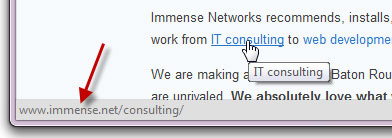
  6. With most links to can "mouse over" the link.  That means you just move your mouse so it's on the link, but don't click yet!  Your browser will display the address to which the link will lead.  This displays at the bottom of the browser.  The actual link in the display should make sense and be the location you're expecting.  If not then... don't click!

Tuesday, August 26, 2014

When USBs Attack!

   Sometimes it seems that the more things change, the more they stay the same.  In information security, we've known for a long time that if someone can get physical access to your system, there's a chance they can get into your system.  Once an attacker has possession of your computer, laptop, tablet or smartphone, they can take their time and try multiple attacks.  We can take some preventative measures like encryption, but it needs to be implemented well.

   Of course, it's best to keep your portable devices in your possession!  But they do get lost or stolen.

   Unfortunately, there's more than one way for an attacker to physically get to your system.  If you've ever been to a conference, or a state fair, or just about any kind of gathering with give-aways, you've probably seen free USB sticks (also called thumb drives).  These supposedly have programs, games or advertising files.  And they usually do.  But they can also contain viruses or other malware.  To make matters worse, USB systems have an auto-run feature to make (legitimately) running these files "easier".

Tuesday, August 5, 2014

When Androids Attack!

   All computers, devices and software have flaws.  In fact, there are so many it's hard to keep up.  In the past (not so long ago), we only had to worry about computers... and they were mostly big desktops.  Then came laptops, and with them the additional problems introduced when connecting to unknown and open networks.  And lately, we seem to spend plenty of time talking about flaws in smartphones and tablets.

   The latest in a long string of smartphone issues is the so-called "Fake ID" flaw affecting Android devices.  This attack exploits a vulnerability in the way an Android device checks the authenticity of an app.

   The issue is kind of similar to controls around US credit cards.  When you sign a credit card receipt or at a terminal, the clerk or cashier might check that signature against the one on the card.  Even if the signatures match (and when does that happen???  I can barely duplicate my own signature! :-), that doesn't mean that you are the owner of the card nor does it let anyone know if the card is fake or stolen.

   In a somewhat analogous way, apps are "signed".  The flaw allows Android phones to accept unverified apps.  This provides a potential opportunity to download fake or malicious apps.

   This issue should be patched on your phone by now.  But this is not the first time this kind of problem has emerged. And it won't be the last time!  This can be a serious issue.

Tuesday, July 22, 2014

Beach to Breach - It's not just for work data!

   I heard a great term recently... Beach to Breach.  SC Magazine did an article about a Sourcfire study on employees bringing their portable devices on vacation.  They found that 77% of employees bring their devices with them on vacation to keep in touch with work and that 97% of the use is email.

   Hopefully you can see some of the security problems right away... the devices have a good chance of getting lost or stolen when one is out of their "element"; plenty of opportunities to connect to unknown networks; potential to use hotel printers; possible "incentive" to bypass controls to see that one "important" message, and of course; sand in our devices!

   Organizations certainly should be concerned about the potential for breach of data or loss of equipment.  But what about the rest of us?  Should we take extra precautions with our personal devices and information when out of town?... Definitely!

Tuesday, March 18, 2014

XP End of an Era or... Deja Vu All Over Again!

   Unless you just came back from time traveling, you know that Microsoft is ending support for the XP
operating system on April 8.  To be clear... April 8 is Patch Tuesday, so that will be the last set of updates for XP.  Sort of.

   XP has been one of Microsoft's most popular desktop operating systems and many organizations are dependent upon it.  Many organizations have not yet updated to Windows 7 or 8 and the clock is ticking.  I'd like to look at what that means and share a few ideas of what we can do to protect ourselves and our organizations.

   Microsoft will be stopping all patches, hotfixes and enhancements to XP after April 8.  Anti-virus signatures will continue to be made available.  This means that any vulnerabilities that are discovered or disclosed might not be fixed.  Organizations will need to figure out if they are vulnerable to any new threats and then weigh the risks associated with their options.

   There has been some speculation that online criminal organizations may be stocking up on new vulnerabilities so these can be released after the last patch date.  We can't know if this is true, but it is possible.

   So... if you are still running XP, and need to continue to run XP, what can you do?  Let's do a high-level threat analysis:

Tuesday, February 25, 2014

No, You Can't Have Local Admin!

   If you have responsibility for security and/or access management for an organization, then there is a "simple" request that you have received, and will always receive... Users request local admin access to systems.

   Most of you know what I mean.  I'm referring to the local administrator or root account on a system.  When a person has local admin, they can access any part of the system, change or disable settings (including deactivating anti-malware or other security software), and, perhaps most importantly, install and run any software.  This last item is probably the primary reason people request this level of access.

   We're talking about Minimum Necessary... the idea that everyone should have exactly the level of access needed to do their job, and no more.  In most, if not all, organizations, far more people have local admin than really need it.

   Security vendor Avecto recently released a new study showing that over 90% of the most serious vulnerabilities in Microsoft software products in 2013 could have been mitigated by simply removing administrator rights.  Put another way, this means that only your systems administrators were vulnerable to all of the most critical Microsoft software vulnerabilities!  And these are the people who have the most access on your systems!  Here are a two good articles on the subject and here is a link to the full report.

   Let's break this down...

Tuesday, December 10, 2013

Password Problems Again

   So here we go again... more problems with breached passwords.  But this time there is a different wrinkle.

   By now, most of you have probably heard about the recent discovery of hackers getting around 2 million userid's and passwords to online services like Facebook, Gmail, Yahoo, LinkedIn and Twitter.  Notable on the list of sites is ADP, the payroll processor.

   It's "just" 2 million sets of ID's and passwords.  That's not really big news these days when the new record of over 152 million stolen passwords was recently set by the Adobe breach.  But there is a difference here.  For most of the big password breaches, the service provider's website or password store is hacked.  Then the encrypted password file or database is downloaded.  The attackers can take their time analyzing the encrypted data to come up with userid's and passwords.  This work is made easier because so many sites use poorly implemented encryption.  And some sites use no encryption at all.

   But that's not what happened here.

   This time the passwords were stolen from the users of the sites.  That's you and me (well... hopefully not you or me!).

Tuesday, November 19, 2013

It's That Time of Year - Holiday Spams and Scams

   It's that time of year again folks.  And whatever holiday you may, or may not, celebrate... there's something we're all likely to see.  It's not presents, though maybe there are some for you.  It's not snow, though we'll see that soon enough here in the upper midwest US.  It's malware and holiday scams!

   Unfortunately, it happens every year.  Sometimes it's malicious attachments.  Sometimes it's links to malware to download or phishing sites with forms ready to collect your personal and financial information.

   Here is my 2013 edition of my Top 10 Tips To Avoid Holiday Spams and Scams...

Tuesday, October 29, 2013

Online Self-Defense - Don't Phall for Phishing!

   It's Cyber Security Month!  And the more things change, the more they stay the same.  The key advice for online self-defense I've given in the past is just as true now.  So to help us all celebrate, I'm "re-featuring" a few articles I've run in the past.

   I said in part 1 that this would be a 3 part series, because everything comes in 3's.  Well... it's still Cyber Security Month and I would be remiss if I didn't write about phishing.  So we'll just call this part 4 of 3!  Here are parts 1, 2 and 3.

   As you probably know, phishing refers to an attempt to fraudulently get your personal information by masquerading as a trusted source. Examples include: a fake email that looks like it came from your bank; a fake fraud warning message that looks like it came from your credit card company, or; a distress message that looks like it came from a "friend" asking for money.

Tuesday, October 22, 2013

Online Self Defense - Don't Click!

   This week I'm presenting at the Cyber Security Summit in Minneapolis.  I hope to see you there!

   It's Cyber Security Month!  And the more things change, the more they stay the same.  The key advice for online self-defense I've given in the past is just as true now.  So to help us all celebrate, I'm "re-featuring" a few articles I've run in the past.


   This is the third post in my series on Online Self-Defense.  We've covered malware and passwords, two key issues effecting your online privacy and security.  If you've tried the simple tips I gave on those two subjects then you are now safer than most web surfers.

   Now, to keep you and your computer safe... don't click on that link!

Tuesday, October 8, 2013

Online Self Defense - Your Computer

   It's Cyber Security Month!  And the more things change, the more they stay the same.  The key advice for online self-defense I've given in the past is just as true now.  So to help us all celebrate, I'm "re-featuring" a few articles I've run in the past.


   Happy US Cyber Security Month!  This partnership between Homeland Security, NCSA and MS-ISAC is an opportunity to recognize the importance of information security.  How are you celebrating?

   Last week I ran a couple of sessions at work on awareness and security.  Over the next few posts I will be reviewing some of the 3 themes I covered in a talk entitled "Online Self-Defense". You can view the slides on my slideshare page. (actually, the talk focuses on just 2 of the themes but that's OK!). Since everything comes in threes (omne trium perfectum), I will give 3 easy tips for each theme (and some bonus tips as well).

   The first theme is protecting your computer or device.