Showing posts with label vulnerability. Show all posts

Tuesday, January 30, 2018

Speculative Speculation

   Patch.

   NO WAIT!... DON’T Patch!

   It may cause unexpected reboots (as opposed to the expected kind???? J).

   It may cause system slowdowns.

   It may conflict with your other system controls.

   It sounds kind of like the “fine print” in one of those pharmaceutical adds… patching side effects may include arrhythmia, faintness, moderate to severe amnesia, flushing of the face, dry mouth, blurry vision, visual distortions or white spots, nausea and vomiting, constipation, muscle twitches, confusion, euphoria, sedation, itchiness, and increased anxiety, respiratory or cardiac arrest, coma, hypoventilation (inadequate ventilation), and possibly death.
   This whole Spectre/Meltdown thing has gotten so much attention lately. But the reports are loaded with misinformation, speculation (!), and even some facts.  I’ve have seen some uber-geeky explanations of what is going on.  If you haven’t seen the major rant by the father of linux Linus Torvalds, check this out.

   One thing that has been lacking is more simple, straightforward explanations of this complex topic.  I think Steve Gibson did a great job talking about this recently in his SecurityNow! podcast.  He actually explained the underlying mechanism of speculative execution years ago when he was talking about how modern processors work.

   Speculative Execution is really pretty cool.  It can be complex, but a good example is when there are two choices in how some code may execute, i.e. GO here or GO here, the processor does both!  And it executes steps ahead from where you are in the code now.  The overall effect is that the code executes faster.  It’s kind of like paying it forward with extra computing cycles.  Here's a great explanation.

   Here’s the point about this vulnerability… we’ve had plenty of named vulnerabilities.  They are all the rage these past few years – a name and a logo.  But most of these vulnerabilities are code or protocol problems.  Yes, some of those were very wide ranging.  However, this newly discovered problem is a vulnerability in the underlying architecture of nearly every modern computer chip created since 1995.  Everywhere.

   And while this has not been exploited in practice, that will happen.  The Fix is not yet in.  For now, the advice is to not panic, patch selectively and we’ll all watch and wait!

Tuesday, August 8, 2017

You Gotta Be You

   I just received an update from the Social Security Administration.  Yes, it was real! :-)  It was a reminder to log in to the SSA website to check my information online.  That also made me think about advice I've written about in the past... it's critical that you connect and establish your presence on critical government websites before someone else can create an account in your name.

   Here's a rewind of a 2016 post with all the information...


   I recently received a letter from the SSA (Social Security Administration).  It provided instructions for me to finish setting up my online account.  As I've written in the past you can, and need to, create personal accounts on the SSA and IRS websites.  The key issue is that you need to reserve and establish your identity on these critical government websites before someone else does it for you!  This is ID Fraud is still a big issue.

   These accounts are straightforward to set up.  One thing you will need to do is go through an Identity Proofing process.  That process asks you for some personal information that, in theory, only you should know.  I list info about the irs.gov account creation process in this post.

   Here is some info from the ssa.gov website:
You can create a my Social Security account if you’re age 18 or older, have a Social Security number, a valid email, a U.S. mailing address, and a cell phone that can receive text messages. You’ll need to provide some personal information to confirm your identity; you’ll be asked to choose a username and password; and then provide your cell phone number. You’ll then receive a security code via text that you will be required to enter when you first create an account. We’ll send your cell phone a new security code each time you log in with your username and password. The security code is part of our enhanced security feature to protect your personal information. Keep in mind that your cell phone provider's text message and data rates may apply.
   Now SSA has increased their security by offering two-factor authentication (2FA) on their site.  We've written about 2FA a number of times in the past.  SSA had said this was coming and now it's available.

   I highly recommend that you create accounts on these sites and use 2FA where available.  Here are the instructions for SSA.  Here for the IRS.  You can enable 2-factor authentication on the SSA site when you create your account.  Here's a link to a previous post looking at other sites where 2FA is available.  Double up wherever you can!

Tuesday, May 23, 2017

I'll Cry if I Wanna

   I try not to jump on bandwagons, but with so much coverage and affects of the whole worldwide WannaCry mess, I do have a few things to say.  I have a few different things to cover that you may not have seen elsewhere.

   There's been plenty of media coverage so I'll just give a high level overview of what happened.  Like many other nations, the US National Security Agency (NSA) studies computer flaws and develops ways to attack them.  The Shadow Brokers are a hacker group who started leaking some of these NSA-developed attacks in the second half of 2016.  The April 2017 edition of their leaks included the code that enabled the WannaCry attack.
   The attack that started on Thurs May 11 consisted of two parts.  One would encrypt files so that the owner could not get access to their files (commonly called "CryptoWare").  The other part could get remote access to any vulnerable computer.  This was a very powerful combination and this is the first time we've seen this kind of auto-spreading cryptoware.  Once infected, the victim sees a screen that directs them to pay a ransom in bitcoin - so the whole attack is considered "Ransomware".

   Now, Microsoft did release a patch in March to fix some of these problems, in particular the remote access part.  So no problem, right?  Desktops and laptops are usually easier to patch, and you should always have your home systems set to automatically update.  But servers need more testing to assure that applications continue to work as expected.

   Patching was a critical part of the fix, but there was definitely more to it including things like new anti-virus signatures, whitelisting, intrusion prevention signatures and firewall rules.

Tuesday, January 3, 2017

New Year, Don't Click!

   Well, it's a new year and, as we've discussed in the past, the more things change the more they stay the same.

   My advice for 2017... Don't Click!

   Of course, that's easier said than done.  We've discussed phishing and malicious email here, here and here.

   But on a more practical note, and because I like things that come in 3's, here's some info from the way-back machine... it's advice from Brian Krebs from 2011.  It is his 3 basic rules for online safety.  They are every bit as relevant now as when this was first published.  And it was relevant for years before that.

   The 3 rules are:
  1. If you didn’t go looking for it, don’t install it - this means when you get a pop-up asking you to install some software... don't click!  Only install software that you look for and intend to use.  And, wherever possible, install from reputable websites.  Do your research.
  2. If you installed it, update it - After you install the software you want, you need to keep it up to date.  This is not trivial, but I like using Secunia PSI (Personal Software Inspector) on my home systems for keeping software up to date.
  3. If you no longer need it, remove it - software will have vulnerabilities.  The less software you have, the fewer opportunities there are for vulnerabilities and malware.  This is especially true on your smartphone and tablet, where excess software really slows the performance of the device.
   Here's to a safe and secure 2017!

Tuesday, August 9, 2016

News you Need Now (NNN)

    I recently received a letter from the SSA (Social Security Administration).  It provided instructions for me to finish setting up my online account.  As I've written in the past you can, and need to, create personal accounts on the SSA and IRS websites.  The key issue is that you need to reserve and establish your identity on these critical government websites before someone else does it for you!  This is ID Fraud is still a big issue.

   These accounts are straightforward to set up.  One thing you will need to do is go through an Identity Proofing process.  That process asks you for some personal information that, in theory, only you should know.  I list info about the irs.gov account creation process in this post.

   Here is some info from the ssa.gov website:
You can create a my Social Security account if you’re age 18 or older, have a Social Security number, a valid email, a U.S. mailing address, and a cell phone that can receive text messages. You’ll need to provide some personal information to confirm your identity; you’ll be asked to choose a username and password; and then provide your cell phone number. You’ll then receive a security code via text that you will be required to enter when you first create an account. We’ll send your cell phone a new security code each time you log in with your username and password. The security code is part of our enhanced security feature to protect your personal information. Keep in mind that your cell phone provider's text message and data rates may apply.
   Now SSA has increased their security by offering two-factor authentication (2FA) on their site.  We've written about 2FA a number of times in the past.  SSA had said this was coming and now it's available.

   I highly recommend that you create accounts on these sites and use 2FA where available.  Here are the instructions for SSA.  Here for the IRS.  You can enable 2-factor authentication on the SSA site when you create your account.  Here's a link to a previous post looking at other sites where 2FA is available.  Double up wherever you can!

Tuesday, May 31, 2016

YAPF (Yet Another Password Fail)

   It's another week and password problems are in the news again!

   In the July 10, 2012 edition of this blog I wrote about the 2012 LinkedIn password breach.  A month earlier, LinkedIn confirmed that a Russian attacker exploited a website vulnerability and downloaded 6.5 million encrypted passwords.  You can read my old post to see why that's a problem.

   Well, some gifts just keep on giving!  Now, nearly 4 years later, a newly posted password dump from this same breach was advertised for sale on a dark web site.  Except that information on over 167 million accounts were for sale!  Of those, over 117 million had both the email and password.  Slightly different math!!!

   So why is this a problem?  Actually it's an old problem and a new problem.  Here are the key issues:
  • Poor password choices - once again, this latest set of stolen passwords shows weak passwords - the top five found passwords were: 123456 (used on over 1 million accounts!), linkedin, password, 123456789 and 12345678
  • Password reuse - since people have accounts on so many sites that need passwords, they tend to reuse them.  The one million people who used 123456 as their LinkedIn password likely reuse that on other sites.
  • Back to Work - are some of these same poor password choices being made on work systems?  Or are some work passwords being used on sites like LinkedIn and potentially included in this breach?

Tuesday, November 10, 2015

Hospital Held Hostage

  A number of people alerted me that a recent episode of CSI:Cyber, which aired on 11/1/15, had as its theme a cyber attack on a hospital.  The episode was entitled "hack E.R." (see what they did there??? :-) )

   The episode begins with an ominous image showing up on computer screens and all systems in a fictional hospital being under the control of an online attacker.  They threaten to kill a victim every four hours if not paid a ransom.  They then kill a victim by causing an infusion pump to deliver a fatal dose of morphine while preventing the patient's heart monitor from alarming.

   We then follow the CSI:Cyber team and the hospital staff as they try to solve the mystery and track down and stop the attacker.  I won't give a full synopsis nor a review.  You can find some of that here and here (spoiler alert - these linked articles do give away the ending).

   Let's review what was potentially real and some of the deficiencies of the episode.  First the realistic.

Tuesday, August 4, 2015

See the Man With the StageFright

   I always liked the way Rick Danko sang that song, and I saw him perform it a few times.


   But now we have a new StageFright, a vulnerability in the base android phone operating system.  This is an equal-opportunity vulnerability effecting all android phones (nearly 1 billion!).  Like many new vulnerabilities discovered in the past year, this one has a name and a logo.

   The issue is a "feature" in the way androids pre-processes MMS multi-media messages (pictures, videos) sent via your text messaging app.  That could be the stock messaging app, a custom messaging app from your phone manufacturer or data provider, or even Google Hangouts.

   Here's why the vulnerability is so bad... you don't have to open the message!  You don't even have to know that you received the message.  All it takes is for your phone to automatically download a malicious message in the background - which is exactly what it does - for your phone to be owned!  That's a problem.

   At the time I wrote this column, there seems to be a fix only for Google-branded phones, and that's a very small percentage of all phones.  You can check with your carrier to find out when you'll get a patch.

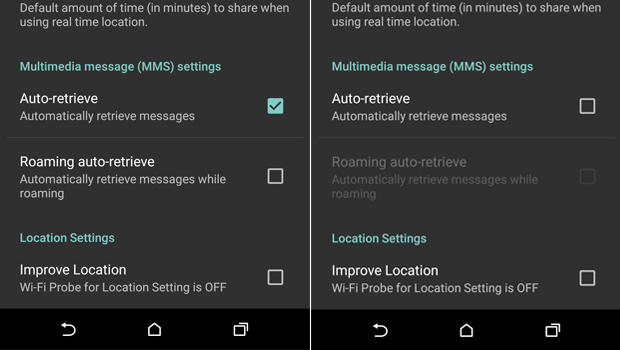
   Meanwhile, there is a work-around.  You need to configure your messaging app to not automatically download MMS messages.

  1. Open you rmessaging app.
  2. Go to Settings
  3. Select: Multimedia messages
  4. un-select Auto Retrieve
   Now, when someone tries to send you a message with multi-media content, you'll see that the message arrived, but the photo or video will not be downloaded.  Only tap to download if the message came from a trusted source.

   Of course, you should also keep your phone patched by applying all phone and app updates.  And... get rid of any apps you don't need.

   Here are some references for more info.

Tuesday, August 5, 2014

When Androids Attack!

   All computers, devices and software have flaws.  In fact, there are so many it's hard to keep up.  In the past (not so long ago), we only had to worry about computers... and they were mostly big desktops.  Then came laptops, and with them the additional problems introduced when connecting to unknown and open networks.  And lately, we seem to spend plenty of time talking about flaws in smartphones and tablets.

   The latest in a long string of smartphone issues is the so-called "Fake ID" flaw affecting Android devices.  This attack exploits a vulnerability in the way an Android device checks the authenticity of an app.

   The issue is kind of similar to controls around US credit cards.  When you sign a credit card receipt or at a terminal, the clerk or cashier might check that signature against the one on the card.  Even if the signatures match (and when does that happen???  I can barely duplicate my own signature! :-), that doesn't mean that you are the owner of the card nor does it let anyone know if the card is fake or stolen.

   In a somewhat analogous way, apps are "signed".  The flaw allows Android phones to accept unverified apps.  This provides a potential opportunity to download fake or malicious apps.

   This issue should be patched on your phone by now.  But this is not the first time this kind of problem has emerged. And it won't be the last time!  This can be a serious issue.

Friday, April 11, 2014

Heartbleedbreaker

   Well, I had no intention of talking about this topic!  But there is so much confusion and misinformation out there.  And the mainstream media is really having a field day.

   So I'm jumping in with some facts, a few opinions, and some action steps that you be taking now.

   First we'll look at the consumer/user side of things.  Then the organization side.  Finally, I'll talk a bit more about what this is and what this isn't.

   If you use the Internet and enter any personal or financial information on any website, then you might be effected by this issue. To find out, follow these steps:

Tuesday, March 26, 2013

Attack Surface

   Last week I did a national webcast with Capella University.  The topic was the Insider Threat.  But my take on this is a bit different than what's usually said on this subject.  I talked a bit about this topic in my post last week.  You can see my slides here.

   As happens in some (perhaps not enough) InfoSec talks, during the presentation we touched on the topic of Risk Management.  In particular, we were talking about how to help keep honest people honest and good people to do the right thing.

   There are all kinds of "formulas" used to calculate, or more correctly - estimate, risk.