Showing posts with label phone. Show all posts

Tuesday, March 13, 2018

We Encounter a Serious Issue


   I just received this voice message on my home phone (landline).

   Here's the text:
   We encounter a serious issue coming out of your computer.  It seems to be someone is trying to hijack your computer and try to steal your personal information.  If it's not fixed right away then your computer will become obsolete and all of your credential information may got compromised.  If you are the one who is using Microsoft Windows in your computer then please call 302-316-9259 or press 1 now to speak with security team now.  Please ignore if we called you by mistake.  Thank you.

   The only serious issue here is that people fall for these scams.  Let's break it down:
  • The Voice - who wouldn't believe a bad computer-generated voice?  Seriously though, there are plenty of pre-recorded and generated junk voice messages we get all the time.  My general rule of thumb - ignore them all and erase is your friend.
  • Bad Grammar - this is practically a throw-back to the old days of spam.  I've written about this in the past.  Someone willing to get past the bad grammar is more likely to continue on to other poor choices.
  • Fear Factor - the message is playing on many people's fear of technology and loss of their personal information.  While we've become almost numb to breach announcements, the idea that there is an attack on our personal home computer is still a scary concept.  Words like "hijack", "steal", "obsolete", and "compromised" invoke fear.
  • Call To Action - "if it's not fixed right away...".  For a person who doesn't understand the complex issues of their computer, the call for immediacy further plays upon the fear state.
  • Microsoft Windows - what are the odds that if a call was made to any household, someone would be using, or would have used int eh past 24 hours, Microsoft Windows?  I'd guess that's pretty high.
  • Politeness - bad voice and grammar aside, the call does say please and thank you.  That further instills a sense of confidence in a person already affected by fear and the call to action.

   As I covered in a past posts, while I did not call the number (and I suspect it's already been disconnected), if I did get through to someone I bet that they would be very helpful!  That is, as long as I was cooperating.  If I was not forthcoming with information, then these kinds of folks often get forceful.

   Obviously, the best course of action is to just have a good laugh and hit delete when you get a message like this.  We also need to assure that less technical, or more vulnerable, people understand the issues and are prepared when the call comes.

   Have you, or someone you know, received a call like this?  What happened?

Tuesday, August 22, 2017

Don't Blame The IRS

  In a post last month, I include a recording of an obviously fake voice message warning about payment and fines due to the IRS.  If you've read my blog in the past, I talk a lot about scams and give tips to avoid them.  We've often discussed that legitimate organizations should not just contact you and ask for personal information.

   That just makes sense.

   But telling the difference between a legitimate call and a scam call has gotten harder.

   A reader let me know that the IRS is now using collection agencies to collect back taxes!  That just makes it even tougher to tell the difference between a legit collection call and a scam!

Tuesday, July 25, 2017

The Matter at the Hand

   Check this out!...


   Here's a transcript:

   Calling from Criminal Investigation Division of I-R-S.  The matter at the hand is extremely time sensitive and urgent, as after all that, we found that, there was a fraud and misconduct on your tax which you are hiding from the federal government. This need to be rectified immediately so do return the call as soon as you receive the message. The toll free number is 1-8-6-6-9-7-8-6-6-1-8. I repeat again, 1-8-6-6-9-7-8-6-6-1-8. Thank you.

   Needless to say, this is a scam.  You can look at all of these reports on phone number lookup sites.

   Now, you may think that this obviously sounds like a scam.  However, it unfortunately works.

   So what should you do if you or someone you know receives one of these calls?

  1. Don't respond.  Just leave that alone.
  2. Report it.  Here is the FTC info page on reporting scams, spams, do not call or telemarketing violations and other issues.  Here is the complaint reporting page.
   I did file a report with the FTC.  It doesn't take long and it's the right thing to do.

   While these calls can be either annoying or entertaining, the bottom line is that they work and some people do fall for these scams.  So educate yourself and others.

   Do you have any interesting robo-call or scam stories to share?

Tuesday, September 20, 2016

It's Microsoft Calling (Not!)

   The amount of automation and detection in our world today can be scary but it can also be useful.  You can set your lights to come on as you approach your home.  You can have your phone switch to wifi when you get to the office.  And Microsoft will even call you when they detect a problem with your PC!

   OK, maybe not that last one!  As we've discussed before, this is a common scam that has now been around for a few years.

   It works like this... There are 2 basic scenarios:
  1. you get a popup on your computer telling you that "Microsoft" has detected that there is a problem with your PC, and you should call the phone number they provide, or;
  2. you get a phone call directly from "Microsoft" telling you that they have detected a problem on your PC.
   Of course, neither of these are legitimate.  Microsoft will not call you.

   This article has a recording of what one of these calls sounds like.  Here's another.

   I said PC above, but people with Macs have received these as well!

   Here's the thing about these scammer orgs...  they provide very good customer support!  That, of course, is good for them but bad for us.  It's one of the reasons that these scams work.  People are very happy to receive great customer support - it's unfortunately too rare.   So when a friendly, attentive "customer service" rep is telling someone that their computer is infected, it can be convincing.

   Typically the "customer service" rep will ask the victim to pop a web browser and type in what they tell them.  The victim's web browser is directed to a malware site that will give the attacker control of that PC.

   Why do they do this?

Tuesday, March 22, 2016

Credit Cards Calling

   So I'm driving down the road, out of state but heading toward home, when I received a text message.  The message said it was from a credit card company asking me whether a charge was legit.  I did not recognize this charge!

   Receiving this kind of message may concern some of you, but for me this is awesome!  The credit card companies have, by necessity, become really good at detecting fraud.  That could be because of the huge amount of credit card fraud out there!  Fraud is big money and it's both in our, and the credit card companies', best interests to try to get a handle on it.

   Detecting this kind of fraud is basically about big data analytics and anomaly detection.  That's just a fancy way of saying it's kind of like finding a needle in a stack of needles!  It's complex and expensive.  Luckily(?) credit card companies have lots of money!  They have to figure out what might be fraud so they can appropriately allow or block transactions.  If they allow too much then there can be a lot of fraud.  If they block too much then there can be unhappy customers.

   Back to our story... the charge was not legit and I responded "2".  As you can see in the image, the credit card company said they would call me.  I did receive a call and was immediately put into a hold loop!  Wait...

   If I did speak to someone they would first have asked me to identify myself.  However, they called me.  I don't actually know who they are!  This whole event could have been a scam to collect personal information from me.  Had someone connected with me that way, I would not have given them any identifying information.  They called me... at my registered (with them) phone number.  They already know who I am.  They need to positively identify themselves to me!

Monday, November 23, 2015

Do the Amazon 2-Step... Now!

   It's not a new song or a new dance...  Amazon has just announced 2-step, aka 2-factor or multi-factor, authentication for online logins!  It's overdue but I'm glad it's here.

   We've talked about 2-factor authentication in the past so I won't go deeply into it in this post.  The important take-away is that Amazon now offers this service and you should use it!

   Here's an overview article and here's a great step-by-step with screen shots.  I set this up for my account and it was really easy using my phone and Google Authenticator.  You can also use text messaging, or setup text messaging as a backup method.

   The main reason that 2-factor is good and important is that it prevents an attacker, who has stolen your userid and password, from logging in as you.  This is because they would need to have your smartphone in addition to the userid and password! (yes, there are other methods as well).

Tuesday, August 4, 2015

See the Man With the StageFright

   I always liked the way Rick Danko sang that song, and I saw him perform it a few times.


   But now we have a new StageFright, a vulnerability in the base android phone operating system.  This is an equal-opportunity vulnerability effecting all android phones (nearly 1 billion!).  Like many new vulnerabilities discovered in the past year, this one has a name and a logo.

   The issue is a "feature" in the way androids pre-processes MMS multi-media messages (pictures, videos) sent via your text messaging app.  That could be the stock messaging app, a custom messaging app from your phone manufacturer or data provider, or even Google Hangouts.

   Here's why the vulnerability is so bad... you don't have to open the message!  You don't even have to know that you received the message.  All it takes is for your phone to automatically download a malicious message in the background - which is exactly what it does - for your phone to be owned!  That's a problem.

   At the time I wrote this column, there seems to be a fix only for Google-branded phones, and that's a very small percentage of all phones.  You can check with your carrier to find out when you'll get a patch.

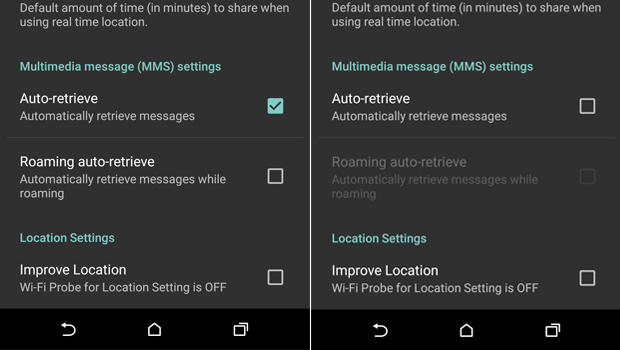
   Meanwhile, there is a work-around.  You need to configure your messaging app to not automatically download MMS messages.

  1. Open you rmessaging app.
  2. Go to Settings
  3. Select: Multimedia messages
  4. un-select Auto Retrieve
   Now, when someone tries to send you a message with multi-media content, you'll see that the message arrived, but the photo or video will not be downloaded.  Only tap to download if the message came from a trusted source.

   Of course, you should also keep your phone patched by applying all phone and app updates.  And... get rid of any apps you don't need.

   Here are some references for more info.

Tuesday, August 5, 2014

When Androids Attack!

   All computers, devices and software have flaws.  In fact, there are so many it's hard to keep up.  In the past (not so long ago), we only had to worry about computers... and they were mostly big desktops.  Then came laptops, and with them the additional problems introduced when connecting to unknown and open networks.  And lately, we seem to spend plenty of time talking about flaws in smartphones and tablets.

   The latest in a long string of smartphone issues is the so-called "Fake ID" flaw affecting Android devices.  This attack exploits a vulnerability in the way an Android device checks the authenticity of an app.

   The issue is kind of similar to controls around US credit cards.  When you sign a credit card receipt or at a terminal, the clerk or cashier might check that signature against the one on the card.  Even if the signatures match (and when does that happen???  I can barely duplicate my own signature! :-), that doesn't mean that you are the owner of the card nor does it let anyone know if the card is fake or stolen.

   In a somewhat analogous way, apps are "signed".  The flaw allows Android phones to accept unverified apps.  This provides a potential opportunity to download fake or malicious apps.

   This issue should be patched on your phone by now.  But this is not the first time this kind of problem has emerged. And it won't be the last time!  This can be a serious issue.

Tuesday, July 9, 2013

The More Things Change...

   As the saying goes... the more they stay the same.  In our ever-changing world of technology and security, it always amazes me how things often don't change!

   Let me clarify... there's always a totally new technology, programming language or social network to learn. Of course, computing power has changed drastically.  Many of the techniques used by attackers to gain improper access to our information have changed.

   Though many have not.  And the advice we give to consumers and business users to protect themselves has not changed!   Consider...

Tuesday, July 2, 2013

Want someone's password? Just ask!

   SC Magazine recently put out an article entitled: More users than ever experiencing phishing attack attempts.  According to the article, phishing attacks are on the rise.

   Phishing is simply any kind of communication intending to extract (typically) personal information from someone.  The scam usually tries to either get the victim to visit a malicious website or directly provide their information, via a reply to the attacker or in an online form.

   Years ago, phishing emails were easy to spot.  They typically used obvious From: addresses, poor grammar and spelling, clearly misleading url's, and overall poor imitation of a legitimate organization's communication.

   But, as is often the case, the phishers have gotten better.  The emails look legit, the grammar and use of language is good, and the links often go to realistic-looking, but malicious, sites.  And email isn't the only delivery method.

   So, how do we avoid, and help others avoid, these attacks?

Tuesday, June 11, 2013

Light and Sound - the next mobile malware vector?

   With all the talk about Prism in the security news, we didn't hear about much else.

   But here's an interesting story... Researchers at University of Alabama, Birmingham verified that malware, or other actions, can be triggered on a mobile device by sounds, music or light!

   From the article:
   "In one instance, the researchers used music in a crowded hallway to launch an attack on an off-the-shelf Android phone. In others, the malicious code was activated by a song with a particular pattern or the ambient light from a TV, computer monitor or overhead light bulb."

   For most of their experiments, the source of the sound or light needed be very close to the target device.

   Right now this is only experimental.  However, we know that well over 50% of mobile phone users in the US have smartphones.  And these phones have input sensors for light, sound and motion.  Essentially, we are all carrying devices that not only track our location and movements, but can record, and be influenced by, the environment around us.

   It will be interesting to track this research and see the ongoing new ways in which these ubiquitous devices can be exploited.