Showing posts with label email. Show all posts

Tuesday, April 24, 2018

Unprecedented Growth in the Fight to Eradicate Scam

   My first thought when I saw this email was that it's from someone with the same name as the guy
from Arrested Development.  Of course, that's Michael Cera!

   The only thing missing is a link or attachment.

   Of course, there are tons of emails like this around.  And people do respond.

   Would you respond?  How many people at your workplace would respond?  How would you help people recognize this kind of email and not respond?


International Debt Funds Recoup Unit of
United States Department of the Treasury Washington DC.
1500 Pennsylvania Avenue, NW;
Washington, DC 20220


Hello,


International Debt Funds Recoup Unit, incorporated November, 2016 as affiliate of United States Department of the Treasury Washington DC, established for the control of recouped international debt funds, within the short time of this establishment, we have experienced unprecedented growth in the fight to eradicate scam and terrorism.

With Our vast experience cutting across several facets of the world and affiliations with numbers of reputable foreign and local organizations, International Debt Funds Recoup Unit has brilliantly done very well in contributing to the effort of the American Government to curtail fictitious and nefarious activities of scam via the internet, which is perpetually taken out on citizens of United States and innocent citizens of other part of the world by impostors through our vast networking.

We implore your earnestly attention on our resent activities in affiliation with Federal Bureau of Investigation FBI. Your computer and telephone communication  were under surveillance device manipulation on discovery that you have been in communication with impostors, imposing as important dignitaries to the undisclosed organization.

The transaction database of Western Union and Wal-Mart Money Gram recently went through screening on evidence for transaction made on your name overseas and the statements of your bank account were properly studied on evidence for transaction made within the states and overseas. However, the collective findings urged the setup of multifaceted maximum security on your everyday activities most specially your email correspondence and telephone communications.

The state of affairs grows to be interesting that intelligent agent of International Debt Funds Recoup Unit and Federal Bureau of Investigation FBI,
where deployed to investigate on issues of debt funds as a result of Contract Payment Funds, Lottery Winning Funds and Inheritance Funds owe to you by the undisclosed conglomerate under impersonation of impostors imposing as important dignitaries to rip you off your hard earned money and to our dismay, it was discovered that your name appeared as owner of funds valued US$10.5Million United States Dollars.

Representatives of American Government bureaus sent on your behalf on this exploit confirmed that the blueprint of your funds recoup was plain and the outcome of the event was a solution to curtail activities of con artist and indeed a perfect solution to your quest on your funds. The recouped funds are deposited in the pecuniary basement of the International Debt Funds Recoup Unit here in Washington.

To apply for claims, we urge you to reconfirm your personal information stated as following below; the details will be used to conduct lawful underlying principles of verification on your reputation as the beneficiary own of the recouped funds lodged in our basement.

1.  First Name:
2.  Middle Name:
3.  Last Name:
4.  Home Phone Number:
5.  Cell Phone Number:
6.  Home Address:
7.  Date of Birth (mm/dd/yyyy)
8.  Driver's License/ Passport Copy:
9.  Marital Status:
10. Current Employer Name:
11. Position/Title:

This is compulsory instruction. REPLY BACK TO THIS ADDRESS ONLY IF YOU WANT FAST RESPONSE TO YOUR E-MAIL ( mrmichealcenadesk@webmail.hu )

God Bless America.
Sincerely yours,
Mr. Michael Cena

   I do enjoy these kinds of emails!  It unfortunate that some people do fall for these scams.  Interesting that this one doesn't ask for my SSN, but wants a copy of my driver's license and/or passport - that can be very valuable to the scammer.

   While there are no links or attachments here, but is still danger.  I've written about these kinds of scams in the past, and the prior advice still holds.

  1. You didn't win!  An unsolicited email promising some kind of prize or payoff is not real.
  2. Don't respond to unsolicited email.  It just lets the spammer know you are a live person.  And definitely don't respond and provide information about yourself.
  3. Use care with links in unsolicited email.  There's a good chance that link leads somewhere you don't want to go... like a phishing site or a malware download.
  4. Watch out for attachments... even pictures.  Stop and think before you click on that attachment.  Even if it looks like it came from a friend.  Were you expecting the email and attachment?
  5. Be stingy with your personal information.  Much of what happens in today's world happens online.  And you will have to provide some information sometimes.  But every site doesn't need all your personal information.  And just because a site asks for information doesn't mean you have to provide it.  Before you fill out that form, stop and think, then decide how much information you want to provide.

   You can find a few more tips here.  These steps can help you at home and at the office.

   What's your favorite example of this kind of scam?

Tuesday, December 12, 2017

Ho-Ho-Holiday Spams and Scams

   It's that time of year again folks.  And whatever holiday you may, or may not, celebrate... there's something we're all likely to see.  It's not presents, though maybe there are some for you.  It's not snow, though we're already seeing that here in the upper midwest US.

   It's malware and holiday scams!

   Unfortunately, it happens every year.  Sometimes it's malicious attachments.  Sometimes it's links to malware to download or phishing sites with forms ready to collect your personal and financial information.

   Here is my 2017 edition of my Top 10 Tips To Avoid Holiday Spams and Scams...

Tuesday, November 28, 2017

You Don't Have to Outrun the (Fancy) Bear

   Two hikers are walking through the woods.  They come around a bend in the trail into a clearing where they can take a break, when suddenly a bear steps out of the woods and roars.  One hiker quickly bends down to tighten his boot laces.  The other hiker says, "what are you doing? You can't outrun a bear!".  The first hiker says, "I don't have to outrun the bear, I only have to outrun you!".

   One of the biggest changes in information security over the past two decades has been with the attackers.  Rather than the old stereotype of a hoodie-wearing loner in the basements with Mountain Dew, Twinkies and old computers, today's attacker is typically trained, smart and well-funded.  Instead of defacing websites for fun and notoriety, attacks today are a business.

   It's a simple risk/reward equation.  There is a cost to any attack.  Email-based attacks are very inexpensive to launch.  Developing sophisticated malware is expensive.  And the more expensive an attack is pull off, the higher the potential gains need to be to make a profit.

   Information security is very complex.  It's as much an art as it is a science.  There are basic things that everyone should do, like patching systems and using strong, long passwords.  And then there are complex solutions to complex problems that need to be artfully implemented to compliment the way people do their work.

   There are so many high profile breaches in the news.  Some of these are the result of highly skilled and motivated attackers going after a specific target.  But many more are "crimes of opportunity".

   As I see it, there are basically three kinds of online attacks:

Tuesday, June 20, 2017

Payday!

   I received this great news in email today.  For some reason gmail marked it as spam!  But it looks great to me! :-)

Tuesday, May 9, 2017

Google Docs and the Mailinator

   You're minding your own business, just checking email, when you get an email from a "friend" inviting you to get a shared Google Doc file.

   You're a student of security, or at least a fan, so you're always skeptical when you receive an email with a link or attachment.  This one appears to come from someone you know.  The subject and body of the message seem consistent with a Google doc sharing message.

   Problem clue #1 - look at the "To:" line.  Clearly, this message wasn't sent to you.

   Problem clue #2 - were you expecting this email and file?  Has this sender sent you Google docs in the past?  Did this email arrive at work or home - and do you normally use Google docs there?

   But, you are rushed and don't have time to send your friend a message to see if this email is legit.  So you click.  If you're not already logged in to your Google account, you're asked to log in.  What you see next is...

Tuesday, January 31, 2017

Hello Dearest One

   I just got some incredible news!  I really love working in Information Security, but with this windfall it's certainly time to retire.

   And I wanted to share this news with all of you!

   Here's the email I received that covers it all... this is so exciting!


Hello Dearest One,

I am Mrs. Jessica W the Administrative manager at a vault of financial & security Institute in Madrid, I am contacting you as regards an abandoned sum of $31.7 Million Us dollars (Thirty One million, Seven Hundred Thousand United State Dollars) in our safe deposit vault, that belongs to one of our foreign customers that share the same surname with you, who died along with his entire family on the 11th march 2009 in a ghastly motor accident in Porto Portugal.

The banking policy can only allow the release of such funds to a benefactor through an application as next of kin to the deceased. After his death, the bank has been expecting a possible beneficiary, but nobody came for the claim, this institute has exploited all its ethical possibilities in other to contact possible relation or inheritor, but no success, I have made my own research with the help of private investigator, it is my knowledge that this man has been living in Barcelona for the past 19 years and has never returned back home. I also leant that his wife and 7 year old daughter died with him during this accident, however because of the international financial crises, a lot of reform has been made within the Spanish financial system; this includes the new law on succession/claims which indicates a duration in which such inheritance could be tolerated,

Upon your acceptance to partner with me, I urge you to please kindly get back to me with your direct contact details for further details via my email address: EMAIL: jessica_jessicaxx@yyy.com  or Alternative Email: jessica_vivian@yyy.com on how you and me can make a claim to the funds in question. I GUARANTEE you that this process would be executed under a legitimate and risk free arrangement. Thanks as I wait to hear from you as soon as you receive this proposal e-letter.

Best Regard,
Mrs. Jessica W
EMAIL: jessica_jessicaxx@yyy.com
Alternative Email: jessica_vivian@yyy.com


   I did alter the email addresses!

   I'm not sure what I did to get so lucky to receive this gift, but it sounds like the greatest thing ever!  And the thing is, I'm lucky that I even saw this message because it was in my spam folder.

   ðŸ˜ƒðŸ˜„😉


Tuesday, January 3, 2017

New Year, Don't Click!

   Well, it's a new year and, as we've discussed in the past, the more things change the more they stay the same.

   My advice for 2017... Don't Click!

   Of course, that's easier said than done.  We've discussed phishing and malicious email here, here and here.

   But on a more practical note, and because I like things that come in 3's, here's some info from the way-back machine... it's advice from Brian Krebs from 2011.  It is his 3 basic rules for online safety.  They are every bit as relevant now as when this was first published.  And it was relevant for years before that.

   The 3 rules are:
  1. If you didn’t go looking for it, don’t install it - this means when you get a pop-up asking you to install some software... don't click!  Only install software that you look for and intend to use.  And, wherever possible, install from reputable websites.  Do your research.
  2. If you installed it, update it - After you install the software you want, you need to keep it up to date.  This is not trivial, but I like using Secunia PSI (Personal Software Inspector) on my home systems for keeping software up to date.
  3. If you no longer need it, remove it - software will have vulnerabilities.  The less software you have, the fewer opportunities there are for vulnerabilities and malware.  This is especially true on your smartphone and tablet, where excess software really slows the performance of the device.
   Here's to a safe and secure 2017!

Tuesday, December 20, 2016

Ya-How?

   Just a few months ago, in September 2016, Yahoo announced that they had uncovered a breach that leaked passwords for 500 million accounts.  The actual breach took place in 2014 but took years to discover.  This breach was different than the prior breach announced in 2012.  We discussed this here.

   This announcement came at a time when Yahoo was deep into talks to be acquired by Verizon.  That September announcement led to speculation about effects to the purchase price.

   Well, truth is stranger than fiction, and Yahoo is back in the news again.  Now on December 14, 2016 it appears that yet another breach has been discovered.  This is different from the previous issues and seems to date from August 2013.  This latest discovery affects... wait for it... one billion accounts!  You'll recall that the 2014 breach discovered in Sept 2016 hit "only" half that many accounts!

   So if we look at the timeline, Yahoo had major breaches in 2012, 2013 and 2014 with discoveries in 2015 and 2016!  Good times.  Here is the latest announcement from Yahoo as well as some articles covering the details.

   This whole thing is a major issue (issues?) for a number of reasons, and it has to do with our dependence on email in our online world and Yahoo's role as major provider of free email.
  • We all use email daily for wide variety of reasons.  We have a need to trust email.  Of course, using email has made our lives easier... Not!
  • Spam and Phishing - when you receive a spam or phishing message from a "friend", you are more likely to click on the links.  Similarly, having your account taken over endangers your friends and contacts.
  • Password reuse - most people reuse passwords among internet sites because it's easier to remember fewer passwords
  • Linked accounts - as a convenience, you can connect accounts together so that you can use multiple services with one login.  This is most common with Facebook ("login with Facebook") but this is also available with Yahoo, Google and others.
  • Password resets and other verifications - often, password reset info or alerts or warnings are sent to an email address you specify.  If you specified your Yahoo account to receive these from your bank or other important site, and you account was compromised in any of the attacks we're discussing, the attackers could intercept this alert information.
   So what should you do?

Tuesday, September 6, 2016

Call Me

  I recently received some awesome news via email.  And it was totally unexpected.  Check it out:


   Now I can retire in style!  :-)

   Needless to say, this is a phishing email.  We've talked about phishing many times in the past.  And we keep talking about it.

   So why does phishing still work?  There are two primary reasons:
  1. No cost/low barrier to entry.  It is effectively free to send out potentially millions of phishing or spam emails.  Attackers can easily relay email through open mail relay servers, but there are other ways to send spam and phishing emails.  Open mail relays are systems that send email but don't require any kind of identification.  Here's some more technical info on open relays.
  2. Exploiting the human factor.  People are busy and we all receive too much email.  It's not always easy to take the time to figure out if an email is OK or not.  Attackers leverage this by sending plausible-looking email, though there are plenty of poorly-created messages as well (like the one above that I received).
   As I mentioned in a previous column, rather than looking examining an email for evidence of phishing, we can approach all email as if it's hostile and then look for indications that it's OK.

   If you'd like to have some fun... try these spot the phishing online quizzes!

   I won't be contacting the "friend" to sent me the above email.  And I did not win.

   Have you seen any interesting phishing emails you'd like to share?

Tuesday, July 12, 2016

Brexit Protection - click here

   Brexit Protection... or should we call it Brexitection? :-)

   How does Brexit affect your finances?  Do you care?  Plenty of people do.

   And that creates an opportunity for scammers.

   Any time there are major news events, particularly disasters or anything economic, people get worried. and the scammers are right there to play on those fears.

   According to the Telegraph, they have seen emails with subjects such as "Brexit causes historic market drop". These emails have links that supposedly connect to pages with information on how to protect your investments.  Of course, they actually download malware to the victims computer.

   This is a common problem... common because it works.

   We've covered this topic before... and the advice remains the same.  In fact, here are my top 10 email scam tips from a 2013 post!  These are just as relevant today as then.  And they will be relevant years from now:

Tuesday, June 28, 2016

We're Going About It All Wrong

   Phishing, scam, spam and malicious emails are an ongoing problem.  A recent study found that rates of these malicious emails are worst in months that have an "a", "u" or "r" in the name, with highest delivery volumes on days ending in a "y".

   Seriously though, while the worldwide spam volume seems to be trending down since a peak over 70% in 2014, rates were trending up in the first quarter of 2016 and the percentage of email that is spam or malicious is well over 50%.

   Email, along with malicious files on websites (whose links are usually delivered through email!), continue to be the top malware vectors.

   In fact, attackers don't even need to use their best, or most complex, attack methods.  It's far more cost-effective to send out random or targeted email, or to place random malicious files on websites and email out the links.  Remember, most cybercrime is economically motivated.  It's a business and the goal is ROI (return on investment).  And business is good.

   It's a big problem because we are fundamentally trusting beings.  I've always believed that people want to do the right thing.  When it comes to people, we should assume positive intent.

   However, email is not a person.

Tuesday, February 23, 2016

Hospital Held Hostage, FBiOS and CEO Phishing

   I usually don't do "news of the week" commentary posts, but too much has happened this past week and we need to discuss it!

Hospital Held Hostage.

   I'm sure by now you've seen some info on what happened at Hollywood Presbyterian Medical Center in California.  Just in case you were on a desert island... on Feb. 5 HPMC experienced a cryptoware attack.  We've talked about those before... it's malicious software that encrypts files so that only the attacker can read them... the people who need to can't.  The story broke about 10 days later.

   Cryptoware becomes ransomware when the attackers offer to fix the problem - decrypt the files - for a "small consulting fee", usually not small and paid in bitcoin, an untraceable online currency.

   The situation itself is, unfortunately, not unique.  These kinds of attacks have been happening everywhere for years.  But there are two things that happened in this case that are unique.  First, the cryptoware completely shut down all the computerized systems in the hospital.  That means no electronic medical records, radiology, anesthesiology... just about any -ology and most hospital functions are computerized.  The hospital reverted to paper and had to turn away surgery patients or those needing more complex diagnosis, tests or procedures.  

   Second, the hospital paid the ransom.  This is the first publicized case of both a hospital shut down in this way and paying the ransom to restore their files.

   Most hospitals have procedures, called "down time procedures" for operating without some computerized resources.  And there is an incident handling process called HICS - Hospital Incident Command System - based on US FEMA (Federal Emergency Management Agency) NIMS (National Incident Management System).  But there are still medical procedures that can't be done with out access to the electronic data or computer-controlled systems.

   This attack is not OK.  Stealing people's data is bad enough.  But this affects lives.

FAQ:
   Can this happen here (wherever "here" is)?  It can, it has, it does and it will.  All industries and even home systems have been hit.  It's not "if", but "when".

   Can't we prevent it?  Yes!

   Wait.  What?  There's more to that story.  An attack like this can be prevented, but systems would have to be locked down so tight that they might not be usable.  And that's not a solution.  But there are some proactive things that can be done:
  • Don't click!  Most of these kinds of attacks start with the click of a link on a website or in an email, or opening an email attachment.  We've discussed this many times before... if you're not expecting it, if it doesn't look right, if it's not consistent... don't click!
  • Endpoint controls.  These are controls on your desktop or laptop computer including old-school anti-virus, application whitelisting, and execution controls; operational procedures like having a standard workstation configuration and regular patching.
  • Network/System controls.  Like monitoring and keeping all applications up to date with the latest versions and patches, and reliable and tested offline backups.
  • Internet controls.  Like web site filtering and email controls.
   So why did they pay?  Isn't that bad?  In some cases, if the cryptoware infection gets so bad that the organization cannot recover, there may be no other choice then to pay.  And even that's no guarantee that the attackers will or can give you the key to decrypt the files.  In some attacks, if the victim doesn't pay in time, the key is deleted and the files could be unrecoverable.  It's obviously better not to pay (or not to have to pay!), but the organization might not have a choice.

   CSI:Cyber did an episode on a hospital malware attack in Nov. 2015.  I wrote about that here.

   Just a quick commentary on the other two issues.

CEO Phishing.

   Or perhaps more correctly... phishing from your CEO!  In this phishing attack variant, an email comes from "the CEO" (or other highly placed official) demanding some kind of immediate action, typically involving wiring money.  All too often, the recipient does what they're told and sends the funds.

   Recent issues in the US and in France have kept this in the news.  Now Microsoft is getting in on the act, trying to make improvements to Outlook to help with this problem.

   As we've discussed in the past, if something on a web page or email doesn't look right, it probably isn't.  Don't click; Report it!  And even if you did click, report it!

FBiOS.

   After the San Bernadino, California terrorist shooting last December, Federal authorities captured one of the attacker's cell phone.  It is an Apple 5C.  Because of the way Apple encrypts its phones, law enforcement has been unable to view the contents of the phone.

   This week a federal judge ordered Apple to help unlock the phone.  The order is based upon the 1789 law called the All Writs Act.  Apple has chosen not to comply and that has led to plenty of discussion on both sides of the issue.  Apple says helping would set a bad precedent and weaken their phones' protections.  The FBI says it's Apple's duty to help with this criminal investigation.

   As is so often the case, there is no perfect answer.

   As Benjamin Franklin famously did not say, "Those who give up liberty for security deserve neither".  The reality for encryption is, if we make technology that law enforcement can crack, then anyone can crack it.  This is true because of the law no one can break - the law of mathematics!

   However, the Apple 5C uses an older encryption method than their newer phone.  So in this case, Apple could help without compromising everyone else's security and privacy.

   There's some great in-depth discussion of this issue on the TWIT podcast this week.

   Here are some good articles with more details.  We'll watch to see how this plays out.

Tuesday, January 12, 2016

New Year = Same Stuff

   It's a new year, but the same kind of online problems we've seen over the past few years are still here and are more prevalent than ever.

   Here's a great video about this issue by Media Pro:
Don't Let Malware Spoil the Fun from MediaPro on Vimeo. (I can't embed the video here, but do click on the link to view it.)

   The video reminds us that malware can, unfortunately, be found in many places including:
  • insecure websites
  • email attachments
  • browser add-ons
  • USB sticks
  • PDF files
   In additional to slowing down your system and causing it to not operate correctly, many kinds of malware try to grab your personal or work information.

   As we discussed here recently, your home computer defense toolkit should include:
  • anti-malware software
  • automatic updates
   But software tools are not enough.  You need to take action to protect your data and your computer:  Remember:
  1. You didn't win!...If it's too good to be true, it probably isn't true.
  2. Be careful with attachments, unknown programs, or files from USB sticks.
  3. Keep your software up to date.
   Let's do what we can to keep ourselves, our data (and our patients', customers' and clients' data) and our computers safe in 2016!

Monday, October 5, 2015

Celebrate! - A Culture of Security

   It's time again to celebrate that wonderful US event... Happy Cyber Security Awareness month!  This partnership between Homeland Security, NCSA (National Cyber Security Alliance) and the MS-ISAC (Multi-State Information Sharing and Analysis Center) is an opportunity to recognize the importance of information security.  It started in 2003 as a way to build awareness for online security and privacy and to encourage individuals, business and government.

   This month I'll be putting out weekly posts connected with the weekly themes put together by DHS.  This week the theme is creating a culture of security.

   The message is simple... in the workplace security is a team sport.  All organizations have customers, patients, systems and data to protect.  To accomplish this, security must be part of everyone's job.

Tuesday, August 18, 2015

Crypto Where?

   It's that scary moment...  You're getting some work done on your computer when you see a dreaded pop-up message:

   CryptoLocker, CryptoWall and other crypto-/ransom-ware has been in the news again (or still?).  This kind of malware attack was first identified in 2013.  Rather than trying to steal information, the malware encrypts your files.  But you don't have the key to decrypt.  The attacker offers, through a pop-up message, to "sell" you the "service" to unlock your files.  To make things worse, the attacker threatens to delete the keys after a set amount of time, typically 72 hours, which could prevent you from recovering the files.

   These ransom-ware viruses are usually sent to your computer as an email attachment.  The attachment can be an office file, pdf, zip file or other file.  The malware can also come from an infected web link.

   When your computer is infected, the virus operates quietly in the background, encrypting files.  You usually won't know there's a problem until the files are encrypted, and then you're in trouble.

   So if you are infected and encrypted... then what?  Well, there's bad news, good news, more bad news and some more potentially good news!

Tuesday, July 21, 2015

Must Click Immediately!

I received this email recently.  Looks legit and serious! :-)  I better open that attachment...


   While many people would recognize this as a problem, many others would click to see what info is in the attachment.

   We regularly read about advanced and targeted attacks.  While there is plenty of nasty malware out there, most attacks start with a click.  Make sure it's not yours!

   Here are some tips to help you recognize a phishing email.

Tuesday, March 24, 2015

GOOD DAY

   I received the following email recently.  Looks too good to be true!  $1.5Million united state dollars!  Maybe I should reply? :-)

   The only thing missing is a link or attachment.

   Of course, there are tons of emails like this around.  And people do respond.

   Would you respond?  How many people at your workplace would respond?  How would you help people recognize this kind of email and not respond?

--------------
From: Dr. Xxxxx Xxxxx
Reply-To: "Dr.Xxxxx Xxxxx"
To:
Date: Fri, Mar 20, 2015 at 6:58 AM
Subject: GOOD DAY

Good day,

How are you doing hoping all is well with you and your family? We know you might have forgotten about this your outstanding compensation payment due to delay on the delivery up till now. We are here by writing to inform you that your payment file was found in our Office and we discovered that your Compensation payment of $1.5Million united state dollars have not been sent to you as it was instructed by The Economic Community of West African States (ECO-WAS)We are here to inform you that your payment has been converted into ATM Visa/Master Card to free it from Expiring, and all the necessary Arrangement for your

ATM VISA CARD Payment worth of $1.5Million United State Dollars has been granted for your payment through Our ATM Card Department Center.Now Your ATM Visa/Master Card is well packaged with every legal documents to convey it having any problem with any Authorities or with your Federal Government therefore we are here by inviting you to our office here in Republic of Benin, Office Address, UNITED BANK OF AFRICA BENIN, Xxx Xxx n,Xxxx Xxxx 2000, to enable us complete the normal formalities and activation process of your ATM Visa Card and issue the Secret PIN CODE/NUMBER to enable

you start using it at any ATM MACHINE worldwide of your choice nearest to you, as soon as it is activated, But if you are unable to come down here in our office in person you will be required to update our ATM Department Center with your contact delivery details as stated below so that they will proceed with

the necessary arrangement for the delivery of your ATM VISA/MASTER CARD.

1. Your Full name, ________________
2. Your home Address, _____________
3. Your telephone number, _________
4. A copy of your ID, _____________
5. Your age/sex, __________________
6. Your occupation, _______________
7. Your country, __________________

Therefore you should contact OUR ATM CARD PAYMENT DEPARTMENT CENTER immediately on their below;

E-mail :( dr.xxxxx.243@gmail.com )
Contact Person;
Dr. Xxxxx Xxxxx
Director Of UNITED BANK OF AFRICA BENIN,
Telephone Number; +229 nnn-nnn-nn
Try to call him immediately to know when your ATM VISA CARD will be delivered to you. I am waiting for you to update us as soon as you have received your

Visa/Master ATM Card.
Thanks and God Bless You.
Yours sincerely

Dr. Xxxxx Xxxxx

Tuesday, February 24, 2015

It Wasn't Englebart's Fault! (part 1)

   Douglas Englebart was an engineer, inventor and pioneer of the early internet.  He died in 2013.  He was known for a number of key ideas and inventions.  In 1967, he invented a very useful computer device that is a key component in propagating malware and facilitating phishing attacks... the Mouse!

   Of course, Englebart didn't invent email, email attachments, phishing emails or malicious links.

   The media is always buzzing with information about the latest breach or computer break-in.  We hear about advanced attacks, nation-states and possibility of cyber-war.  Many of these major attacks start with a simple click (or many clicks).

   Two of the main ways that malware is distributed or information is stolen is via:

  • malicious attachments sent in an email, and;
  • phishing emails with malicious links.
   For either of these methods to work, the recipient of the email needs to click... with a mouse! (well, you could also use a track-pad or track-ball).  The attachment needs to be opened.  If it's a zip file, it needs to be unzip'd.  If it's a link, clicking the link might either download malware or lead to a form asking for personal information.  Any of these actions could cause major problems.

   Let's discuss two issues:
  • what do these viruses do?
  • why can't my organization stop these? (or why can't I stop them at home?)
   This is, unfortunately, pretty complex and we'll probably handle these in two separate posts.

Why Viruses?

   As I've discussed in the past, this is really an economics issue.  There's illicit money to be made and there are smart people out there coming up with new ways to attack and take over systems.

   A typical computer virus does 1 of 3 things (I'm using the term virus generically - a virus is actually just one of a number of different types of malware (malicious software)).  It can even do more than one of these:
  1. connect "home" and download more viruses;
        This is an optional step.  The real goals are items #2 and #3.
  2. take over a computer so it can be remotely controlled, or;
        An attacker can take over a bunch of computers and use them to attack other computers or sell that capability to others. The computers taken over are called robots or bots.  They can be used to spread spam and more malware; to send a lot of traffic at target computers so they won't work properly or at all (this is called Denial of Service or DoS), or; might use other attack methods.
  3. steal information (the techy word for this is exfiltration).
        The stolen personal or corporate information can be sold or used to steal money from existing or newly created accounts.
  4. (bonus item) threaten to do the above (blackmail).
        An attacker might threaten to crash computers if not paid.  One kind of malware called "ransomware" encrypts your files so that only the attacker can decrypt them and charges you a fee to get your access back.
What can we do?

   This is a complex issue and we'll talk about protection methods next time.  For now, the best advice is to take measures we've often discussed here:
  • use anti-malware software
  • use care when opening attachments
  • use care when clicking on links
  • know who sent you that email, message, tweet, social network message, etc.
   I discussed these and other steps you can take in a post last year.

Tuesday, October 7, 2014

Celebrate Cyber-Style!

   It's time again to celebrate that wonderful US event... Happy Cyber Security Awareness month!  This event started in 2003 as a way to build awareness for online security and privacy and to encourage individuals, business and government.

   Over the past couple of posts I've focused on Identity Fraud (here and here).  We'll pause on that topic until next time.

   Today I give you...  The Top 10 Ways to Celebrate Cyber Security Month 2014!
  1. Change your password
  2. Yes, I know... I said in the past that just changing your password is not the effective measure.  That's true but with the frequency with which online sites get compromised, it's not a bad idea.  Even better - use really long passwords.  Remember, when it comes to passwords... size matters!

  3. Use a password vault
  4. A password vault is a program that encrypts and holds all your passwords.  I explain these in detail, and list some good products, in this post.

  5. Look before you click
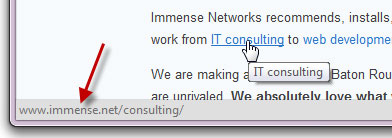
  6. With most links to can "mouse over" the link.  That means you just move your mouse so it's on the link, but don't click yet!  Your browser will display the address to which the link will lead.  This displays at the bottom of the browser.  The actual link in the display should make sense and be the location you're expecting.  If not then... don't click!

Tuesday, July 22, 2014

Beach to Breach - It's not just for work data!

   I heard a great term recently... Beach to Breach.  SC Magazine did an article about a Sourcfire study on employees bringing their portable devices on vacation.  They found that 77% of employees bring their devices with them on vacation to keep in touch with work and that 97% of the use is email.

   Hopefully you can see some of the security problems right away... the devices have a good chance of getting lost or stolen when one is out of their "element"; plenty of opportunities to connect to unknown networks; potential to use hotel printers; possible "incentive" to bypass controls to see that one "important" message, and of course; sand in our devices!

   Organizations certainly should be concerned about the potential for breach of data or loss of equipment.  But what about the rest of us?  Should we take extra precautions with our personal devices and information when out of town?... Definitely!