It's US Cyber Security Month and the key themes I've been discussing here for years are very bit as relevant today. In honor of Cyber Security Month I'm re-running a post from 2016. The more things change, the more they stay the same. Happy Cyber Security Month!
Well, I was trying for something catchy like Stop, Drop and Roll. That's a saying we learned in school, back in the day, for what you should do if your clothes catch on fire.
Fortunately, it seems like everyone has heard that saying and it rolls off the tongue.
Unfortunately, my three word phrase Patch, Vault and Fob, is not nearly as catchy.
Fortunately, the odds of your clothes catching on fire is low.
Unfortunately, the odds of your software, browsers or accounts being compromised is very high.
A couple of weeks ago the internet was hit with the highly impact-full and publicized distributed denial of service (DDoS) attack on Dyn, a DNS provider. I won't go into the details here but I think I will cover DDoS in a future post. Anyway, shortly after that I was chatting with someone at a dinner who asked me about this attack, internet safety in general and what they could do. To keep it simple and because, as a math person I like things in 3's!, I provided these 3 simple (well, maybe straight-forward is more accurate) things that absolutely everyone should do at home...
Showing posts with label vault. Show all posts
Showing posts with label vault. Show all posts
Tuesday, October 31, 2017

Tuesday, October 17, 2017
Still Can't Live With 'Em
 It's US Cyber Security Month and, like clockwork, we have Yahoo! in the news again telling us that the worst case from the past just keeps getting worster (I can make up words, can't I??? :-). They are now counting their breached accounts at over 3 billion! How many people are there in the world these days?... Last year at this time, they announced the breach of 500 million Yahoo! account passwords and other info (while announced in 2016, the breach actually took place in 2014, and is not the same as the password breach they had in 2012! - yes, I know... it's hard to keep up!). In honor of both Cyber Security Month and Yahoo!, I'm re-running a post I wrote in... wait for it... 2012! Not only is everything I wrote in that post 100% relevant today, but I even commented on that 2012 Yahoo! breach. The more things change, the more they stay the same. Happy Cyber Security Month!
 They're dead. They're here to stay.
They're safe. They're breached.
They're encrypted. They're visible.
They're complex. They're too simple.
Once again, the topic we love to hate... Passwords! And, you know what else??? It's also that greatest of holiday celebrations... US Cyber Security Month!
Passwords are a mess! A "good" password has these features:
- hard to create
- hard to remember
- hard to enter
- probably has to be changed as soon as you memorize it
- plus other inconsistent, random rules depending upon the site
Perfect!
Tuesday, September 19, 2017
Equi-Fail!
 Or maybe we should say Equi-Fiasco!
By now you've certainly heard about the Equifax breach including leaked social security numbers and other personal information on over 143 million people. And there's plenty more info to come with this one as the facts continue to get uncovered.
I certainly don't mean to be jumping on the bandwagon here. There has already been so much coverage of this breach, but it is a big deal. And, while I've seen a number of articles on what to do now, I haven't seen any that really cover everything you must do to protect yourself.
Let's do that now!
The bottom line is this... it's 2017... no one can or will protect your personal information. You must take appropriate steps to protect yourself. And here they are... in no particular order... the top-10 things you should do to protect your personal and financial information:
Tuesday, August 8, 2017
You Gotta Be You
I just received an update from the Social Security Administration. Yes, it was real! :-) It was a reminder to log in to the SSA website to check my information online. That also made me think about advice I've written about in the past... it's critical that you connect and establish your presence on critical government websites before someone else can create an account in your name.
Here's a rewind of a 2016 post with all the information...
 I recently received a letter from the SSA (Social Security Administration). It provided instructions for me to finish setting up my online account. As I've written in the past you can, and need to, create personal accounts on the SSA and IRS websites. The key issue is that you need to reserve and establish your identity on these critical government websites before someone else does it for you! This is ID Fraud is still a big issue.
These accounts are straightforward to set up. One thing you will need to do is go through an Identity Proofing process. That process asks you for some personal information that, in theory, only you should know. I list info about the irs.gov account creation process in this post.
Here is some info from the ssa.gov website:
I highly recommend that you create accounts on these sites and use 2FA where available. Here are the instructions for SSA. Here for the IRS. You can enable 2-factor authentication on the SSA site when you create your account. Here's a link to a previous post looking at other sites where 2FA is available. Double up wherever you can!
Here's a rewind of a 2016 post with all the information...
 I recently received a letter from the SSA (Social Security Administration). It provided instructions for me to finish setting up my online account. As I've written in the past you can, and need to, create personal accounts on the SSA and IRS websites. The key issue is that you need to reserve and establish your identity on these critical government websites before someone else does it for you! This is ID Fraud is still a big issue.
These accounts are straightforward to set up. One thing you will need to do is go through an Identity Proofing process. That process asks you for some personal information that, in theory, only you should know. I list info about the irs.gov account creation process in this post.
Here is some info from the ssa.gov website:
You can create a my Social Security account if you’re age 18 or older, have a Social Security number, a valid email, a U.S. mailing address, and a cell phone that can receive text messages. You’ll need to provide some personal information to confirm your identity; you’ll be asked to choose a username and password; and then provide your cell phone number. You’ll then receive a security code via text that you will be required to enter when you first create an account. We’ll send your cell phone a new security code each time you log in with your username and password. The security code is part of our enhanced security feature to protect your personal information. Keep in mind that your cell phone provider's text message and data rates may apply.Now SSA has increased their security by offering two-factor authentication (2FA) on their site. We've written about 2FA a number of times in the past. SSA had said this was coming and now it's available.
I highly recommend that you create accounts on these sites and use 2FA where available. Here are the instructions for SSA. Here for the IRS. You can enable 2-factor authentication on the SSA site when you create your account. Here's a link to a previous post looking at other sites where 2FA is available. Double up wherever you can!
Tuesday, April 25, 2017
World Password Day and Teen Power
 Thurs May 4, 2017 is World Password Day! I know that's coming up fast, but don't worry, you still
have time to plan your celebration. No, that's not the day when you share your password with the world. Nor is it about changing your bank password from 123456 to 1234567.
I've written about this in the past. World Password Day is a day to learn and it's yet another opportunity to take a look at what is protecting your personal information, your financial information, your medical information as well as your internet presence and reputation. Most passwords provide a thin veil of protection
 On World Password Day, we should at the 4 main problems we can very easily fix:
- People choose weak or easily guessable passwords - the simple fix is to choose better passwords! As I've said many times in the past, when it comes to passwords, size matters! Make 'em long. But even if you choose a good password...
- Passwords get reused among sites - this is a major problem because the attackers will try stolen passwords at other sites. And it works. So choose a unique password for every site on which you have an account. But...
- We can't remember all our passwords - so, as we've discussed in the past, use a password vault. The vault is a program that will help you choose great passwords, recall those passwords and protect them. But sometimes that's not enough because...
- Even well-chosen passwords can be guessed or hacked - so for extra protection use two-factor authentication (also called multi-factor authentication). Typically this means using an app on your smartphone as part of the login process. That means, to break into your account, an attacker would need both your (long, strong) password AND your smartphone. That's hard for the attacker to do. And using multi-factor is easy! Setting up 2-factor authentication is easier than ever before and is in use on many mainstream sites including Google, Facebook and Twitter. Here's some info on sites offering 2-factor authentication.

The WPD website has some high level guidance on each of these as well as those great Betty White videos!
And if those all aren't enough reasons to move to 2-factor authentication, now... that pinnacle of journalism... Teen Vogue, has put out a really good article on the subject! You can read it here.
 In addition to really good coverage of 2-factor methods and websites, the article also goes into more advanced topics like the use of a physical fob called a Yubikey.
What is really significant is that this article is directed at a population who both grew up with technology and is used to sharing everything. The key message is that there are good reasons for protecting your information and reputation, even if you don't yet have financial assets or a job.
So, are you ready to take the World Password Day challenge? Start slowly. Get a password vault and start with your most important sites: banks, insurance, investment and social media. Change the passwords to unique long strong ones.
Tuesday, December 20, 2016
Ya-How?

 This announcement came at a time when Yahoo was deep into talks to be acquired by Verizon. That September announcement led to speculation about effects to the purchase price.
Well, truth is stranger than fiction, and Yahoo is back in the news again. Now on December 14, 2016 it appears that yet another breach has been discovered. This is different from the previous issues and seems to date from August 2013. This latest discovery affects... wait for it... one billion accounts! You'll recall that the 2014 breach discovered in Sept 2016 hit "only" half that many accounts!
So if we look at the timeline, Yahoo had major breaches in 2012, 2013 and 2014 with discoveries in 2015 and 2016! Good times. Here is the latest announcement from Yahoo as well as some articles covering the details.
This whole thing is a major issue (issues?) for a number of reasons, and it has to do with our dependence on email in our online world and Yahoo's role as major provider of free email.
- We all use email daily for wide variety of reasons. We have a need to trust email. Of course, using email has made our lives easier... Not!
- Spam and Phishing - when you receive a spam or phishing message from a "friend", you are more likely to click on the links. Similarly, having your account taken over endangers your friends and contacts.
- Password reuse - most people reuse passwords among internet sites because it's easier to remember fewer passwords
- Linked accounts - as a convenience, you can connect accounts together so that you can use multiple services with one login. This is most common with Facebook ("login with Facebook") but this is also available with Yahoo, Google and others.
- Password resets and other verifications - often, password reset info or alerts or warnings are sent to an email address you specify. If you specified your Yahoo account to receive these from your bank or other important site, and you account was compromised in any of the attacks we're discussing, the attackers could intercept this alert information.
Tuesday, November 8, 2016
Patch, Vault 'n Fob
Well, I was trying for something catchy like Stop, Drop and Roll. That's a saying we learned in school, back in the day, for what you should do if your clothes catch on fire.
Fortunately, it seems like everyone has heard that saying and it rolls off the tongue.
Unfortunately, my three word phrase Patch, Vault and Fob, is not nearly as catchy.
Fortunately, the odds of your clothes catching on fire is low.
Unfortunately, the odds of your software, browsers or accounts being compromised is very high.
A couple of weeks ago the internet was hit with the highly impact-full and publicized distributed denial of service (DDoS) attack on Dyn, a DNS provider. I won't go into the details here but I think I will cover DDoS in a future post. Anyway, shortly after that I was chatting with someone at a dinner who asked me about this attack, internet safety in general and what they could do. To keep it simple and because, as a math person I like things in 3's!, I provided these 3 simple (well, maybe straight-forward is more accurate) things that absolutely everyone should do at home...
Fortunately, it seems like everyone has heard that saying and it rolls off the tongue.
Unfortunately, my three word phrase Patch, Vault and Fob, is not nearly as catchy.
Fortunately, the odds of your clothes catching on fire is low.
Unfortunately, the odds of your software, browsers or accounts being compromised is very high.
A couple of weeks ago the internet was hit with the highly impact-full and publicized distributed denial of service (DDoS) attack on Dyn, a DNS provider. I won't go into the details here but I think I will cover DDoS in a future post. Anyway, shortly after that I was chatting with someone at a dinner who asked me about this attack, internet safety in general and what they could do. To keep it simple and because, as a math person I like things in 3's!, I provided these 3 simple (well, maybe straight-forward is more accurate) things that absolutely everyone should do at home...
Tuesday, October 4, 2016
Can't Live with 'em, Can't Live without 'em
They're dead. They're here to stay.They're safe. They're breached.
They're encrypted. They're visible.
They're complex. They're too simple.
Once again, the topic we love to hate... Passwords! And, you know what else??? It's also that greatest of holiday celebrations... US Cyber Security Month!In honor of US Cyber Security Month and the recently announced breach of 500 million Yahoo! account passwords and other info (while announced in 2016, the breach actually took place in 2014, and is not the same as the password breach they had in 2012! - yes, I know... it's hard to keep up!), I'm re-running a post I wrote in... wait for it... 2012! Not only is everything I wrote in that post 100% relevant today, but I even commented on that 2012 Yahoo! breach. The more things change, the more they stay the same. Happy Cyber Security Month!
-----------------
Passwords are a mess! A "good" password has these features:
- hard to create
- hard to remember
- hard to enter
- probably has to be changed as soon as you memorize it
- plus other inconsistent, random rules depending upon the site
Perfect!
Tuesday, August 9, 2016
News you Need Now (NNN)
I recently received a letter from the SSA (Social Security Administration). It provided instructions for me to finish setting up my online account. As I've written in the past you can, and need to, create personal accounts on the SSA and IRS websites. The key issue is that you need to reserve and establish your identity on these critical government websites before someone else does it for you! This is ID Fraud is still a big issue.These accounts are straightforward to set up. One thing you will need to do is go through an Identity Proofing process. That process asks you for some personal information that, in theory, only you should know. I list info about the irs.gov account creation process in this post.
Here is some info from the ssa.gov website:
You can create a my Social Security account if you’re age 18 or older, have a Social Security number, a valid email, a U.S. mailing address, and a cell phone that can receive text messages. You’ll need to provide some personal information to confirm your identity; you’ll be asked to choose a username and password; and then provide your cell phone number. You’ll then receive a security code via text that you will be required to enter when you first create an account. We’ll send your cell phone a new security code each time you log in with your username and password. The security code is part of our enhanced security feature to protect your personal information. Keep in mind that your cell phone provider's text message and data rates may apply.Now SSA has increased their security by offering two-factor authentication (2FA) on their site. We've written about 2FA a number of times in the past. SSA had said this was coming and now it's available.
I highly recommend that you create accounts on these sites and use 2FA where available. Here are the instructions for SSA. Here for the IRS. You can enable 2-factor authentication on the SSA site when you create your account. Here's a link to a previous post looking at other sites where 2FA is available. Double up wherever you can!
Tuesday, May 31, 2016
YAPF (Yet Another Password Fail)
 It's another week and password problems are in the news again!
In the July 10, 2012 edition of this blog I wrote about the 2012 LinkedIn password breach. A month earlier, LinkedIn confirmed that a Russian attacker exploited a website vulnerability and downloaded 6.5 million encrypted passwords. You can read my old post to see why that's a problem.
Well, some gifts just keep on giving! Now, nearly 4 years later, a newly posted password dump from this same breach was advertised for sale on a dark web site. Except that information on over 167 million accounts were for sale! Of those, over 117 million had both the email and password. Slightly different math!!!
So why is this a problem? Actually it's an old problem and a new problem. Here are the key issues:
- Poor password choices - once again, this latest set of stolen passwords shows weak passwords - the top five found passwords were: 123456 (used on over 1 million accounts!), linkedin, password, 123456789 and 12345678
- Password reuse - since people have accounts on so many sites that need passwords, they tend to reuse them. The one million people who used 123456 as their LinkedIn password likely reuse that on other sites.
- Back to Work - are some of these same poor password choices being made on work systems? Or are some work passwords being used on sites like LinkedIn and potentially included in this breach?
Tuesday, May 17, 2016
National Betty White's Password Day
So apparently May 5, 2016 was World Password Day. Who knew? Not me... I missed this one. But Betty White didn't! Here's a great video:
It's not exactly clear to me how May 5 was chosen. I thought that was Cinco De Mayo! Apparently this is the 3rd annual World Password Day on the first Thursday in May. However, for years before that, Feb. 1 has been National Change Your Password Day.
I don't know about the date change but I definitely support the name change. The point here is that changing your password is not the key thing to do... I've written about this plenty of times before... when it comes to passwords, size matters! And multi-factor authentication is a great choice for your personal accounts.
But don't take it from me... Let's hear from Betty White!
It's not exactly clear to me how May 5 was chosen. I thought that was Cinco De Mayo! Apparently this is the 3rd annual World Password Day on the first Thursday in May. However, for years before that, Feb. 1 has been National Change Your Password Day.
I don't know about the date change but I definitely support the name change. The point here is that changing your password is not the key thing to do... I've written about this plenty of times before... when it comes to passwords, size matters! And multi-factor authentication is a great choice for your personal accounts.
But don't take it from me... Let's hear from Betty White!
Wednesday, March 9, 2016
How To Vault (part 2)
A few posts ago I wrote an overview of why you may want to use a password vault. This was in answer to reader question to provide more specifics about vaults.
 We've talked about passwords and password vaults a number of times in the past including here, here and here.
We've talked about passwords and password vaults a number of times in the past including here, here and here.
If you haven't read part 1 of this discussion, it's here.
Hopefully you are now convinced that you should be using a password vault, also called a password manager. Now what...?
Products & Costs.
A few years ago there were just a few key players in this field, but the list of products has grown and there are a number of good choices. I'll briefly mention four of the best known and provide some links where you can get more info.
- LastPass - the basic product is free. It has most of the features you'd want, but the free version only supports use in a web browser. If you want a mobile app and to support password fills in mobile apps then you need to get LastPass Premium, $1/month or $12/year.
- DashLane - this is another very popular product. It's free to download and use on any device. However to have your passwords synced across devices, a very important feature, you need to use the Premium product which costs $40/year.
- KeePass - this is well known and solid product. It always has been free and is open source. It was designed to support an exportable vault. That means the primary way to use this tool is to keep it on a thumb drive and plug it in to the computer you use it on. That can be either handy or inconvenient depending upon how many computers you have and how you do your work. With KeePassX you can store the vault in free cloud storage like GoogleDrive, OneDrive, Dropbox, etc. and can connect with apps on mobile devices.
- 1Password - many people like this product and consider it easy to use. It's design is similar to KeePass in that it's basic use is on a single system and you can share your vault using free online cloud storage services. It's free to download and there is a one-time license fee. There is also mobile support and that requires a valid license.
Tuesday, February 9, 2016
How To Vault (part 1)
I was recently asked to provide more information on vaults. I think this is a memorable one :-).
Well, to be more precise, the question was about password vaults...
But why do we even need something like a password vault. There are a few reasons, and they have to do with the problems passwords pose:
Well, to be more precise, the question was about password vaults...
you've talked about password vaults and it seems like something should do, but I'm not sure how to start and it still seems a bit scary.That is a great question. We've talked about passwords and password vaults a number of times in the past including here, here and here.
But why do we even need something like a password vault. There are a few reasons, and they have to do with the problems passwords pose:
Tuesday, December 22, 2015
What's in Your Home Computer Security Toolkit?
It's always great to get questions and comments from readers. I received this question recently:
 Thanks for the great question! You’ve got some good bases covered:
My home recipe is Windows Defender, Malwarebytes and KeePass. Is that a good approach or should I be thinking about adding something to my security toolkit in 2016?
 Thanks for the great question! You’ve got some good bases covered:
- Anti-malware (I also use defender)
- Malware removal (I also use malwarebytes), and
- A password vault (I use LastPass)
- Backups – you’ve got irreplacable pictures, tax returns, music and info of all sorts. There are many of good online products available that encrypt your data before cloud storage. I use CrashPlan, but there are many others. For extra bonus points, you can both backup one computer to another computer and to the cloud. That way you have more than one way to recover.
- Next, 2-factor authentication should be added for any sites and accounts where available. This nicely complements your password vault so that even if an attacker stole individual or multiple passwords, they still couldn't log in to your accounts without your phone or other second authentication device. I wrote about this recently.
Tuesday, September 29, 2015

Tuesday, June 23, 2015
Say It Ain't So LastPass!

I think most people have heard about the OPM - Federal (US) Office of Personnel Management - breach in which personal information on over 4 million people, including security clearance information, possibly dating back to 1985 was stolen in attack on federal computers. Everyone agrees that this one was big and bad. But also in the news was the breach of information at LastPass, and there is far less consensus on the impact.
LastPass is a password vault - a program that lets you store all your passwords in an encrypted "safe". I've talked about password vaults many times in the past. I have always recommended the use of a password vault and I still do.
First, let's discuss what happened.
Tuesday, October 21, 2014
Dropbox Wasn't Hacked... This Time!
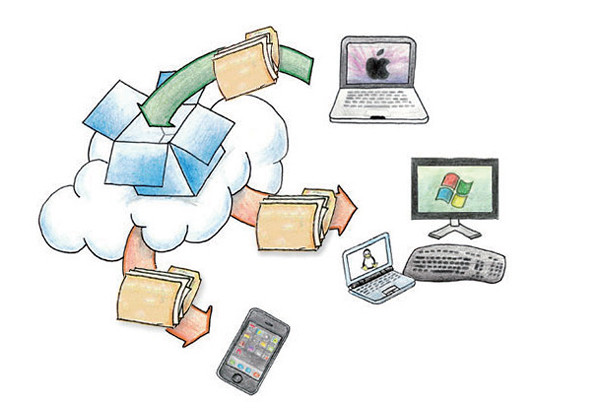 I'm sure that many of you have read the news about an apparent attack, and subsequent account breach at Dropbox this past week. There have been conflicting reports flying around, but Dropbox's own blog points out what appears to be the truth... Dropbox wasn't hacked.
The story is that apparently the attackers got user IDs and passwords from attacks on other applications. They then tried these same credentials on a number of internet sites, including Dropbox. You can read the Dropbox blog post here.
This is a typical attack scenario, as I've discussed before. Among the value of stealing a password file from a site or organization is that people unfortunately reuse their IDs and passwords on other sites. This is because it's difficult to remember all those passwords! I won't go into that issue because I've covered it plenty of times in the past.
In this case, like many others, the attackers simply try the IDs and passwords on other sites. It's almost guaranteed that they will get some logins that work. That is apparently what happened here.
So... Dropbox wasn't hacked... this time! Of course, there have been a number of successful breaches of Dropbox in the past!
More on that in a moment, but I want to make a quick editorial comment on the use of the term "hacked".
Tuesday, October 7, 2014
Celebrate Cyber-Style!
It's time again to celebrate that wonderful US event... Happy Cyber Security Awareness month! This event started in 2003 as a way to build awareness for online security and privacy and to encourage individuals, business and government.
Over the past couple of posts I've focused on Identity Fraud (here and here). We'll pause on that topic until next time.
Today I give you... The Top 10 Ways to Celebrate Cyber Security Month 2014!
Over the past couple of posts I've focused on Identity Fraud (here and here). We'll pause on that topic until next time.
Today I give you... The Top 10 Ways to Celebrate Cyber Security Month 2014!
- Change your password Yes, I know... I said in the past that just changing your password is not the effective measure. That's true but with the frequency with which online sites get compromised, it's not a bad idea. Even better - use really long passwords. Remember, when it comes to passwords... size matters!
- Use a password vault A password vault is a program that encrypts and holds all your passwords. I explain these in detail, and list some good products, in this post.
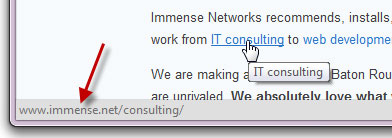
- Look before you click With most links to can "mouse over" the link. That means you just move your mouse so it's on the link, but don't click yet! Your browser will display the address to which the link will lead. This displays at the bottom of the browser. The actual link in the display should make sense and be the location you're expecting. If not then... don't click!
Tuesday, June 10, 2014
Security Awareness and Password Safety
I've written about problems with passwords plenty of times. I've also written about my philosophy on security awareness.
I recently cut another security awareness video. This one gives staff some tips on how to protect their information by choosing and protecting passwords. Here it is:
Here are a set of powerpoint slides covering the important points and tips. Feel free to use this information to protect yourself and your information and, for information security professionals, to use this info in your security awareness programs.
I recently cut another security awareness video. This one gives staff some tips on how to protect their information by choosing and protecting passwords. Here it is:
Here are a set of powerpoint slides covering the important points and tips. Feel free to use this information to protect yourself and your information and, for information security professionals, to use this info in your security awareness programs.
Tuesday, May 13, 2014
The Best (First Good) Password Policy Ever!

- good passwords are hard to remember, and;
- passwords you can remember are easy for attackers to guess.
- 8 characters;
- upper/lower case;
- numbers;
- special characters.
Subscribe to:
Posts (Atom)