Showing posts with label apps. Show all posts

Tuesday, December 12, 2017

Ho-Ho-Holiday Spams and Scams

   It's that time of year again folks.  And whatever holiday you may, or may not, celebrate... there's something we're all likely to see.  It's not presents, though maybe there are some for you.  It's not snow, though we're already seeing that here in the upper midwest US.

   It's malware and holiday scams!

   Unfortunately, it happens every year.  Sometimes it's malicious attachments.  Sometimes it's links to malware to download or phishing sites with forms ready to collect your personal and financial information.

   Here is my 2017 edition of my Top 10 Tips To Avoid Holiday Spams and Scams...

Tuesday, May 9, 2017

Google Docs and the Mailinator

   You're minding your own business, just checking email, when you get an email from a "friend" inviting you to get a shared Google Doc file.

   You're a student of security, or at least a fan, so you're always skeptical when you receive an email with a link or attachment.  This one appears to come from someone you know.  The subject and body of the message seem consistent with a Google doc sharing message.

   Problem clue #1 - look at the "To:" line.  Clearly, this message wasn't sent to you.

   Problem clue #2 - were you expecting this email and file?  Has this sender sent you Google docs in the past?  Did this email arrive at work or home - and do you normally use Google docs there?

   But, you are rushed and don't have time to send your friend a message to see if this email is legit.  So you click.  If you're not already logged in to your Google account, you're asked to log in.  What you see next is...

Tuesday, May 3, 2016

Secrets Your Phone Told Me

   You may remember that earlier this year we were all talking about the standoff between the FBI San Bernadino attack.  This specific problem was "solved" when the FBI said they were able to decrypt the phone and no longer needed Apple's help.  The assumption by many is that the FBI purchased an exploit used to break into the phone.
and Apple about the decryption of an iPhone used by one of the shooters in the

   This leads us to an important consideration and question... can any phone be hacked?  Is any information on your smartphone really private?

   We have become completely dependent upon our phones.  According to a 2015 Pew Research Center study, in the US over two-thirds of the population uses a smartphone.  We keep all of our personal information on there: passwords and accounts, photos and videos, credit card data, tax data; we shop and set many preferences (travel, food, dating, real estate); we track our workouts, our weight our food and all our movements.  Today's smartphone is the key to far more information about you than you can imagine!

   We can, of course, watch TV on our phone.  And on 4/17/2016, 60 Minutes aired a show about smartphone security and privacy.  You can view it here.

   In the episode, they talked about the SS7 (Signaling System 7) protocol and how it works.  SS7 was designed in 1975 and it is the protocol that allows phone systems to pass calls between them.  For mobile, it handles maintaining connections as you move between cell towers, for example as you are driving down the road (using hands-free calling of course! :-).  This particular exploit is not new at all.  In fact, this has been a topic at the Black Hat Briefings and other security conferences for years.

   But all this aside, there is no need for exploits or vulnerabilities to track people or glean personal information through their phones.  Disclosing this information is simply how phones and apps work!  Let me explain...

Tuesday, August 4, 2015

See the Man With the StageFright

   I always liked the way Rick Danko sang that song, and I saw him perform it a few times.


   But now we have a new StageFright, a vulnerability in the base android phone operating system.  This is an equal-opportunity vulnerability effecting all android phones (nearly 1 billion!).  Like many new vulnerabilities discovered in the past year, this one has a name and a logo.

   The issue is a "feature" in the way androids pre-processes MMS multi-media messages (pictures, videos) sent via your text messaging app.  That could be the stock messaging app, a custom messaging app from your phone manufacturer or data provider, or even Google Hangouts.

   Here's why the vulnerability is so bad... you don't have to open the message!  You don't even have to know that you received the message.  All it takes is for your phone to automatically download a malicious message in the background - which is exactly what it does - for your phone to be owned!  That's a problem.

   At the time I wrote this column, there seems to be a fix only for Google-branded phones, and that's a very small percentage of all phones.  You can check with your carrier to find out when you'll get a patch.

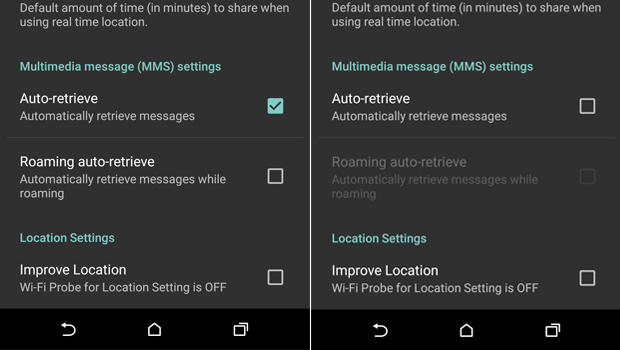
   Meanwhile, there is a work-around.  You need to configure your messaging app to not automatically download MMS messages.

  1. Open you rmessaging app.
  2. Go to Settings
  3. Select: Multimedia messages
  4. un-select Auto Retrieve
   Now, when someone tries to send you a message with multi-media content, you'll see that the message arrived, but the photo or video will not be downloaded.  Only tap to download if the message came from a trusted source.

   Of course, you should also keep your phone patched by applying all phone and app updates.  And... get rid of any apps you don't need.

   Here are some references for more info.

Tuesday, August 5, 2014

When Androids Attack!

   All computers, devices and software have flaws.  In fact, there are so many it's hard to keep up.  In the past (not so long ago), we only had to worry about computers... and they were mostly big desktops.  Then came laptops, and with them the additional problems introduced when connecting to unknown and open networks.  And lately, we seem to spend plenty of time talking about flaws in smartphones and tablets.

   The latest in a long string of smartphone issues is the so-called "Fake ID" flaw affecting Android devices.  This attack exploits a vulnerability in the way an Android device checks the authenticity of an app.

   The issue is kind of similar to controls around US credit cards.  When you sign a credit card receipt or at a terminal, the clerk or cashier might check that signature against the one on the card.  Even if the signatures match (and when does that happen???  I can barely duplicate my own signature! :-), that doesn't mean that you are the owner of the card nor does it let anyone know if the card is fake or stolen.

   In a somewhat analogous way, apps are "signed".  The flaw allows Android phones to accept unverified apps.  This provides a potential opportunity to download fake or malicious apps.

   This issue should be patched on your phone by now.  But this is not the first time this kind of problem has emerged. And it won't be the last time!  This can be a serious issue.

Tuesday, March 18, 2014

XP End of an Era or... Deja Vu All Over Again!

   Unless you just came back from time traveling, you know that Microsoft is ending support for the XP
operating system on April 8.  To be clear... April 8 is Patch Tuesday, so that will be the last set of updates for XP.  Sort of.

   XP has been one of Microsoft's most popular desktop operating systems and many organizations are dependent upon it.  Many organizations have not yet updated to Windows 7 or 8 and the clock is ticking.  I'd like to look at what that means and share a few ideas of what we can do to protect ourselves and our organizations.

   Microsoft will be stopping all patches, hotfixes and enhancements to XP after April 8.  Anti-virus signatures will continue to be made available.  This means that any vulnerabilities that are discovered or disclosed might not be fixed.  Organizations will need to figure out if they are vulnerable to any new threats and then weigh the risks associated with their options.

   There has been some speculation that online criminal organizations may be stocking up on new vulnerabilities so these can be released after the last patch date.  We can't know if this is true, but it is possible.

   So... if you are still running XP, and need to continue to run XP, what can you do?  Let's do a high-level threat analysis:

Tuesday, November 19, 2013

It's That Time of Year - Holiday Spams and Scams

   It's that time of year again folks.  And whatever holiday you may, or may not, celebrate... there's something we're all likely to see.  It's not presents, though maybe there are some for you.  It's not snow, though we'll see that soon enough here in the upper midwest US.  It's malware and holiday scams!

   Unfortunately, it happens every year.  Sometimes it's malicious attachments.  Sometimes it's links to malware to download or phishing sites with forms ready to collect your personal and financial information.

   Here is my 2013 edition of my Top 10 Tips To Avoid Holiday Spams and Scams...

Tuesday, October 8, 2013

Online Self Defense - Your Computer

   It's Cyber Security Month!  And the more things change, the more they stay the same.  The key advice for online self-defense I've given in the past is just as true now.  So to help us all celebrate, I'm "re-featuring" a few articles I've run in the past.


   Happy US Cyber Security Month!  This partnership between Homeland Security, NCSA and MS-ISAC is an opportunity to recognize the importance of information security.  How are you celebrating?

   Last week I ran a couple of sessions at work on awareness and security.  Over the next few posts I will be reviewing some of the 3 themes I covered in a talk entitled "Online Self-Defense". You can view the slides on my slideshare page. (actually, the talk focuses on just 2 of the themes but that's OK!). Since everything comes in threes (omne trium perfectum), I will give 3 easy tips for each theme (and some bonus tips as well).

   The first theme is protecting your computer or device.

Tuesday, April 2, 2013

My Top 4 Everyday Apps

   I don't know about you, but I was not happy when Google announced that it would be pulling support of Google Reader on July 1.  Reader is tool I use all the time.  I have the RSS toolbar extension on Firefox on my computers set to default to reader so I can quickly add new sources to my feeds.  I regularly check reader on my computers and use the app on my mobile devices.

   So I was looking for a reader replacement.  CIO Online put together a nice list of alternatives.  After reviewing that list, I decided that feedly seemed to be the app that best met my needs.  I downloaded the feedly add-on for my browser(s) as well as the app for my mobile devices.  And that got me thinking... do I need the app on my mobile devices?  After all, mobile devices tend to become clogged with too many apps, and mine are no exception.

   And that got me thinking... what mobile apps am I really using?

Tuesday, December 25, 2012

A Few of My Favorite Things - Apps

   I recently (finally) got modern smartphone.  My previous phone was the "free" phone from over 2 years ago.  Even when I had a basic smartphone I very quickly found useful apps that used everyday.

   Someone was recently asking me what apps I use on my phone.  I thought it would be useful to make a list of some of my favorites here and focus on those that I use most.

Tuesday, December 18, 2012

Tis The Season - Holiday Spams and Scams

   We have always had the need to be careful online. We always have to be aware of what sites we are visiting and what apps were using. I've written about this in my series on Online Self-Defense.

   But at this time of year you have to be even more careful. The amount of online trouble increases. Your volume of work may increase, you're often stressed during the holidays and may not pay as much attention to what you're doing online.

   There are also many e-cards and "cute" pictures and videos that have to be shared.  This, and other information, floods our inboxes, social media timelines and chat/text lists. Many of these have links. And unfortunately, far too many of these links go to malicious sites.

   Here's a great list of some common holiday spams/scams. Here's another.

Tuesday, October 9, 2012

Online Self Defense - Part 1 - Your Computer

   Happy US Cyber Security Month!  This partnership between Homeland Security, NCSA and MS-ISAC is an opportunity to recognize the importance of information security.  How are you celebrating?

   Last week I ran a couple of sessions at work on awareness and security.  Over the next few posts I will be reviewing some of the 3 themes I covered in a talk entitled "Online Self-Defense". You can view the slides on my slideshare page. (actually, the talk focuses on just 2 of the themes but that's OK!). Since everything comes in threes (omne trium perfectum), I will give 3 easy tips for each theme (and some bonus tips as well).

   The first theme is protecting your computer or device.

Tuesday, September 11, 2012

Mobility not just Mobile

   Yesterday I gave a talk at CSO Magazine's The Security Standard conference in NY.  There was a great group of attendees and the conference has been excellent.  My talk was on the Embracing the IT Consumerization Imperative.  You can view the slides on the conference site or my slideshare site.

   One of the important points I made, and a frequent theme for me, is the need for alignment between business and security and IT.  It's too easy for those of us in the technology space to get caught up with the devices, toys and tech solutions.  We too often get disconnected from the business need.  Security and IT groups exist to service the business.  Business drives security; business drives IT... not the other way around.