Tuesday, January 27, 2015

How To Get Someone’s Password


   No matter what else is going on, it seems that I keep circling back to the subject of passwords.  I’ve covered this topic many times, including here, here and here.  But it’s a new year and a new week and passwords are in the news again

   I’ve jokingly said for many years that the easiest way to get someone’s password is to just ask them!  What I mean by that is that many people will inadvertently give up their userid and password via a Social Engineering attack.

   Wikipedia defines Social Engineering as the "psychological manipulation of people into performing actions or divulging confidential information. A type of confidence trick for the purpose of information gathering, fraud, or system access, it differs from a traditional "con" in that it is often one of many steps in a more complex fraud scheme."

   An attacker can send a phishing email that either directly, or via a link to an online form, asks for a password.  They can call the victim on the phone, or call a help desk impersonating the victim.

   Or, they can just walk up to someone on the street and ask!...


   And this is certainly not the first time something like this has been tried.

   There you have it!  So protect your passwords… use a password vault; use different passwords for different systems; use strong passwords; watch out for phishing emails and calls, and; don’t give your password to someone else!

 
   For extra fun, try one of these phishing quizzes.  See if you can identify the imposters!  And reread this post on phishing.

Tuesday, January 6, 2015

The Secret Life of Passwords

   I've written about passwords plenty of times in the past.  Passwords are one of the main security touch-points for people, and it's often not a pleasant experience.

   As we've discussed, it's hard for people to pick good passwords and remember them.  So users need "tricks" to help the memory.  One way I've told people to construct a password is to base the password on an embarrassing moment in your life - that way you won't forget the password and you also won't tell it to anyone else.

   Apparently people have been using that, and similar, methods.  NY Times reporter Ian Urbana wrote a great piece on this called "The Secret Life of Passwords".  He asked people to tell him their passwords - yes, you shouldn't do that - but also the story behind the passwords.  There are some very interesting stories.  People seem to memorialize a part of their life in their passwords!  You can read the full story here.  Leo Laporte did a great interview with Ian in the Triangulation podcast.  You can hear that here.

   I'd like to focus to two aspects of this story that jumped out at me.

   First is the story of Cantor Fitzgerald.  They are a large financial firm who were headquartered at the World Trade Center in 2001.  When the terrorist attacks hit the towers, Cantor Fitzgerald over two-thirds of their employees were killed.  That was tragic.

Tuesday, December 2, 2014

The 4 R's of ID Fraud (part 2)

   As promised, in this post we'll wrap up the series about ID Fraud.  Check here if you'd like to see the first 3 parts of this series, and the first half of this post.

   So far we've focused on what ID Fraud is, and in the third installment, the steps you should take now if you are a victim.  As we've discussed, having the information for one of your credit cards grabbed in an attack such as we saw on Target or Home Depot doesn't automatically mean you will have other ID Fraud related problems.

   But we should all take steps to reduce our exposure and the odds that our ID and financial information will be fraudulently used... or at least increase the odds that we'll notice any problems quickly.

   We'll continue with the 4 R's: Review, Reduce, Record, Report. (unlike the 5 D's of dodge ball! :-)

Reduce - the amount of information you give out online.
  • Use care when emailing personal information.  Don't unless you need to.  Provide a minimum amount of information. Use encrypted email if it's available.
  • Choose passwords and hints that are not based on personal information.
  • Don't "click here to unsubscribe" from a spam or unwanted message - it just let's them know you exist.
  • Shop online with reputable or known vendors.
  • Delete doesn't really delete.
  • Use malware protection on your home computers and devices.
  • And a bonus tip for online - watch out for Phishing messages.  That's a big topic that I've covered in the past, and probably will revisit as scammer techniques evolve.

Tuesday, November 18, 2014

The 4 R's of ID Fraud (part 1)

   As part of our celebration of US Cyber Security Awareness Month, we've been talking about ID Fraud.  Check here if you'd like to see the first 3 parts of this series.

   So far we've focused on what ID Fraud is, and in the third installment, the steps you should take now if you are a victim.  As we've discussed, having the information for one of your credit cards grabbed in an attack such as we saw on Target or Home Depot doesn't automatically mean you will have other ID Fraud related problems.

   But we should all take steps to reduce our exposure and the odds that our ID and financial information will be fraudulently used... or at least increase the odds that we'll notice any problems quickly.

   Our theme for today is the 4 R's: Review, Reduce, Record, Report (just like you learned when you were a kid! :-)

[as I was writing this, the post became really long so I've broken it up into 2 parts]

Review - your credit report.  You are entitled to 1 free report from each of the big 3 credit reporting agencies each year.  So, spread it out and get 1 every 4 months.  The US FTC endorsed site to get these reports is www.annualcreditreport.com.  You can also put a fraud alert on your account as we discussed last time.
   You're also entitled to a free copy of your credit report if you:

Tuesday, November 4, 2014

Got ID Fraud? - Stop, Drop and Roll

   OK, maybe not stop, drop and roll (I'll always remember that fire safety phrase from my childhood), but take action!

   Cyber Security Awareness Month is now over, and I haven't finished covering the ID Fraud topic I started at the beginning of Oct.  I did get distracted on some other issues.  Besides, we can't confine our celebrating to only one month!

   I covered the basics of ID Fraud in these posts.  But if you have been a victim, and particularly if you recently discovered you are victim, you need to take action... and time matters.

   Here are the four key things you need to do, right now, if you have recently been the victim of ID Fraud in the US:
  1. Contact one of the three major Credit Bureaus (we'll leave a discussion of the "4th credit bureau" for another time).
  2. Close the suspect accounts.
  3. File a police report.
  4. File a report with the FTC by phone and in writing.
   I'll provide more detail and add a few more steps below.

   One additional thing you must do throughout this process is to keep a record of everything you do.  This includes: noting date/time of phone calls; copies of letters; printout any web forms, and; keep a chronological log of your overall progress.

   The FTC website has the specifics here.

Contact one of the Credit Bureaus and put a fraud alert on your account.
   This is the first thing to do.  You can put what is called an initial fraud alert on your credit record.  This initial alert will last 90 days.  It should not cost anything to place this alert.  The bureau you call should contact the other two credit bureaus, but it doesn't hurt to verify this with them.
   The fraud alert basically requires extra effort to authenticate any requests for new credit.  This typically means that the credit issuer needs to contact you before issuing credit.  This should make it tougher for a fraudster to open credit in your name.  That's good!  The downside is that it also might make it more difficult for you to open new credit.
   After the initial 90 day period, you can renew the alert each 90 days.  This may cost a nominal fee depending upon what state you live in (US).
   (we'll talk about other measures like credit monitoring services in a future post)

Close the affected accounts.
   Contact the credit issuer and close any accounts you know were affected.  If your purse or wallet was stolen, then close all the accounts for the cards you were carrying.
   If you're not sure if a particular account was affected, you're probably best off closing it as well.

File a police report.
   Contact your local police and file a report.  Except in rare cases where there was additional theft (for example, if your identifying documents and credit cards were stolen as part of a home break-in), the police will not actually take any action.  You're not contacting the police so they will investigate the problem.  You are establishing documentation and proof of the event.  In the future, you may need to prove that you took action and when you took action.  The police report accomplishes this.  Get a copy of that report.

File a complaint with the FTC (US Federal Trade Commission).
   Again, this is part of establishing your documentation trail.  The FTC has a great website for information that I'll link below.  The specific instructions for filing the FTC complaint is here.  Note that they suggest filing with the FTC before filing the police report.  That is not critical, and you need to do both.  You can complete the FTC form online so that might be easier and it's available 24x7.

   Those are the first steps to take.  But there are more.  Here are a few more steps to take:

Who else to notify?
   You may want to notify your other banks and creditors both to find out if there has been any unusual activity (banks and card issuers are usually pretty good at finding anomalous activity before you do) and so they can flag your accounts.  Consider notifying anyone who bills you monthly for services including utilities and insurance providers.

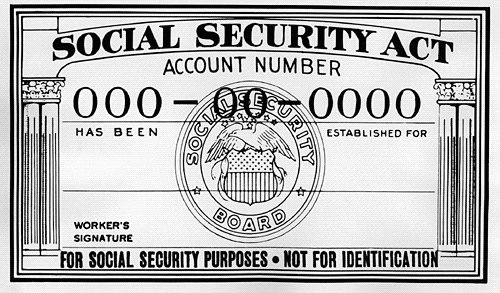
   If you think your US social security number has been compromised, you should contact the Social Security Administration.

   You can notify your state driver and vehicle services department in case someone tries to get a driver's license in your name.

Online defense.
   If this problem started online, perhaps through an information breach, you should change your passwords and consider using multi-factor authentication as I've covered in the past.

   There are more complete details on these steps on the FTC website here.

   Even under the best of circumstances, the process of reporting, documenting and repairing ID Fraud is a major pain.  In our next installment I'll talk about things you can do to help prevent you from becoming a victim, or in those circumstances where this is out of your control, how to increase the odds of early detection and minimize the impact.

   Have you had experience with any of the steps I list above?  Do you have any advice on additional steps to take?

Tuesday, October 21, 2014

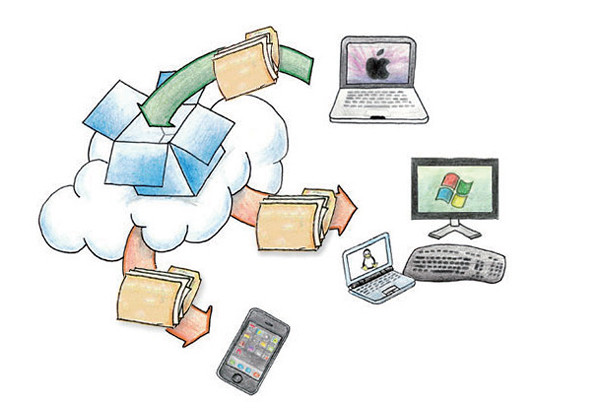
Dropbox Wasn't Hacked... This Time!

   I'm sure that many of you have read the news about an apparent attack, and subsequent account breach at Dropbox this past week.  There have been conflicting reports flying around, but Dropbox's own blog points out what appears to be the truth... Dropbox wasn't hacked.


   The story is that apparently the attackers got user IDs and passwords from attacks on other applications.  They then tried these same credentials on a number of internet sites, including Dropbox.  You can read the Dropbox blog post here.

  This is a typical attack scenario, as I've discussed before.  Among the value of stealing a password file from a site or organization is that people unfortunately reuse their IDs and passwords on other sites.  This is because it's difficult to remember all those passwords!  I won't go into that issue because I've covered it plenty of times in the past.

   In this case, like many others, the attackers simply try the IDs and passwords on other sites.  It's almost guaranteed that they will get some logins that work.  That is apparently what happened here.

   So... Dropbox wasn't hacked... this time!  Of course, there have been a number of successful breaches of Dropbox in the past!

   More on that in a moment, but I want to make a quick editorial comment on the use of the term "hacked".

Tuesday, October 7, 2014

Celebrate Cyber-Style!

   It's time again to celebrate that wonderful US event... Happy Cyber Security Awareness month!  This event started in 2003 as a way to build awareness for online security and privacy and to encourage individuals, business and government.

   Over the past couple of posts I've focused on Identity Fraud (here and here).  We'll pause on that topic until next time.

   Today I give you...  The Top 10 Ways to Celebrate Cyber Security Month 2014!
  1. Change your password
  2. Yes, I know... I said in the past that just changing your password is not the effective measure.  That's true but with the frequency with which online sites get compromised, it's not a bad idea.  Even better - use really long passwords.  Remember, when it comes to passwords... size matters!

  3. Use a password vault
  4. A password vault is a program that encrypts and holds all your passwords.  I explain these in detail, and list some good products, in this post.

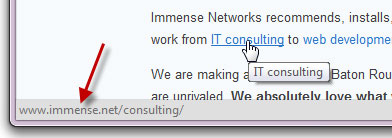
  5. Look before you click
  6. With most links to can "mouse over" the link.  That means you just move your mouse so it's on the link, but don't click yet!  Your browser will display the address to which the link will lead.  This displays at the bottom of the browser.  The actual link in the display should make sense and be the location you're expecting.  If not then... don't click!