It's that scary moment... You're getting some work done on your computer when you see a dreaded pop-up message:
CryptoLocker, CryptoWall and other crypto-/ransom-ware has been in the news again (or still?). This kind of malware attack was first identified in 2013. Rather than trying to steal information, the malware encrypts your files. But you don't have the key to decrypt. The attacker offers, through a pop-up message, to "sell" you the "service" to unlock your files. To make things worse, the attacker threatens to delete the keys after a set amount of time, typically 72 hours, which could prevent you from recovering the files.
These ransom-ware viruses are usually sent to your computer as an email attachment. The attachment can be an office file, pdf, zip file or other file. The malware can also come from an infected web link.
When your computer is infected, the virus operates quietly in the background, encrypting files. You usually won't know there's a problem until the files are encrypted, and then you're in trouble.
So if you are infected and encrypted... then what? Well, there's bad news, good news, more bad news and some more potentially good news!
A place to talk about information security, Internet safety and, of course... coffee!
Thoughtful, sometimes controversial, but not following the crowd unless I'm in line at the coffee shop.
Tuesday, August 18, 2015
Crypto Where?
Labels:
advanced,
anti-malware,
anti-virus,
attachments,
attack,
computer,
consumer,
crypto,
cryptowall,
cryptoware,
email,
encryption,
exploit,
key,
malware,
phishing,
ransom,
ransonware,
virus
Tuesday, August 4, 2015
See the Man With the StageFright
I always liked the way Rick Danko sang that song, and I saw him perform it a few times.
But now we have a new StageFright, a vulnerability in the base android phone operating system. This is an equal-opportunity vulnerability effecting all android phones (nearly 1 billion!). Like many new vulnerabilities discovered in the past year, this one has a name and a logo.
The issue is a "feature" in the way androids pre-processes MMS multi-media messages (pictures, videos) sent via your text messaging app. That could be the stock messaging app, a custom messaging app from your phone manufacturer or data provider, or even Google Hangouts.
Here's why the vulnerability is so bad... you don't have to open the message! You don't even have to know that you received the message. All it takes is for your phone to automatically download a malicious message in the background - which is exactly what it does - for your phone to be owned! That's a problem.
At the time I wrote this column, there seems to be a fix only for Google-branded phones, and that's a very small percentage of all phones. You can check with your carrier to find out when you'll get a patch.
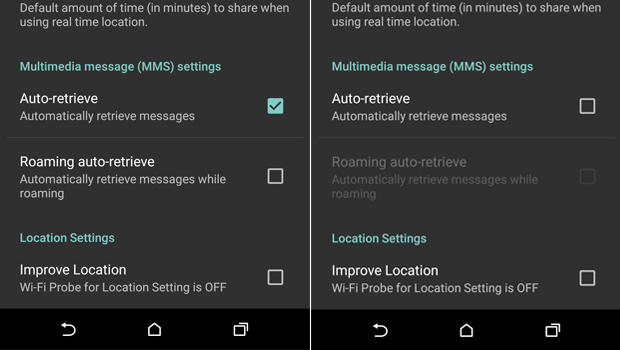
Meanwhile, there is a work-around. You need to configure your messaging app to not automatically download MMS messages.
The issue is a "feature" in the way androids pre-processes MMS multi-media messages (pictures, videos) sent via your text messaging app. That could be the stock messaging app, a custom messaging app from your phone manufacturer or data provider, or even Google Hangouts.
Here's why the vulnerability is so bad... you don't have to open the message! You don't even have to know that you received the message. All it takes is for your phone to automatically download a malicious message in the background - which is exactly what it does - for your phone to be owned! That's a problem.
At the time I wrote this column, there seems to be a fix only for Google-branded phones, and that's a very small percentage of all phones. You can check with your carrier to find out when you'll get a patch.
Meanwhile, there is a work-around. You need to configure your messaging app to not automatically download MMS messages.
- Open you rmessaging app.
- Go to Settings
- Select: Multimedia messages
- un-select Auto Retrieve
Now, when someone tries to send you a message with multi-media content, you'll see that the message arrived, but the photo or video will not be downloaded. Only tap to download if the message came from a trusted source.
Of course, you should also keep your phone patched by applying all phone and app updates. And... get rid of any apps you don't need.
Here are some references for more info.
Tuesday, July 21, 2015
Must Click Immediately!
I received this email recently. Looks legit and serious! :-) I better open that attachment...
While many people would recognize this as a problem, many others would click to see what info is in the attachment.
We regularly read about advanced and targeted attacks. While there is plenty of nasty malware out there, most attacks start with a click. Make sure it's not yours!
Tuesday, July 7, 2015
ID Fraud... What to do Now
I've written about Identity Fraud in the past. Today I'd like to review what you need to do now if you are a victim. I have written about this before, but a picture is worth a thousand words... and a video?...
Labels:
credit card,
FTC,
identity,
identity fraud,
police,
privacy,
report,
safety,
security
Tuesday, June 23, 2015
Say It Ain't So LastPass!
There are so many data breaches happening each week that it's easy to become numb to all the announcements. Sometimes one or two dominate the news because of the size or importance of the breach. Sometimes there is confusion in the media about the breach or the significance. Sometimes the experts don't agree.
I think most people have heard about the OPM - Federal (US) Office of Personnel Management - breach in which personal information on over 4 million people, including security clearance information, possibly dating back to 1985 was stolen in attack on federal computers. Everyone agrees that this one was big and bad. But also in the news was the breach of information at LastPass, and there is far less consensus on the impact.
LastPass is a password vault - a program that lets you store all your passwords in an encrypted "safe". I've talked about password vaults many times in the past. I have always recommended the use of a password vault and I still do.
First, let's discuss what happened.
I think most people have heard about the OPM - Federal (US) Office of Personnel Management - breach in which personal information on over 4 million people, including security clearance information, possibly dating back to 1985 was stolen in attack on federal computers. Everyone agrees that this one was big and bad. But also in the news was the breach of information at LastPass, and there is far less consensus on the impact.
LastPass is a password vault - a program that lets you store all your passwords in an encrypted "safe". I've talked about password vaults many times in the past. I have always recommended the use of a password vault and I still do.
First, let's discuss what happened.
Tuesday, April 28, 2015
I Know Where Your Cat Lives!
Today's post brings together two of the most important, popular and topics online - security and privacy of your information on the Internet and... Cats!
We know why the first topic is important. I've written plenty about data breaches, keeping yourself safe online and how to decrease your exposure to identity fraud. But cats? Interestingly, the Internet has had a long fascination with cats. And memes are everywhere starting with the early days of Lolcats and Keyboard Cat. Disclaimer - I am not a cat person... I don't own any and am not a fan. But I do like a good meme!
Regardless of your pet of choice, we do care about our pets and they are often treated like members of the families. And that includes... pictures. If you do a search on cat pictures or pet pictures, you'll see plenty. If you look on people's social network profiles, Facebook, Instagram, Pinterest, etc., there will be pet pictures all over the place. You can even find them on "professional" sites like LinkedIn.
Looping back to security and privacy... it's hard enough to keep your data safe when you're deciding what to share. Many sites deal with the normal stuff - name, A/S/L, credit card numbers, and more. You can enter this info to a site, or not. But it's much harder when you don't realize that you are sharing data. Or, put another way, how do you know when you're sharing more than you think you are. There is hidden data and data sharing happening on the net everywhere. For example, when you connect to a website, that connection creates a log that includes things like: your IP address, your browser type, your computer/phone/tablet operating system and other info. The site may put a "tracking cookie" on your machine to help customize your experience while gathering more data.
Then there's metadata. This is data about data. For example, when you take a picture with a digital camera or your phone, there is all kinds of additional data "attached" to that photo including: location, IP address, and timestamp. There is also a great deal of extra visual information, other than the core subject in the photo including: views of your house, entrances, other people and surroundings.
There is a fun and interesting website called "I Know Where Your Cat Lives". They simply connect to photo sharing and social sites, grab cat photos, mine the metadata, connect the photo to a map, and create stats and charts. Oh yes, and display cat photos!
The lesson here is to pay attention to your digital surrounding. When you take a picture, know what else is in that picture. When upload a picture to a site, think about what data is going with that picture. Most photo software gives you the ability to edit and alter most of the metadata. Are you automatically uploading photos?
Tuesday, April 14, 2015
It Wasn't Englebart's Fault! (part 2)
When we have a post with a "part 1", it probably means we should have a "part 2". Sometimes other things get in the way!A few posts ago we had part 1 of this discussion. To briefly review, Douglas Englebart was an engineer, inventor and pioneer of the early internet. He died in 2013. He was known for a number of key ideas and inventions. In 1967, he invented a very useful computer device that is a key component in propagating malware and facilitating phishing attacks... the Mouse!
In part 1 we discussed how malware (malicious software) like viruses get into our computer systems. Today we'll wrap things up by looking at why it's difficult for our organizations to stop this malware (and why it's difficult to stop this at home).
Really, the primary issue this stuff is hard to stop is because it's too easy to click on links and attachments. As we discussed in part 1, as long as we're clicking, we'll have problems.
But what about anti-virus software? Anti-virus (or anti-malware or endpoint protection) software has been around for nearly 30 years. Yet malware problems seem to be getting worse. (I'll continue to use the term "virus" generically, but I'm really talking about any kind of malware.)
Labels:
analysis,
anti-malware,
anti-virus,
click,
complexity,
mouse,
phishing,
software,
VDI,
virtual,
virus
Subscribe to:
Posts (Atom)