It's time again to celebrate that wonderful US event... Happy Cyber Security Awareness month! This partnership between Homeland Security, NCSA (National Cyber Security Alliance) and the MS-ISAC (Multi-State Information Sharing and Analysis Center) is an opportunity to recognize the importance of information security. It started in 2003 as a way to build awareness for online security and privacy and to encourage individuals, business and government.
This month I'll be putting out weekly posts connected with the weekly themes put together by DHS. This week the theme is creating a culture of security.
The message is simple... in the workplace security is a team sport. All organizations have customers, patients, systems and data to protect. To accomplish this, security must be part of everyone's job.
A place to talk about information security, Internet safety and, of course... coffee!
Thoughtful, sometimes controversial, but not following the crowd unless I'm in line at the coffee shop.
Monday, October 5, 2015
Tuesday, September 29, 2015
Do Strong, Unique Passwords Matter?
Labels:
authentication,
browser,
complexity,
cyber,
cybersecurity,
October,
online,
password,
passwords,
safety,
security,
strong,
unique,
vault,
video,
website
Tuesday, September 15, 2015
Bring It On Home
I'm giving a presentation at the Twin Cities ISSA Security Awareness SIG. I'll be talking about a number of different methods I've used over the years to create buzz and interest about security and make topics accessible to everyone.
I was planning to refer to one of my earliest blog posts, covering my general philosophy on this topic. But... going through past posts it appears that, while I've alluded to the ideas, I never actually wrote the post! So I'll do that now!
Like the song says, I try to bring it on home. I find that while people do want to understand security rules at work, when we start talking about things like home computers, smart phones and family internet safety, then we get peoples' attention.
And that's a great thing! For a bunch of reasons:
I was planning to refer to one of my earliest blog posts, covering my general philosophy on this topic. But... going through past posts it appears that, while I've alluded to the ideas, I never actually wrote the post! So I'll do that now!
Like the song says, I try to bring it on home. I find that while people do want to understand security rules at work, when we start talking about things like home computers, smart phones and family internet safety, then we get peoples' attention.
And that's a great thing! For a bunch of reasons:
- When people think about protecting themselves and family and data, it helps them remember that in the office we are protecting customers'/patients'/users' privacy and data.
- Security needs the eyes and ears of all staff to help us know what is going on. Security Awareness focusing on personal topics helps open the communication channels to the security team. We're not so scary! :-)
- When staff understand more about how security topics can help them, we gain real evangelists.
And yet there is still controversy about the usefulness of Security Awareness. But I think it's one of the most important and useful things we can do to help secure our environments.
Here's a link to the slides from my presentation.
And here are a few of my past favorite security awareness posts:
If you are a computer use, what are some topics you'd like to learn more about?
If you are an information security professional, what tips and techniques would you like to share?
Tuesday, September 1, 2015
The XORcist (aka Get Rid of Bad Encryption)
I remember when the movie version of the Exorcist came out. I was in high school and it was probably the scariest, most graphic movie released by that time. Parents didn't want their kids to see it. There were all kinds of media discussions about the potential detrimental effects to roller-skating Linda Blair, who played the possessed Regan. It was a freaky movie, at least for it's day, though it was way surpassed in gore by the slasher movies of the 80s.
I recently read the book (well, you know... audiobook!). It's well written and I recommend it. But it is graphic, and there's plenty that wasn't in the movie.
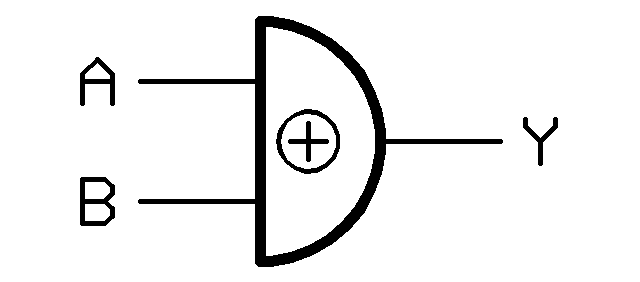
Easily as scary is the way many systems and sites handle encryption! For those who don't get the title... XOR is a basic mathematical function that all computers can do easily and quickly. It's critical for computer operations, and is used in some encryption operations, but is not really a strong encryption method by itself. If you want to learn more about XOR, look here or here.
I've covered problems with passwords many times here. One of the problems that has allowed password breaches to work is poor encryption of the password file. XOR is not a strong encryption method!
So what does this all mean? I have two messages... one for programmers and one for everyone else.
Programmers. Don't invent your own encryption. There are fantastic, freely available encryption routines out there that you can use in your code. Or, your organization may already have standard encryption methods you can use. Bottom line is that 2000 years of mathematics has led us to some pretty solid encryption algorithms. Use them! Friends don't let friends use bad encryption! Here are some great references.
Everyone else. Password storage should use something we call a "one-way hash". Not a tasty dish, but a method of encrypting data so it can't be decrypted. That means that no one should be able to tell you your password! So, if you call customer support or the help desk because you forgot your password, and they can tell you your actual password... run!
Can you think of any examples of bad encryption? Do you know of any websites that can show you a forgotten password?
I recently read the book (well, you know... audiobook!). It's well written and I recommend it. But it is graphic, and there's plenty that wasn't in the movie.
Easily as scary is the way many systems and sites handle encryption! For those who don't get the title... XOR is a basic mathematical function that all computers can do easily and quickly. It's critical for computer operations, and is used in some encryption operations, but is not really a strong encryption method by itself. If you want to learn more about XOR, look here or here.I've covered problems with passwords many times here. One of the problems that has allowed password breaches to work is poor encryption of the password file. XOR is not a strong encryption method!
So what does this all mean? I have two messages... one for programmers and one for everyone else.
Programmers. Don't invent your own encryption. There are fantastic, freely available encryption routines out there that you can use in your code. Or, your organization may already have standard encryption methods you can use. Bottom line is that 2000 years of mathematics has led us to some pretty solid encryption algorithms. Use them! Friends don't let friends use bad encryption! Here are some great references.
Everyone else. Password storage should use something we call a "one-way hash". Not a tasty dish, but a method of encrypting data so it can't be decrypted. That means that no one should be able to tell you your password! So, if you call customer support or the help desk because you forgot your password, and they can tell you your actual password... run!Can you think of any examples of bad encryption? Do you know of any websites that can show you a forgotten password?
Tuesday, August 18, 2015
Crypto Where?
It's that scary moment... You're getting some work done on your computer when you see a dreaded pop-up message:
CryptoLocker, CryptoWall and other crypto-/ransom-ware has been in the news again (or still?). This kind of malware attack was first identified in 2013. Rather than trying to steal information, the malware encrypts your files. But you don't have the key to decrypt. The attacker offers, through a pop-up message, to "sell" you the "service" to unlock your files. To make things worse, the attacker threatens to delete the keys after a set amount of time, typically 72 hours, which could prevent you from recovering the files.
These ransom-ware viruses are usually sent to your computer as an email attachment. The attachment can be an office file, pdf, zip file or other file. The malware can also come from an infected web link.
When your computer is infected, the virus operates quietly in the background, encrypting files. You usually won't know there's a problem until the files are encrypted, and then you're in trouble.
So if you are infected and encrypted... then what? Well, there's bad news, good news, more bad news and some more potentially good news!
CryptoLocker, CryptoWall and other crypto-/ransom-ware has been in the news again (or still?). This kind of malware attack was first identified in 2013. Rather than trying to steal information, the malware encrypts your files. But you don't have the key to decrypt. The attacker offers, through a pop-up message, to "sell" you the "service" to unlock your files. To make things worse, the attacker threatens to delete the keys after a set amount of time, typically 72 hours, which could prevent you from recovering the files.
These ransom-ware viruses are usually sent to your computer as an email attachment. The attachment can be an office file, pdf, zip file or other file. The malware can also come from an infected web link.
When your computer is infected, the virus operates quietly in the background, encrypting files. You usually won't know there's a problem until the files are encrypted, and then you're in trouble.
So if you are infected and encrypted... then what? Well, there's bad news, good news, more bad news and some more potentially good news!
Labels:
advanced,
anti-malware,
anti-virus,
attachments,
attack,
computer,
consumer,
crypto,
cryptowall,
cryptoware,
email,
encryption,
exploit,
key,
malware,
phishing,
ransom,
ransonware,
virus
Tuesday, August 4, 2015
See the Man With the StageFright
I always liked the way Rick Danko sang that song, and I saw him perform it a few times.
But now we have a new StageFright, a vulnerability in the base android phone operating system. This is an equal-opportunity vulnerability effecting all android phones (nearly 1 billion!). Like many new vulnerabilities discovered in the past year, this one has a name and a logo.
The issue is a "feature" in the way androids pre-processes MMS multi-media messages (pictures, videos) sent via your text messaging app. That could be the stock messaging app, a custom messaging app from your phone manufacturer or data provider, or even Google Hangouts.
Here's why the vulnerability is so bad... you don't have to open the message! You don't even have to know that you received the message. All it takes is for your phone to automatically download a malicious message in the background - which is exactly what it does - for your phone to be owned! That's a problem.
At the time I wrote this column, there seems to be a fix only for Google-branded phones, and that's a very small percentage of all phones. You can check with your carrier to find out when you'll get a patch.
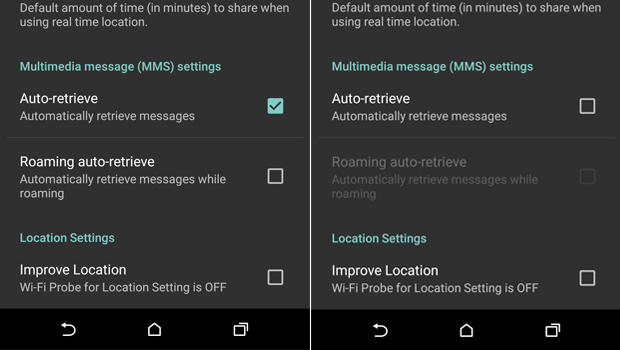
Meanwhile, there is a work-around. You need to configure your messaging app to not automatically download MMS messages.
The issue is a "feature" in the way androids pre-processes MMS multi-media messages (pictures, videos) sent via your text messaging app. That could be the stock messaging app, a custom messaging app from your phone manufacturer or data provider, or even Google Hangouts.
Here's why the vulnerability is so bad... you don't have to open the message! You don't even have to know that you received the message. All it takes is for your phone to automatically download a malicious message in the background - which is exactly what it does - for your phone to be owned! That's a problem.
At the time I wrote this column, there seems to be a fix only for Google-branded phones, and that's a very small percentage of all phones. You can check with your carrier to find out when you'll get a patch.
Meanwhile, there is a work-around. You need to configure your messaging app to not automatically download MMS messages.
- Open you rmessaging app.
- Go to Settings
- Select: Multimedia messages
- un-select Auto Retrieve
Now, when someone tries to send you a message with multi-media content, you'll see that the message arrived, but the photo or video will not be downloaded. Only tap to download if the message came from a trusted source.
Of course, you should also keep your phone patched by applying all phone and app updates. And... get rid of any apps you don't need.
Here are some references for more info.
Tuesday, July 21, 2015
Must Click Immediately!
I received this email recently. Looks legit and serious! :-) I better open that attachment...
While many people would recognize this as a problem, many others would click to see what info is in the attachment.
We regularly read about advanced and targeted attacks. While there is plenty of nasty malware out there, most attacks start with a click. Make sure it's not yours!
Subscribe to:
Posts (Atom)